Promotions & Trials
Give discount codes and free trials on your membership plans. Make a coupon once in the Gym Builder Dashboard; members use it when they buy a plan, through a shared link or from an offers list on your site.
What it does
A discount brings people in; a free week lets them try before they commit. Promotions & Trials adds both to the plans you already sell, and shows you which offers are working.
- Coupons — a percent or an amount off, on the first payment, for some months or on every payment. Limit a coupon to some plans, to a number of uses, to an end date or to new customers.
- Codes where members pay — a Have a discount code? box in the Stripe checkout window and in the Offline Payments checkout, or an Apply box on a page of your own.
- Share links — every coupon has a link. Whoever opens it gets the code ready and a banner saying so.
- An offers list on your site — show the coupons you choose, with a Copy and a Use Now button.
- Free trials — a free start of 1 to 365 days on a plan that renews through Stripe. One trial per member per plan.
- Reminders — an email to the member before their trial ends, and to you before a coupon ends.
- Figures — an Overview of coupon use and discounts given, a Free Trials page, a Promotions tab on the Member Dashboard and a panel on each member's page.
Before you start
- Gym Builder 3.0.0 or newer. With an older Gym Builder the add-on stays switched off and shows a notice with an Update Gym Builder link.
- A way to take payment for plans. Coupons work with Stripe Payments and with Offline Payments. Free trials need Stripe Payments. Class Booking & Payment and Personal Session do not take coupons.
- For Stripe: a working connection. Your Stripe keys and Payment Updates from Stripe (Webhook) must be set up in Stripe Payments. Each coupon gets its own copy in your Stripe account, and Stripe's payment updates are how uses and trials are counted.
- Plans sold through Stripe. A free trial only starts on a plan whose Card Payments card is switched on (see the Stripe Payments guide).
Install and switch on
- Go to Plugins → Add Plugin and click Upload Plugin.
- Choose the add-on's zip file, click Install Now, then Activate Plugin.
- Enter your license key when asked. If you skip it, the Gym Builder Dashboard shows Promotions & Trials → License Key in its menu until the license is active.
Once it is on, Promotions & Trials appears in the Gym Builder Dashboard menu with four pages: Overview, Coupons, Free Trials and Settings. Every plan's edit screen gets a Free Trial card.
Set it up
Go to Gym Builder → Promotions & Trials → Settings. The page has four cards. Change what you need and click Save Settings at the bottom.
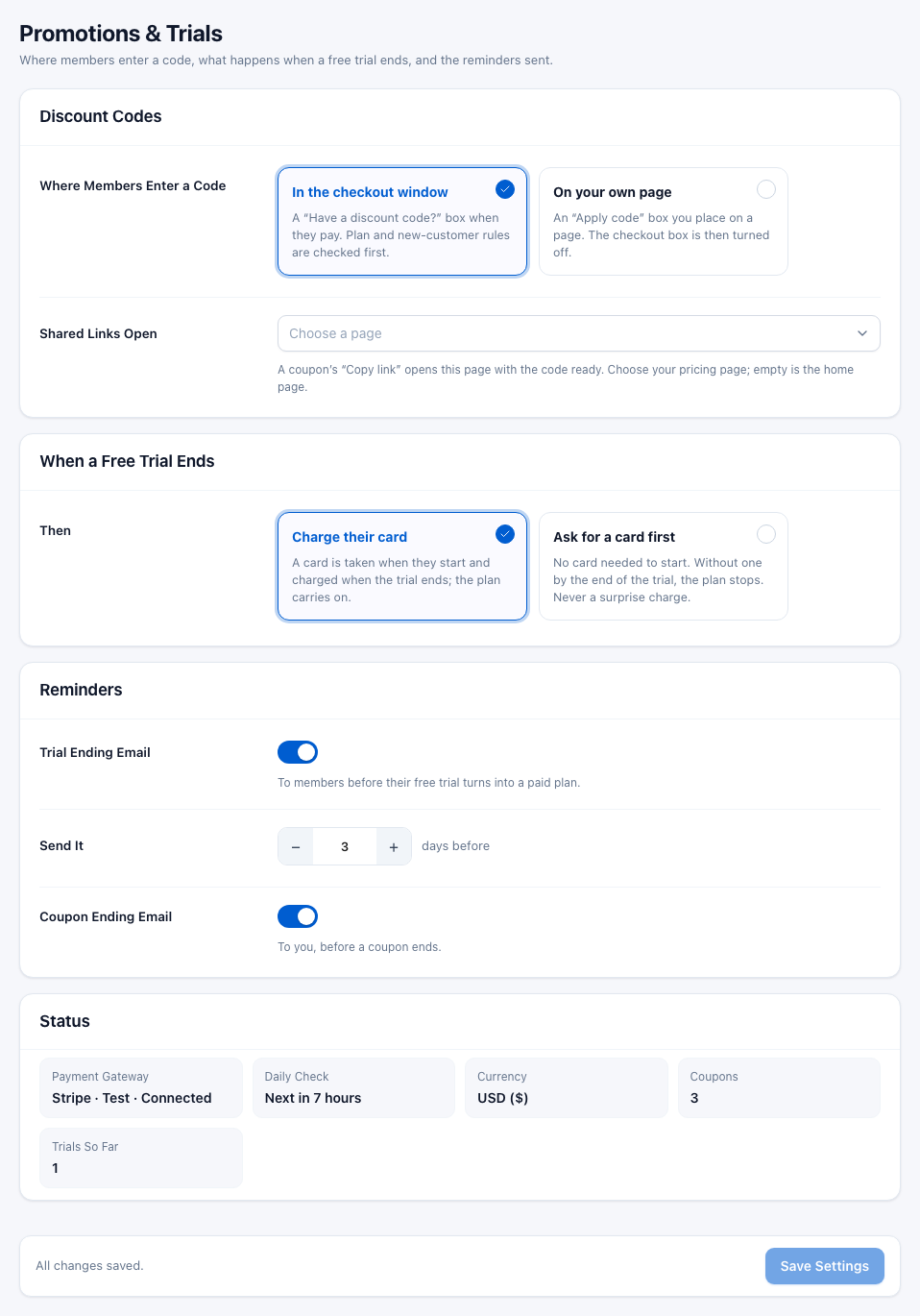
Discount Codes
- Where Members Enter a Code — In the checkout window (the default; called On the payment page when Stripe Payments is off): members type the code in a Have a discount code? box when they buy a plan. On your own page: you put an Apply box on a page of your own, and the Stripe checkout window shows no code box.
- Code Box for Your Page — shown when you choose On your own page. Copy
[gbpt_coupon_field]and paste it on your pricing page. Addplan="123"(the plan's number) to check codes for that one plan. - Shared Links Open — the page a coupon's share link opens, with the code ready. Choose your pricing page. Left empty, links open your home page.
![The Discount Codes card with On your own page chosen, showing the Code Box for Your Page row with the [gbpt_coupon_field] shortcode and a Copy button](img/settings-onsite.png)
This setting is for the Stripe checkout window. The Offline Payments checkout has its own Have a discount code? link whenever Promotions & Trials is on, on every plan that allows discount codes.
When a Free Trial Ends
Choose what happens on the last day of a free trial. This applies to every plan with a trial.
- Charge their card (the default) — Stripe takes the member's card when they start the trial and charges it when the trial ends. The plan carries on without a break.
- Ask for a card first — the member starts without a card. If they have not added one by the end of the trial, the plan stops. No one is ever charged by surprise. Their Promotions tab reminds them to add a card in their Billing tab.
Reminders
- Trial Ending Email — on by default. Emails the member before their free trial turns into a paid plan.
- Send It — how many days before the trial ends: 1 to 30 (3 by default). Each trial gets the email once.
- Coupon Ending Email — on by default. Emails you (the site's administration email address) 7 days before a coupon's end date. Each coupon is reported once.
The emails are sent by a daily check on your site. You can see what they look like under Emails.
Status
A read-only summary to check that everything is in place:
- Payment Gateway — for example Stripe · Test · Connected, or None is on when Stripe Payments is off.
- Daily Check — when the reminder check runs next. Not scheduled means no reminder emails go out.
- Currency — taken from Gym Builder's own settings. Amount coupons use it.
- Coupons and Trials So Far — how many you have.
Coupons
Go to Gym Builder → Promotions & Trials → Coupons. Every coupon is one row: its code and name, the discount, how often it has been used, its status and whether it is shown on your site.
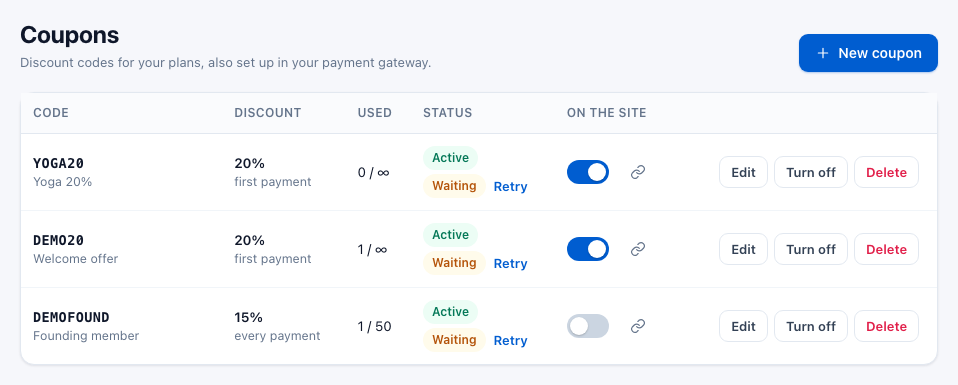
Make a coupon
- Click New coupon.
- Type the Code members will enter, for example
SPRING20. Letters and numbers only (a dash or underscore is fine); it is turned into capitals. - Fill in the rest of the form (each field is explained below).
- Click Create coupon. With Stripe Payments on, the coupon is also set up in your Stripe account straight away.

- Code — what members type. Each code can exist only once. Cannot be changed later.
- Name (only you see it) — a note for you, such as "Spring offer". It is also the title on the offers list on your site.
- Discount — Percent or Amount (in your site's currency). Cannot be changed later.
- Percent off / Amount off — how much comes off. Cannot be changed later.
- Applies to — The first payment, Payments for some months (then fill in For how many months) or Every payment. This matters for plans that renew through Stripe; a one-time payment is only ever one payment. Cannot be changed later.
- Which plans — All plans, Some plans or Some categories (the Package Type you give a plan). For the last two, pick at least one from the list under it.
- Can be used — how many times the coupon can be used in total. Empty means any number of times. On top of this, each member can use a code once.
- Ends on (optional) — the last day the code works. It works until the end of that day, in your site's time zone, and stops at midnight. Empty means it never ends.
- New customers only — only for people who have never paid you before: no card payment through Stripe Payments (in the Stripe mode you use) and no approved Offline Payments order. Your site checks it as soon as a logged-in member applies the code — in the Stripe or Offline checkout, your own page's box or a share link — and tells a member who has paid before "This code is for new customers only." For a visitor who is not logged in, Stripe checks it when they pay.
- Show it on the site — lists the coupon in your offers list.
Read the list
- Used — uses so far out of the limit; ∞ means no limit.
- Status — Active or Off. Under it, whether your payment gateway has its copy: Synced (ready), Waiting (not sent yet, for example because the coupon was made while Stripe Payments was off) or Failed (Stripe refused it; point at the badge to read why). Click Retry to send it again.
- On the site — the switch shows or hides the coupon in your offers list. The link button next to it copies the coupon's share link (see Share a coupon).
When Stripe has refused one or more active coupons, the number shows next to Coupons in the Dashboard menu, and the Dashboard home page lists it under Needs you.
Change a coupon
- Click Edit on the coupon's row.
- Change the name, the plans, the number of uses, the end date, New customers only or Show it on the site.
- Click Save. Its Stripe copy is made again with the new rules.

The code, the discount and Applies to cannot change, because Stripe does not allow a discount to change once it exists. To offer a different discount, make a new coupon and turn the old one off.
Turn a coupon off, or delete it
- Turn off — the code stops working straight away, here and in Stripe. The coupon and its figures stay. Turn on brings it back.
- Delete — asks first: click Yes, delete to remove it, or Keep. Its Stripe copy is switched off. Uses already counted stay in the Overview totals.
Share a coupon
- On the Coupons page, click the link button in the coupon's On the site column. The message Link copied. appears.
- Paste the link into an email, a social post or a message.
The link opens the page chosen in Shared Links Open. The visitor's browser keeps the code for 7 days and a banner tells them it is ready. When they buy a plan through Stripe without typing another code, the discount is applied — as long as the coupon's rules allow it for that plan and that member. If your browser blocks copying, a box with the link appears instead; copy it from there.
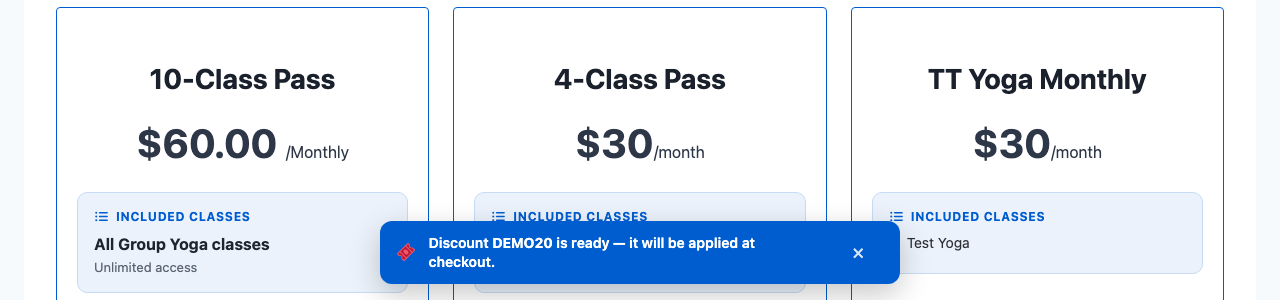
The code kept from a link (or from your own page's Apply box) is used by Stripe Payments. In the Offline Payments checkout the member types the code themselves.
How members use a code
In the Stripe checkout window
With In the checkout window chosen, the window that opens from Subscribe Now has a Have a discount code? link. It appears when at least one coupon is on and the plan allows discount codes.
- The member clicks Have a discount code?, types the code and clicks Apply.
- The site checks the code against the coupon's rules and says Code applied: 20% off. You will see it on the payment page. — or why it can't be used.
- They click Proceed to Payment. The code is checked once more, and Stripe's payment page shows the discount.
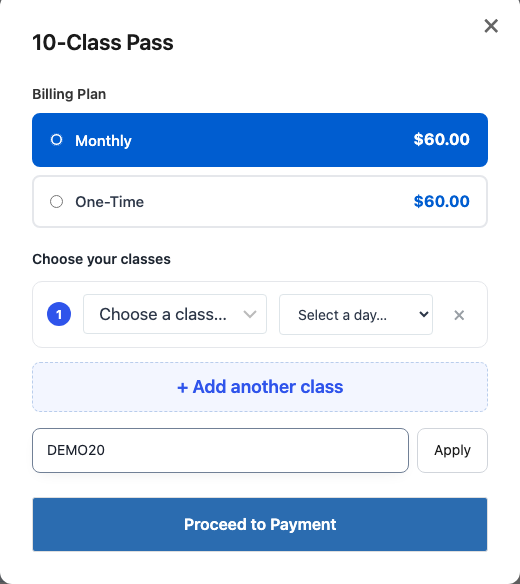
Stripe's own promotion-code box is never shown: codes always go through your site, so plan limits and "once per member" are checked before anyone pays.
In the Offline Payments checkout
The Offline Payments checkout has its own Have a discount code? link. The member sees the lower price straight away. The use is only counted, and the coupon's limit only used up, when you approve the order. See the Offline Payments guide.
On a page of your own
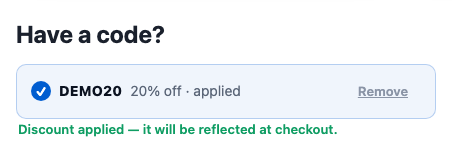
Paste [gbpt_coupon_field] on a page, for example above your plans. A visitor types a code and clicks Apply; the typing box then gives way to the code with applied and a Remove link (Remove brings the empty box back). The code is then used when they pay through Stripe.
What is checked
- The code exists and the coupon is on.
- Its uses are not used up.
- Its end date has not passed: it works through the whole of its Ends on day, in your site's time zone.
- It is meant for this plan (Which plans), and the plan allows discount codes (Allow Discount Codes).
- This member has not used it before.
- With New customers only, the member has never paid you (see Make a coupon).
- In the Stripe checkout window, also: the coupon has its Stripe copy.
Free trials
Offer a free trial on a plan
- Go to Gym Builder → Membership Plans and open the plan.
- Under Add-ons on the left, click Free Trial.
- Switch on Offer a Free Trial.
- Set the Trial Length in days (1 to 365; 7 to start with).
- Leave Allow Discount Codes on if codes may be used on this plan, or switch it off.
- Click Update.
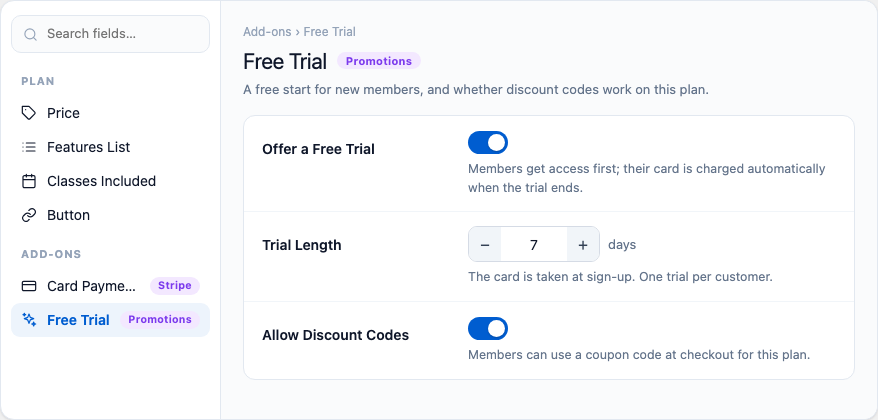
Allow Discount Codes is on for every plan until you switch it off. When it is off, no code can be used on that plan, wherever it comes from: the Stripe and Offline Payments checkout windows show no code box for it, and a code from your own page's box, a share link or the offers list is refused for that plan ("Discount codes can't be used on this plan.").
The notes on the card follow your When a Free Trial Ends choice: with Charge their card they say the card is taken at sign-up and charged when the trial ends; with Ask for a card first, that no card is needed to start and the plan stops without one.
How trials work
- Plans that renew only. The trial starts when a member buys the plan through Stripe with a Monthly, Bi-Monthly, Quarterly or Yearly billing plan. One-Time never gets a trial.
- The plan must be sold through Stripe. If its Card Payments card is off, the trial can't start. The Free Trials page and the Dashboard's Needs you list warn you.
- One trial per member per plan. Someone who has had a trial on a plan pays from day one next time.
- Stripe runs the trial. When it ends, Stripe charges the card or — with Ask for a card first and no card — stops the plan. Members who sign up through the Registration Popup and pay with Stripe get the trial too.
- Offline Payments has no trials. An offline order is always paid in full.
Follow your trials
Go to Gym Builder → Promotions & Trials → Free Trials.
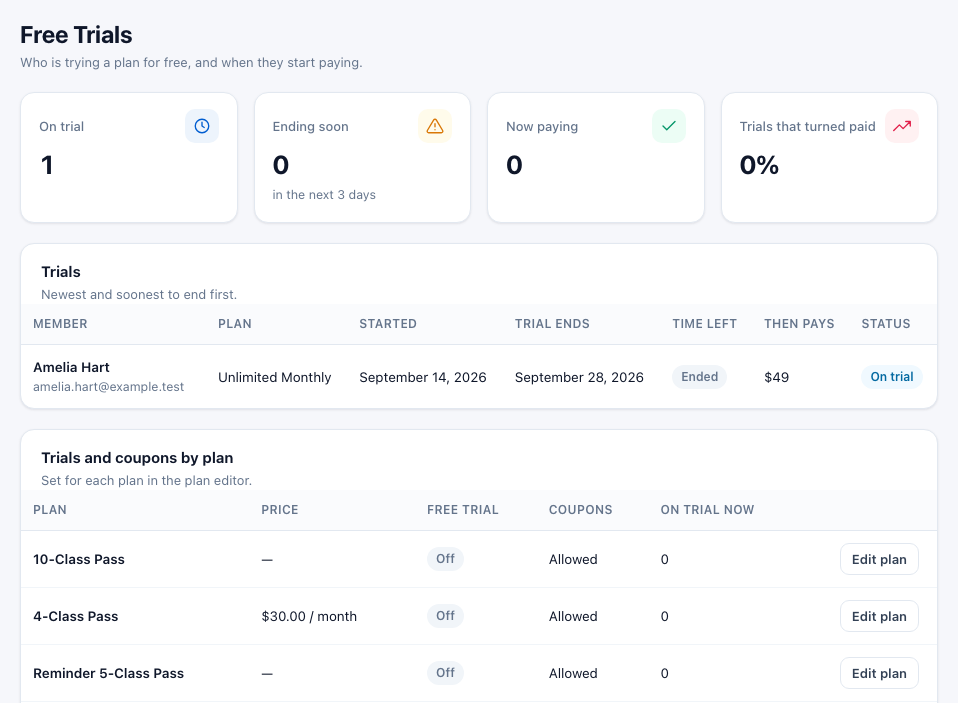
- The four figures — On trial, Ending soon (trials that end within the next 3 days; a trial that has already ended is not counted), Now paying and Trials that turned paid.
- Trials — each member's trial: plan, start, end, time left, what they then pay, and a status (On trial, Ends soon, Now paying or Canceled).
- Trials and coupons by plan — every plan with its price, its trial length or Off, whether coupons are Allowed, and who is on trial now. Edit plan opens the plan.
See how your offers do
Go to Gym Builder → Promotions & Trials → Overview.
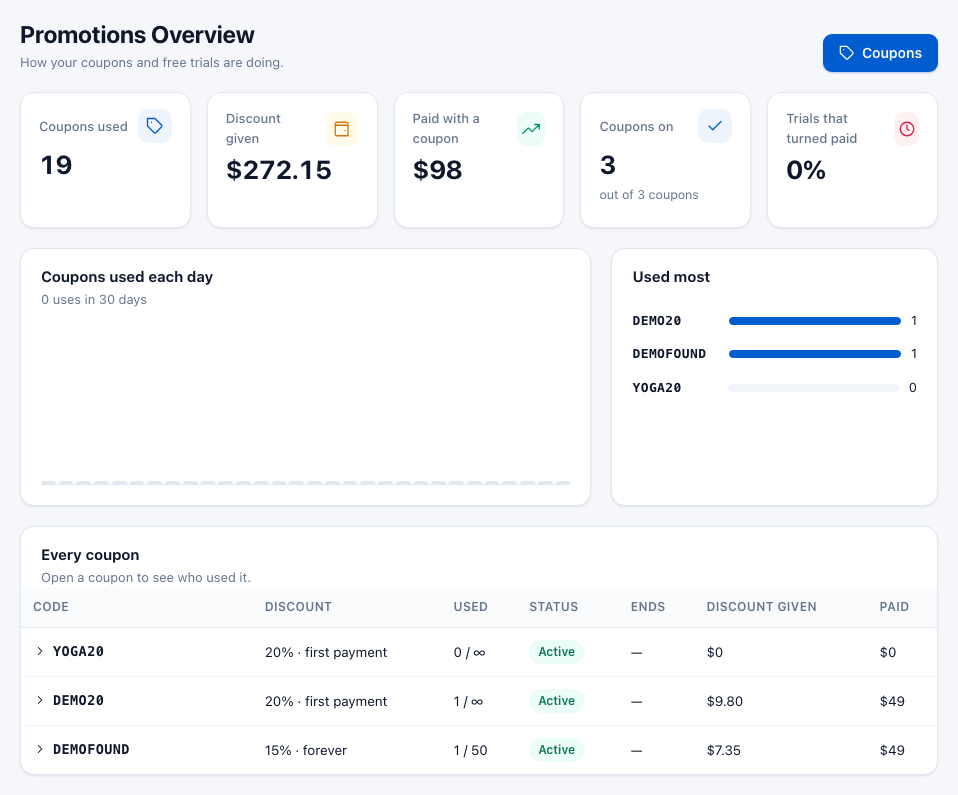
- Coupons used and Discount given — every use counted so far and the total taken off, all time.
- Paid with a coupon — what members paid for Stripe plans they bought with a code. Only plans bought in the Stripe mode you use (Test or Live) count.
- Coupons on — coupons that can be used right now, "out of" all your coupons.
- Trials that turned paid — the share of free trials that became paying plans.
- Coupons used each day — the last 30 days. Used most — your five busiest codes.
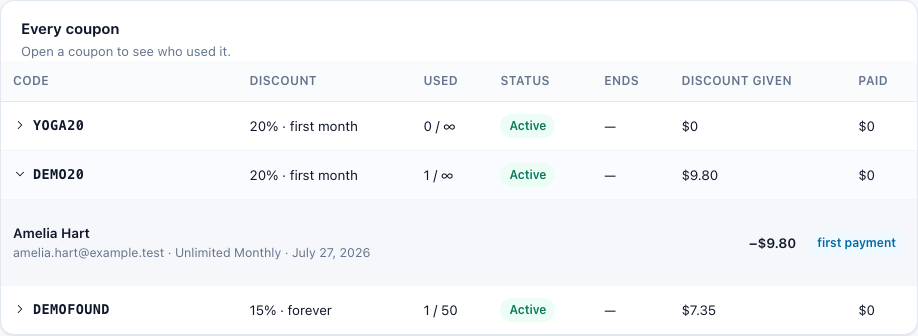
- Every coupon — each coupon's discount and how long it applies (for example "20% · first payment"), uses, status (Active, Used up, Expired, or Off for one you turned off), end date, discount given and Paid — what members paid for the plans they bought with it. Click a code to see who used it.
On a member's page
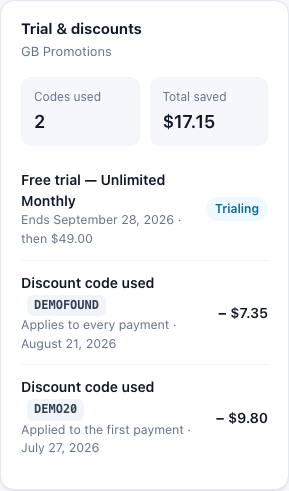
Open a member in Gym Builder → Members. If they have had a trial or used a code, a Trial & discounts panel shows the codes used, the total saved and each trial and discount.
What members see
The Promotions tab
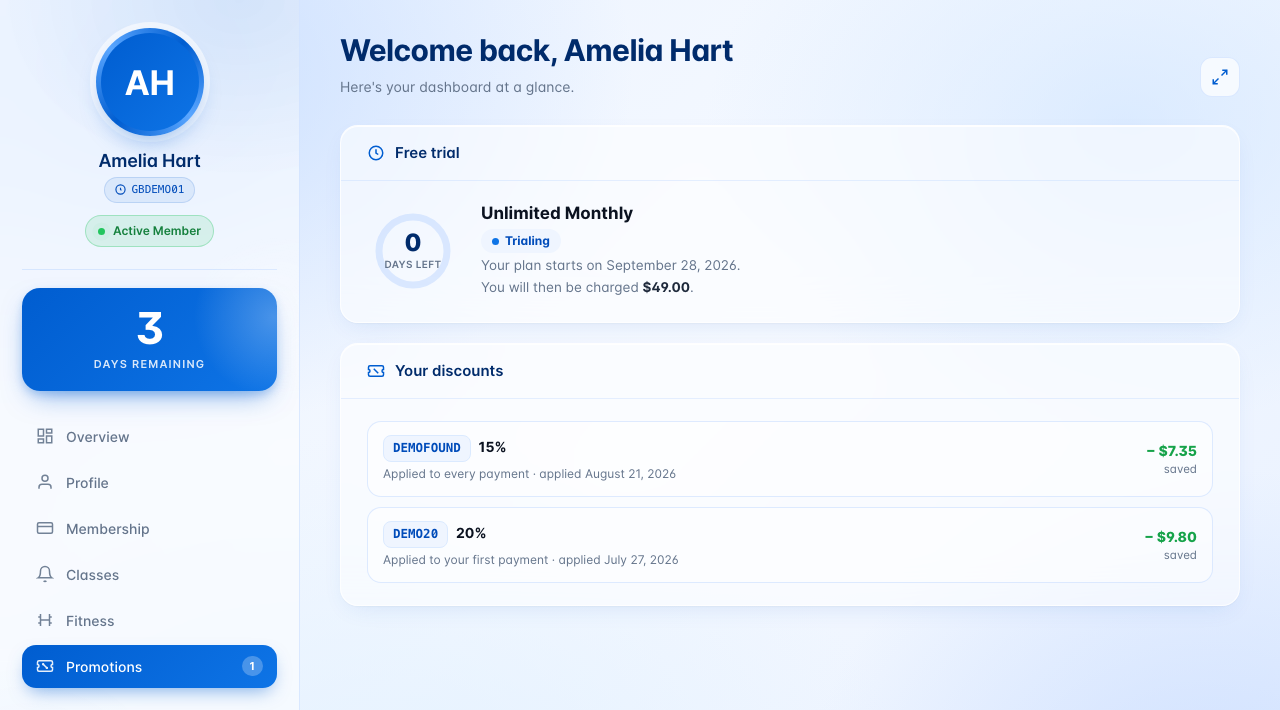
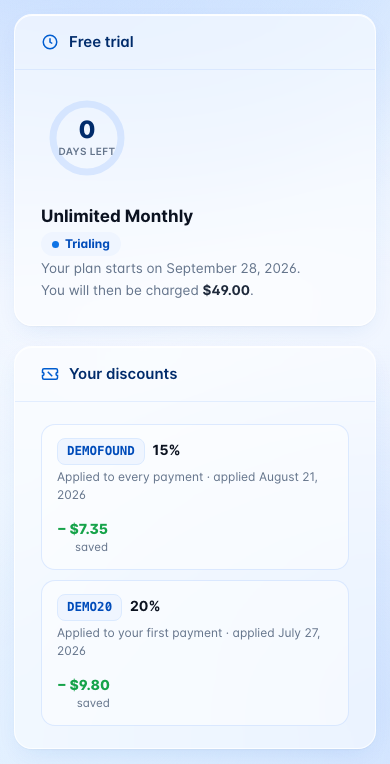
A member who has had a free trial or used a code gets a Promotions tab on their Member Dashboard. The number on the tab is how many trials are running.
- Free Trial — the days left, the plan, the date the paid plan starts and what they will be charged. With Ask for a card first, a Go to Billing button asks them to add a card.
- Your Discounts — each code they used, how long it applies and how much they saved.
Your offers list
Coupons with Show it on the site switched on can be listed on any page. Each card shows the discount, the coupon's name, how long it applies, its end date, the code with a Copy button and a Use Now button that works like the share link. Coupons that are off, ended or used up drop off the list by themselves.
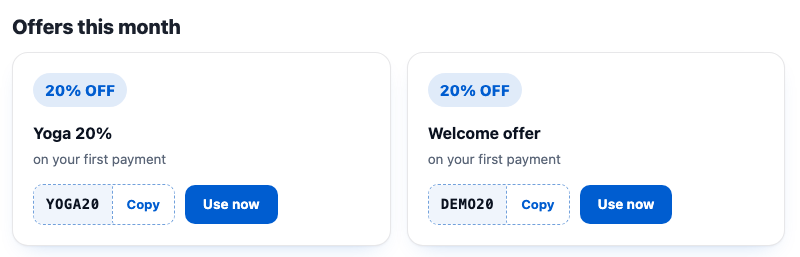
[gbpt_coupons title="Offers this month"].Add it with the shortcode, the Coupon Showcase block (Block Tools) or the GB Coupon Showcase widget (Elementor Widgets). See Shortcodes and blocks.
Emails
- Your [plan] free trial ends soon — to the member, the number of days before the trial ends set in Send It (3 by default). Once per trial. It follows When a Free Trial Ends: with Charge their card it says what they will then be charged; with Ask for a card first it asks them to add a card in the Billing tab of their account, and says they are charged only if they have added one.
- Coupon [code] is about to expire — to you (the site's administration email address), 7 days before a coupon's end date. Once per coupon.
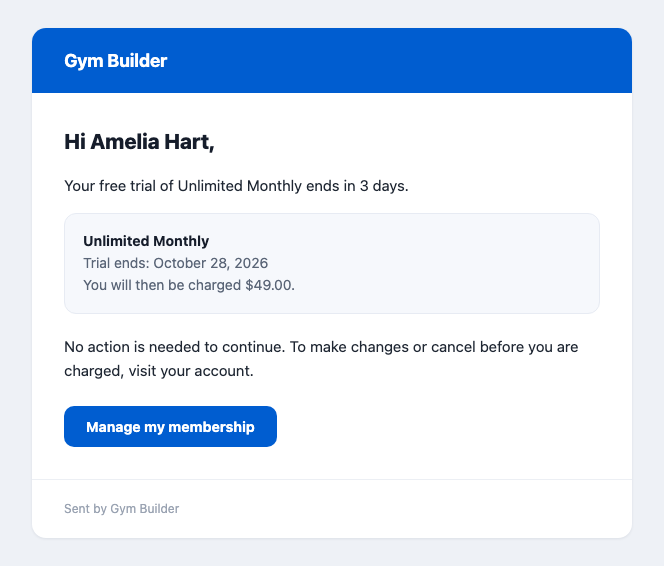
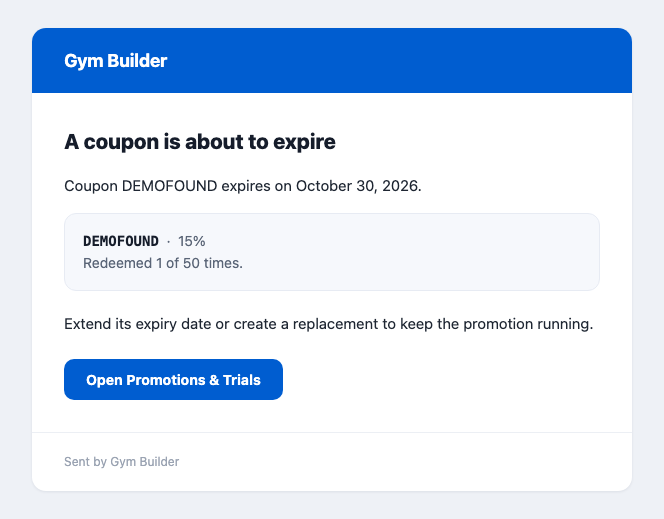
Both emails use your site's name and Gym Builder's sender settings. Switch either off under Reminders.
Shortcodes and blocks
[gbpt_coupons] — your offers list: the coupons with Show it on the site on. With none, it says "No public offers right now."
| Option | What it does |
|---|---|
title="" | A heading above the list. |
layout="grid" | grid, list or single (only the newest offer). |
columns="3" | 2 to 4 cards per row, for the grid. |
limit="6" | How many coupons, 1 to 48. |
show_expiry="yes" | no hides the end date. |
[gbpt_coupon_field] — the Apply code box for your own page.
| Option | What it does |
|---|---|
plan="123" | Checks codes for one plan (its number). |
placeholder="" | The text inside the empty box. "Discount code" by default. |
- Coupon Showcase block — the same offers list in the block editor. Needs Block Tools. Settings: Heading (Optional), Layout (Grid, List, Single (Featured)), Columns, Max Coupons (1 to 24) and Show Expiry Date.
- GB Coupon Showcase widget — the same offers list in Elementor. Needs Elementor Widgets. Settings: Heading, Layout, Columns, Max coupons and Show expiry date.
- Share link — any page address with
?gbpt_promo=CODEon the end, for examplehttps://yoursite.com/pricing/?gbpt_promo=SPRING20. A coupon's link button copies one for you.
Questions
Can a member use two codes on one purchase?
No. One code per purchase. A code typed in the Stripe checkout window takes the place of one kept from a share link.
Can a member use the same code twice?
No. Each member can use a code once. They are told "You've already used this code."
I want to change a coupon from 20% to 25%. How?
Make a new coupon with the new discount, then turn the old one off. The code and the discount are locked once a coupon exists, because Stripe does not allow a discount to change.
Does a coupon count as used when someone places an offline order?
Only when you approve the order. An order that is never paid does not use up the coupon.
Can I offer a free trial on a class pass or a one-time plan?
No. Trials are for plans that renew through Stripe. A member who chooses One-Time pays at once.
What does the member pay during the trial?
Nothing. With Charge their card Stripe takes their card at the start and charges it when the trial ends. With Ask for a card first they may start without a card.
I switched Stripe from Test to Live. Do my coupons still work?
A coupon's Stripe copy is made in the mode that was on when it was saved. After switching to Live, open each coupon, click Edit, then Save: that makes its copy in Live mode.
Where is Stripe's own "Add promotion code" box?
It is never offered. Codes go through your site's box, so the plan limits and "once per member" are checked first.
Can coupons be used with Class Booking & Payment or Personal Session?
No. Coupons and trials are for membership plans sold through Stripe Payments or Offline Payments.
If something goes wrong
- No "Have a discount code?" link in the Stripe checkout window — is Where Members Enter a Code set to In the checkout window? Is at least one coupon Active? Is Allow Discount Codes on in the plan's Free Trial card?
- A member is told "This code can't be applied." — the coupon has no Stripe copy. On the Coupons page, look for Waiting or Failed under its status and click Retry. Point at Failed to read Stripe's reason.
- "This code doesn't apply to this plan." — the coupon's Which plans leaves this plan out. Click Edit and add it.
- "Discount codes can't be used on this plan." — Allow Discount Codes is off in the plan's Free Trial card. That applies to every way a code can come in, including share links and the offers list.
- "This code is for new customers only." — the coupon has New customers only on and this member has paid you before (by card in the Stripe mode you use, or with an approved offline order).
- "This code has expired." or "This code has reached its redemption limit." — the coupon's Ends on day is over (in your site's time zone), or Can be used is used up. Edit the coupon, or make a new one.
- A number next to Coupons in the menu — Stripe refused that many active coupons. Click Retry on each; if it fails again, check your Stripe keys in Stripe Payments.
- Codes work, but the Overview counts no uses, or the Free Trials page stays empty — uses and trials are counted when Stripe tells your site about the payment. Check Payment Updates from Stripe (Webhook) in the Stripe Payments settings.
- A plan has a trial but members pay from day one — did they choose One-Time? Is the plan's Card Payments card on? Have they had a trial on this plan before?
- The Free Trials page says "No payment gateway is on." — switch on Stripe Payments. Trials need it.
- The Dashboard's Needs you card says "No payment gateway is active, so coupons and trials cannot be applied at checkout." — neither Stripe Payments nor Offline Payments is on, so codes can't be used anywhere. Switch one of them on.
- No reminder emails arrive — check Daily Check in the Status card: it must show a next run. WordPress runs the check when someone visits your site, so on a very quiet site it can run late. Also check that your site's emails arrive at all; an email (SMTP) plugin helps.
- The offers list says "No public offers right now." — switch on On the site for at least one active coupon that has not ended or been used up.