
Reward Members for Coming Back
GB Loyalty & Rewards gives your members points for checking in, keeping a weekly streak, buying and renewing a membership, joining, their birthday and bringing friends — and lets them spend those points on rewards: a smoothie at the desk, extra days on their plan, a discount code, or money off their next plan at checkout. Every rule, reward and report lives in the Gym Builder Dashboard.
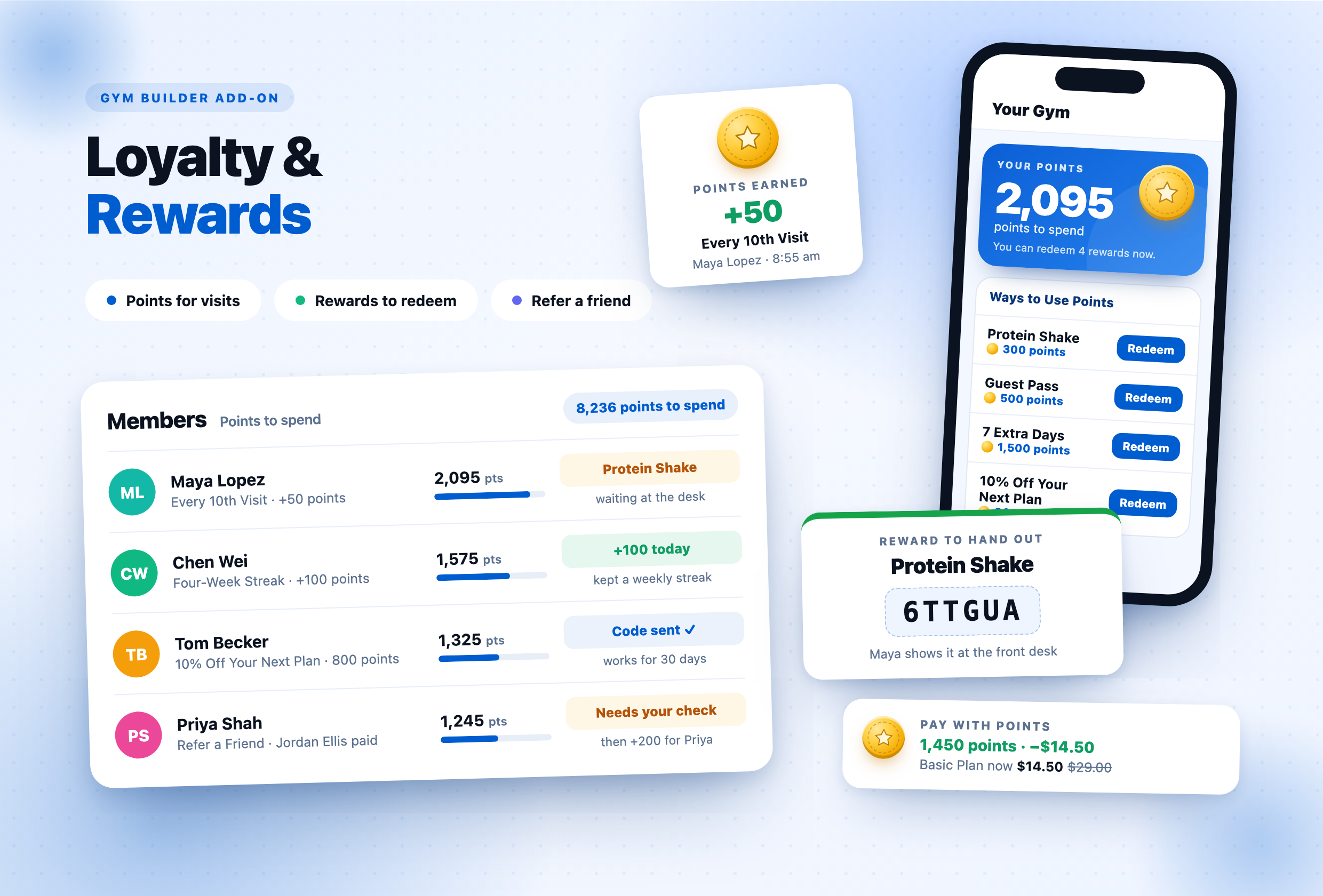
Why this add-on exists
Gym Builder knows who your members are and what they bought — and with Attendance, when they come in. GB Loyalty & Rewards turns that into a reason to keep coming. Points arrive as things happen: a class check-in, the 10th visit, a four-week streak, a renewal, a friend who joins. Members watch them add up on their own dashboard and spend them on rewards you choose. Points for payments wait a few days so a refund can still take them back, points can expire if you want them to, and nobody ever goes below zero. There is no app to install and nothing to count by hand.
Everything you need
A complete loyalty program for your front desk and your members.
Points for What Members Do
Class check-ins, visits, weekly streaks, buying and renewing a membership, joining, birthdays, anniversaries and referrals. Each rule says how many points and how often.
Rewards You Choose
Something staff hand over with a pickup code, extra membership days, a discount code for a plan, or a coupon for your shop.
Pay With Points
Members pay part of a plan with points in the Offline Payments window, the Stripe card checkout and the WooCommerce shop. You set what a point is worth.
Refer a Friend
Every member gets an invite link and code. Both get points when the friend pays or comes to classes, with your check for friends from the same network.
A Rewards Tab for Members
Points to spend, rewards they can redeem, pickup codes, ways to earn, their invite link and history — on the Member Dashboard, made for phones.
Front-Desk Tools
Find a member, add or take points, use points for them, hand out rewards by pickup code — or give points to many members at once.
Emails That Bring Them Back
A daily summary of points earned, a nudge before points or codes run out, reward and referral emails and birthday wishes — in your gym’s name and colour.
Overview & Reports
Points given, used and expired for any dates, the rules and rewards that moved them, what members hold now, and what needs you.
Fair by Design
Points can expire, payment points wait a few days, refunds take points back in the same share, and nobody ever goes below zero.
Any dates, at a glance.
See how your program is doing
- Points Given, Points Used and Points Expired for this month, last month, this year or any dates you choose — each compared with the period before.
- Use Rate shows how much of what you give gets spent: “1,100 used for 3,223 given.”
- Points to Spend — what members hold right now, and what that is worth at checkout.
- Points In and Out by day, week or month, with Show as Table for the numbers.
- Below: the rules that gave the most points, the rewards members chose, and Needs You for anything only you can sort out.
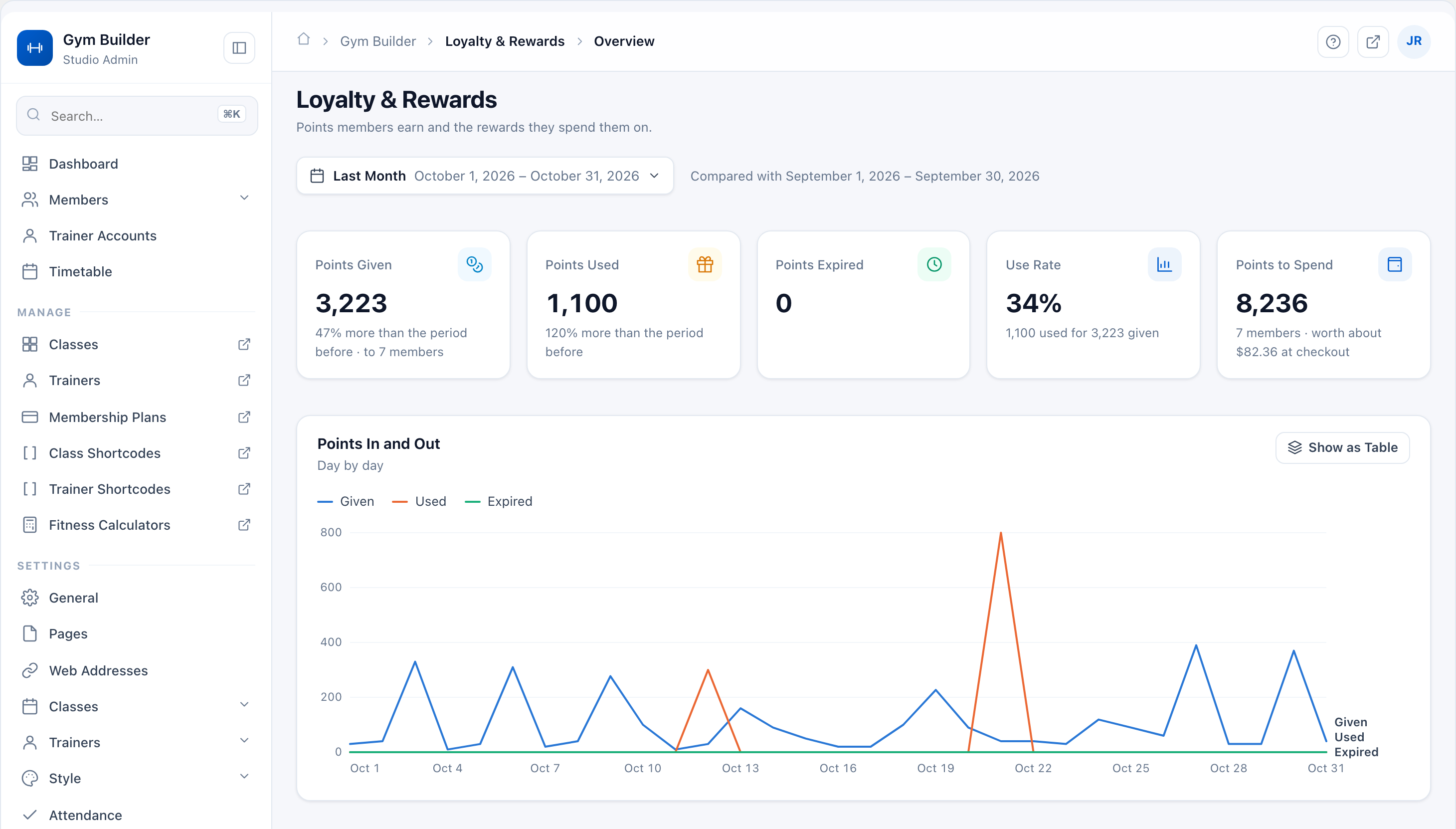
Gym Builder › Loyalty & Rewards › OverviewADMIN
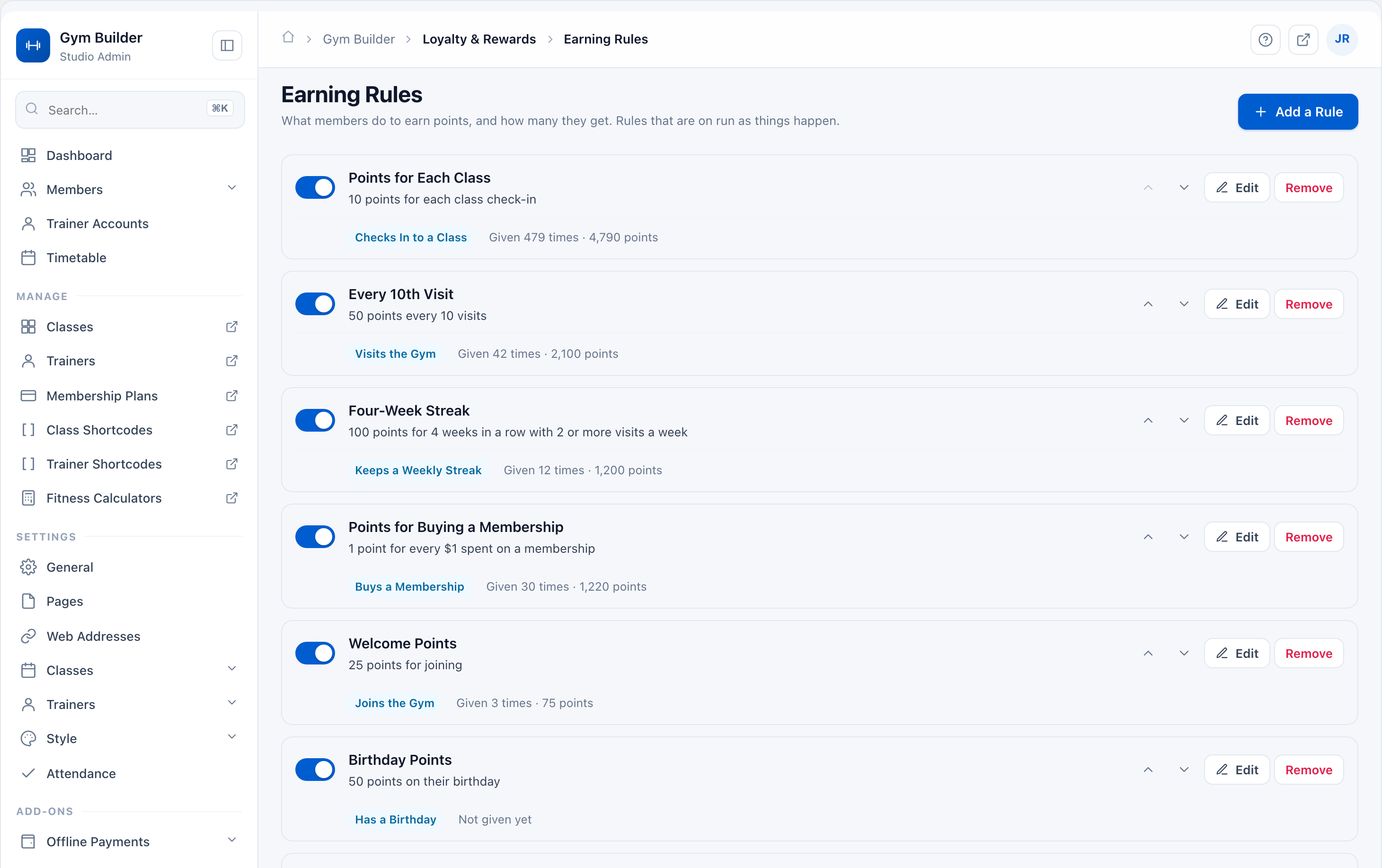
Gym Builder › Loyalty & Rewards › Earning RulesADMIN
Rules that run by themselves.
Decide what earns points
- Six starter rules are ready to switch on: Points for Each Class, Every 10th Visit, Four-Week Streak, Points for Buying a Membership, Welcome Points and Birthday Points.
- Each card says what it gives in plain words — “100 points for 4 weeks in a row with 2 or more visits a week” — and how often it has paid out.
- Switch a rule on or off, move it up or down, edit or remove it. Rules that are on run as things happen.
- Add rules for renewals, membership anniversaries, referrals, or points your staff give by hand.
Simple fields, plain words.
Every rule, your way
- Choose what it is for: Checks In to a Class, Visits the Gym, Keeps a Weekly Streak, Buys a Membership, Renews a Membership, Joins the Gym, Has a Birthday, Has a Membership Anniversary, Refers a Friend and more.
- Limit it to some classes, some ways of checking in (the desk, their dashboard, QR code, kiosk, online class), some plans or a smallest payment.
- Give a set number of points, or points for every dollar paid.
- Every Time, Once per Member, a limited number of times a day, week, month or year, or Once a Year.
- More Options: active members only, start and end dates for a double-points month, a waiting period, and the words members see.
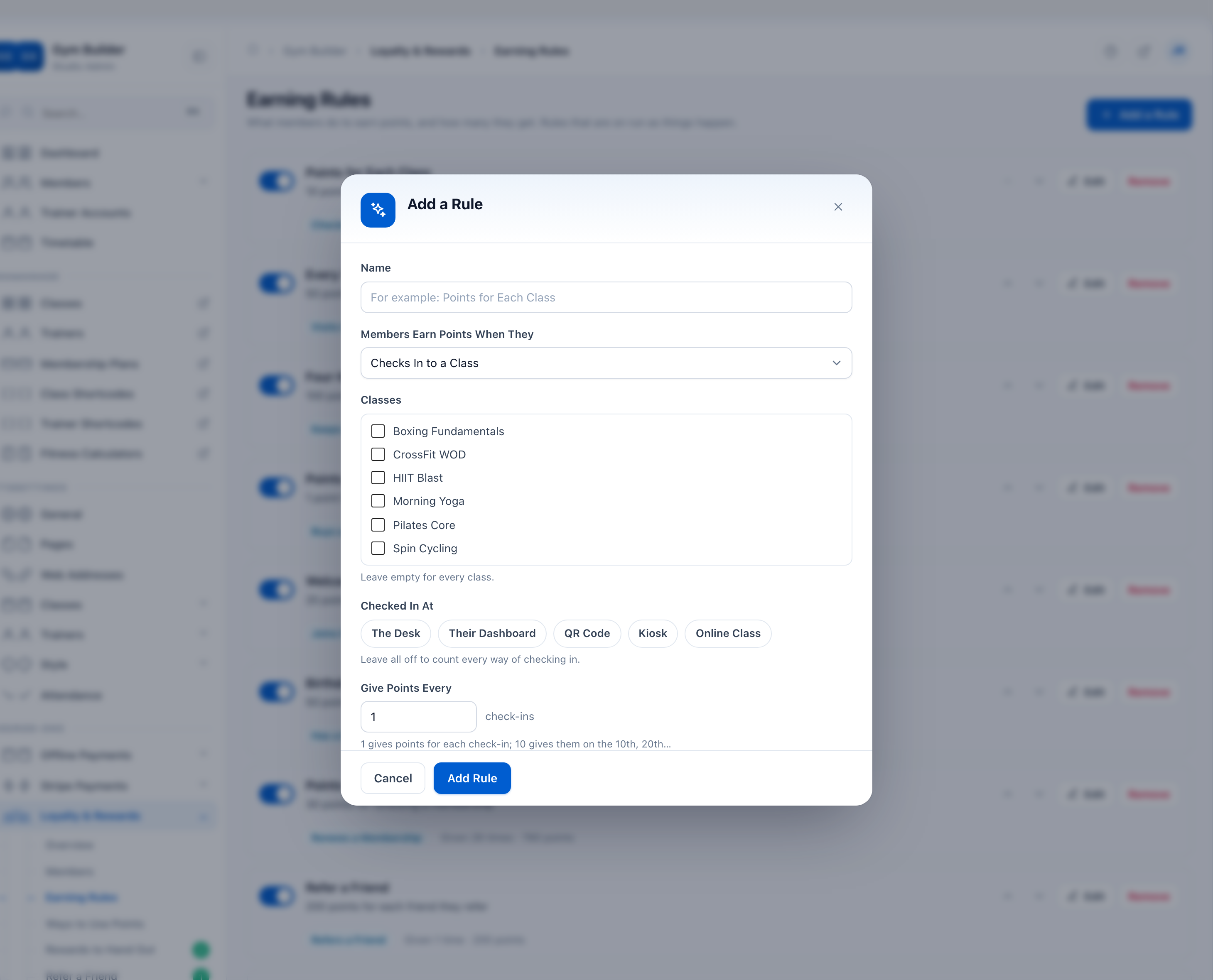
Earning Rules › Add a RuleADMIN
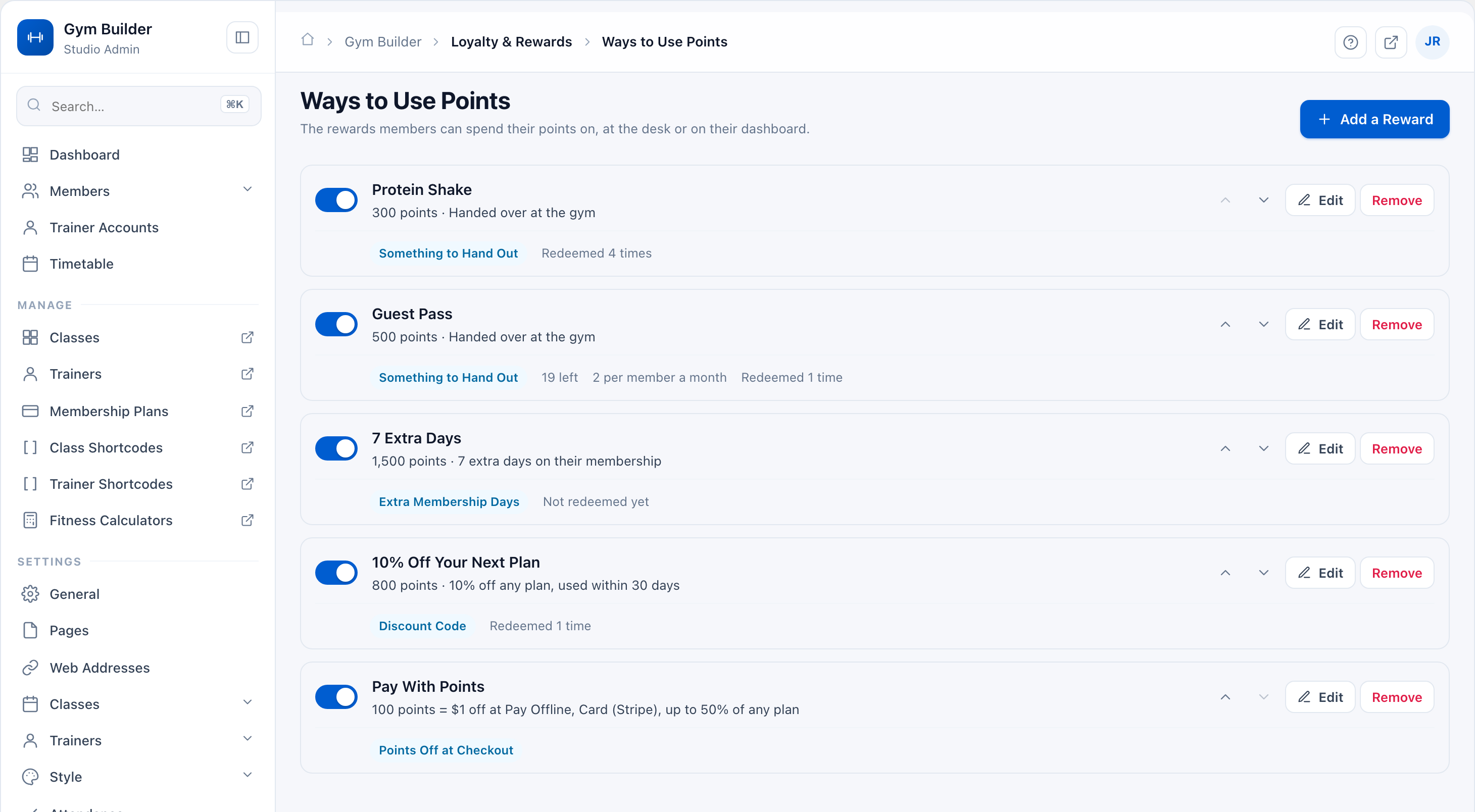
Gym Builder › Loyalty & Rewards › Ways to Use PointsADMIN
Your own rewards list.
Rewards worth coming back for
- Something to Hand Out — a smoothie, a T-shirt, a guest pass or a free session, with a pickup code.
- Extra Membership Days — added to the end of the member’s running plan, wherever it was bought.
- Discount Code — money off a membership plan, for that member only, to use within the days you set (with Promotions & Trials).
- Shop Coupon — money off in your WooCommerce shop (with Class Booking & Payment).
- Set how many are left, a limit per member each week, month or year, who can redeem it and when.
You set what a point is worth.
Points as money off
- Points for $1 Off — for example, 100 points take $1 off.
- Smallest Number of Points a member needs before they can pay with them.
- Most of the Price — up to 100% of a plan, counted after any discount code.
- In Steps Of — members use points in round steps, such as 50, 100, 150.
- At These Checkouts — Pay Offline, Card (Stripe) and Shop (WooCommerce) — and the plans it works for.
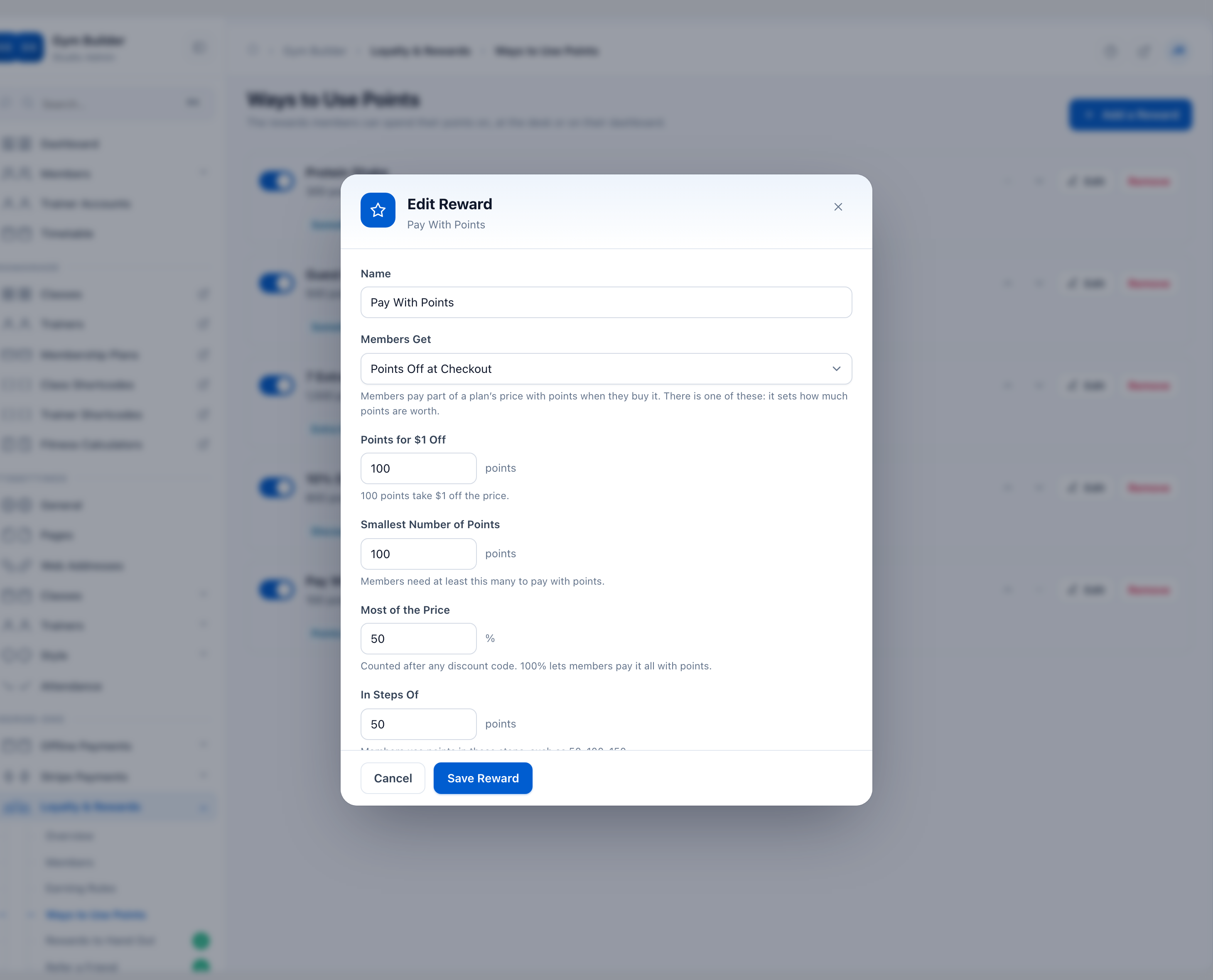
Ways to Use Points › Pay With PointsADMIN
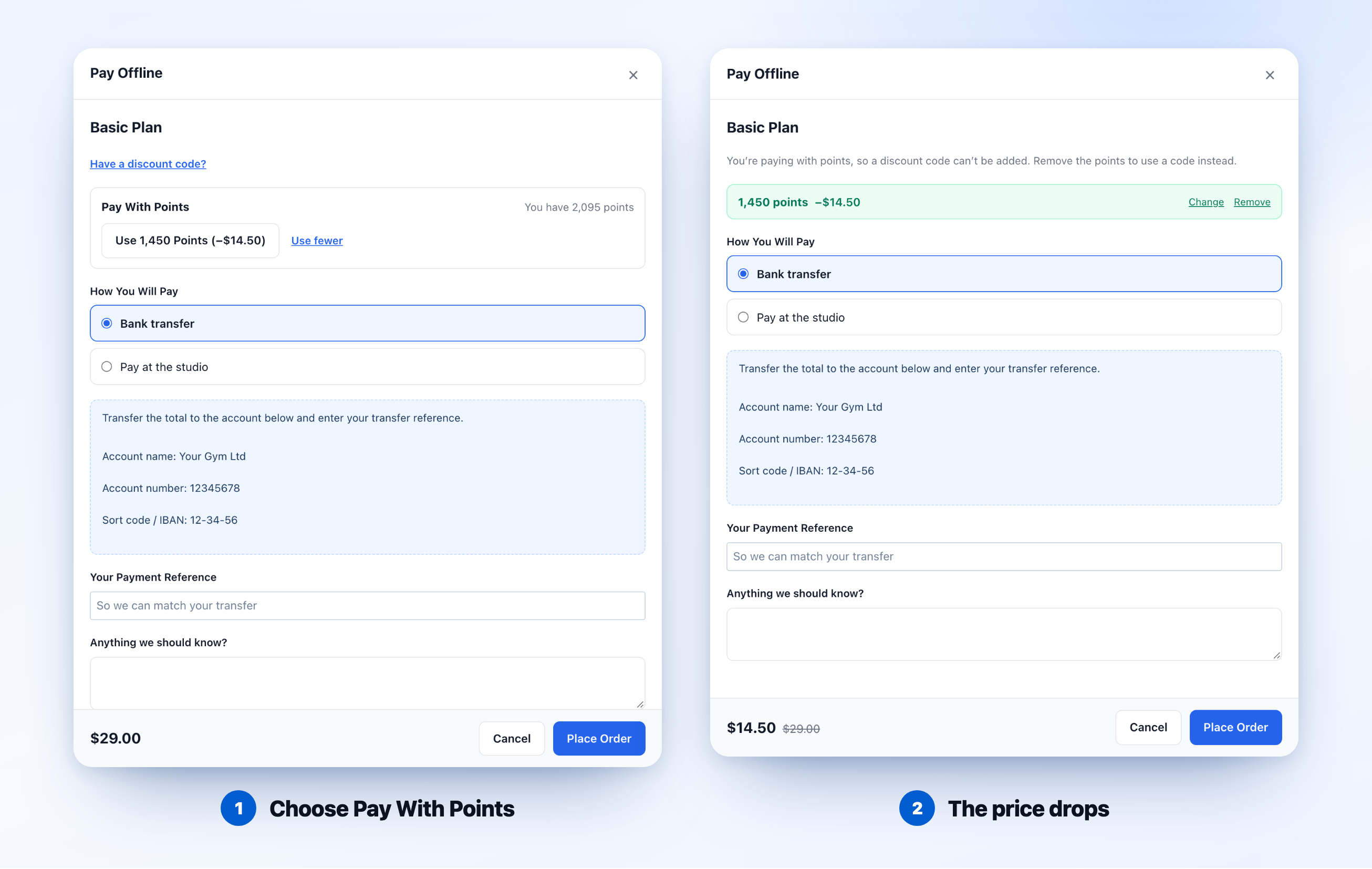
Offline Payments order windowFRONTEND
Right where they pay.
Pay part of a plan with points
- A Pay With Points box shows how many points the member has and the most they can use: “Use 1,450 Points (−$14.50).”
- Use fewer lets them choose. The total drops straight away — $29.00 becomes $14.50.
- The points are held while an offline order waits, used when you approve it, and freed if it is rejected or runs out.
- The same box appears in the Stripe card checkout and on the WooCommerce shop checkout.
- A card or shop refund gives the points back in the same share.
Where they already sign in.
A Rewards tab on the member’s dashboard
- Your Points — points to spend, how many rewards they can redeem now, points on the way and the day they arrive.
- Ways to Use Points — every reward with its price and a Redeem button. New rewards are marked New.
- My Rewards — what they redeemed, with the pickup code or their discount code.
- The tab’s number shows the rewards ready to use, and the Overview tab gets a Your Points card.
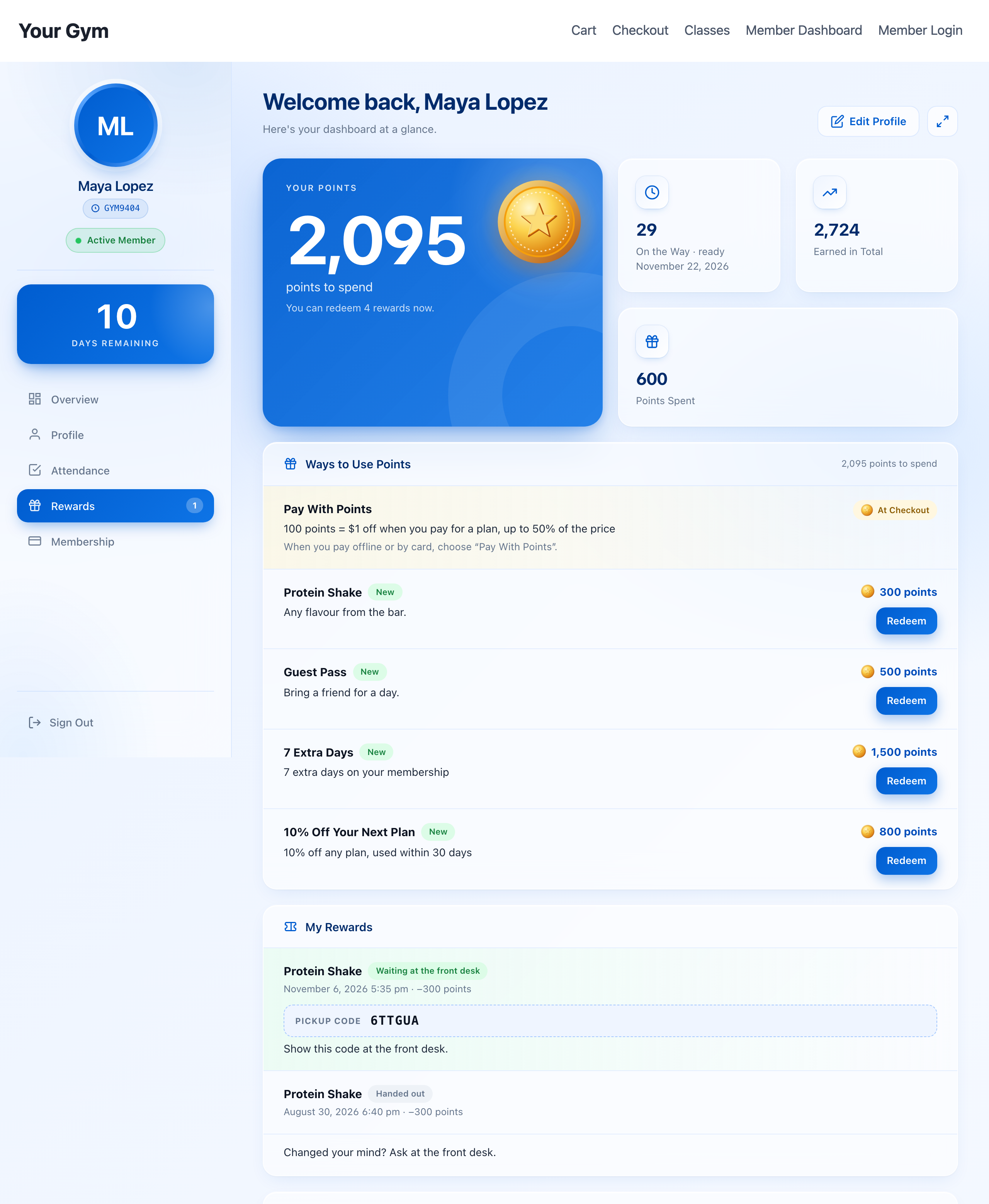
Member Dashboard › RewardsMEMBER
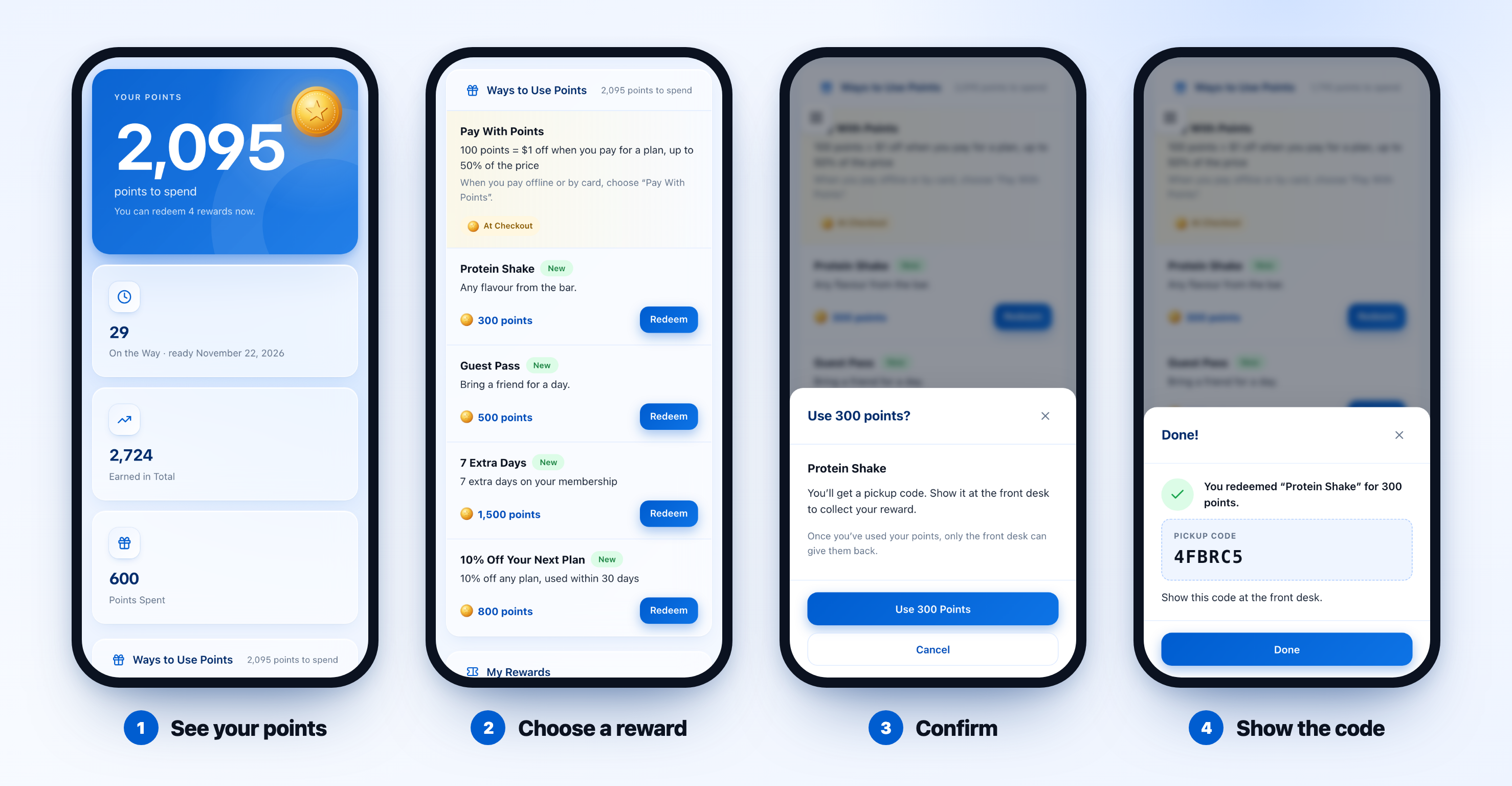
Member Dashboard, on a phoneMEMBER
No app needed.
Redeem in a few taps
- Members tap Redeem, confirm “Use 300 points?” and the reward is theirs.
- A reward to hand out gets a pickup code to show at the front desk.
- A discount code appears straight away, with Copy Code.
- Extra days are added to their plan there and then.
- They are told before they confirm: once points are used, only the front desk can give them back.
Share a link, earn points.
Members bring their friends
- Each member gets an invite link and a code, with Copy Link, Email It, and Share on a phone.
- The card says what both of them get: “Give a friend 100 points. You get 200 points when they pay for their first plan.”
- Friends You Invited shows where each friend stands.
- Ways to Earn lists your rules in plain words, so members know how to get more.
- Members add their birthday once, for birthday points.
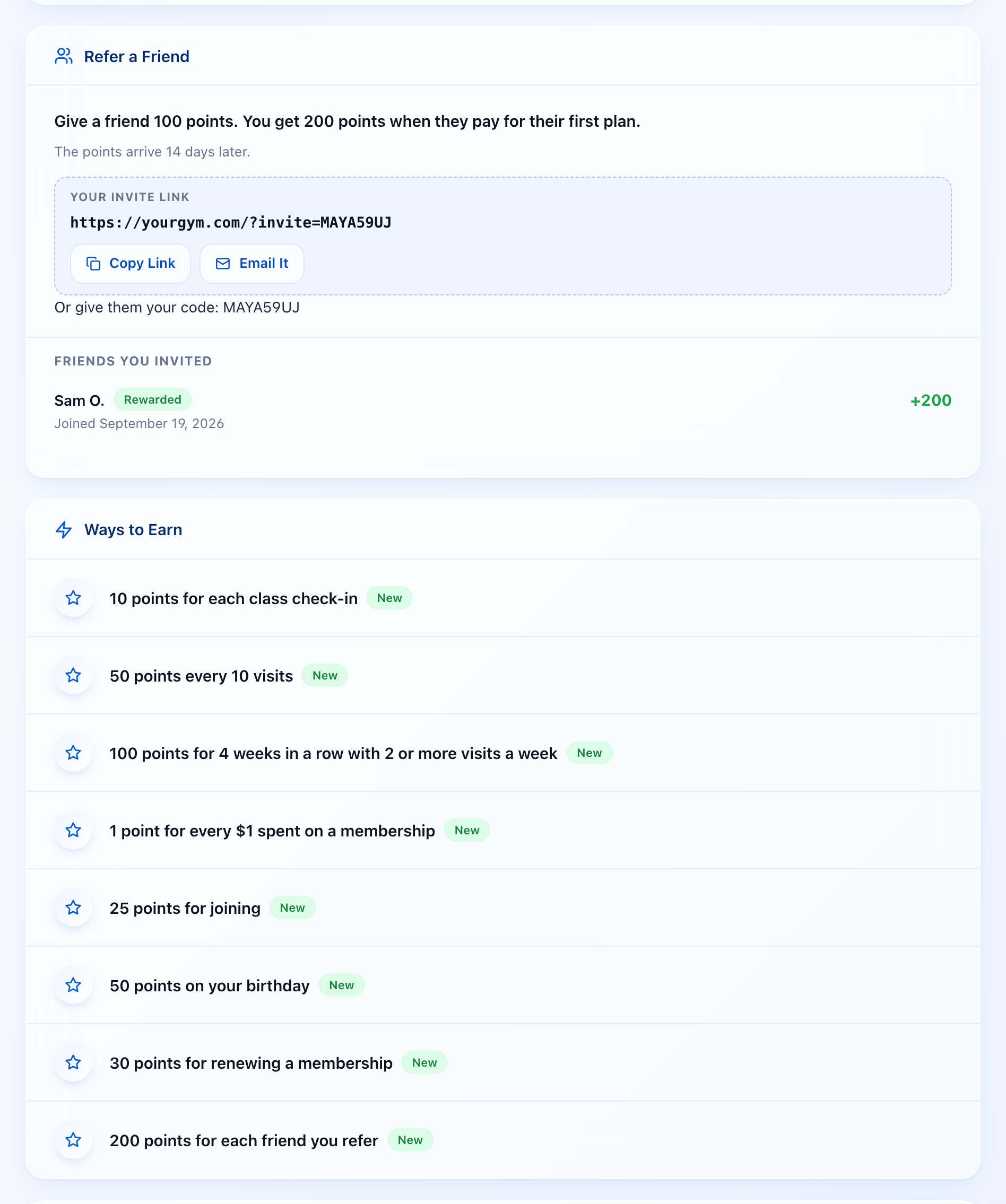
Member Dashboard › RewardsMEMBER
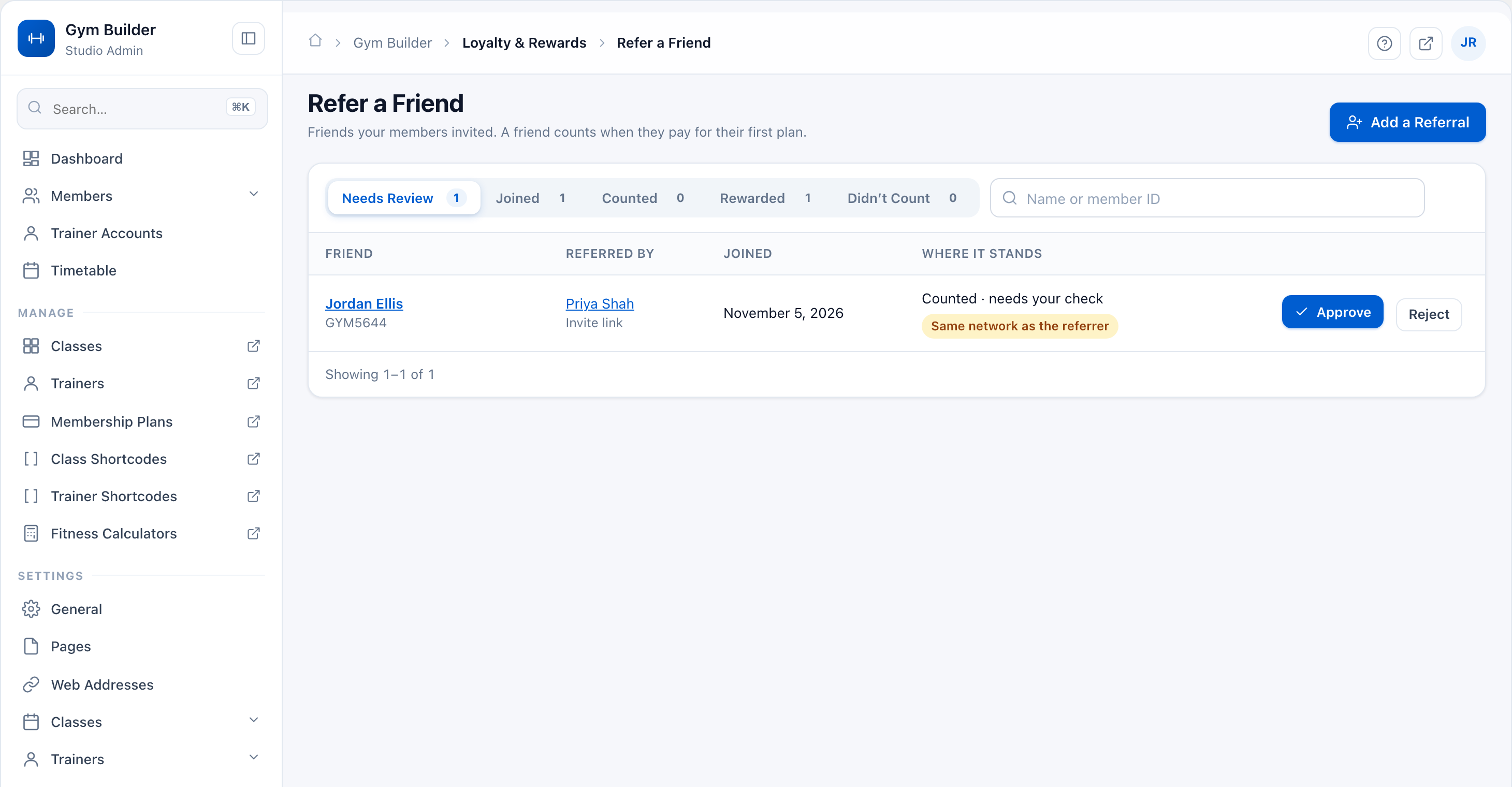
Gym Builder › Loyalty & Rewards › Refer a FriendADMIN
With your check where it matters.
Referrals you can trust
- Every invited friend, who referred them and where it stands: Joined, Counted, Rewarded or Didn’t Count.
- A friend from the referrer’s own network, or a referrer over their monthly limit, waits in Needs Review for Approve or Reject.
- A friend counts on their first payment, or after their first classes — you choose, with a smallest first payment if you like.
- Referral points wait out the refund window, and a refunded first payment means no points.
- Add a Referral for a friend who joined without the link.
Search, sort, act.
Every member’s points in one list
- Members With Points, Points to Spend, Points on Their Way and Members Who Owe Points at the top.
- For each member: points to spend, on their way, earned in total, last activity and the next points to expire.
- Search by name, email or member ID, or show only members with points expiring soon, points on the way or points owed.
- Tick members and click Give or Take Points to change points for just them.
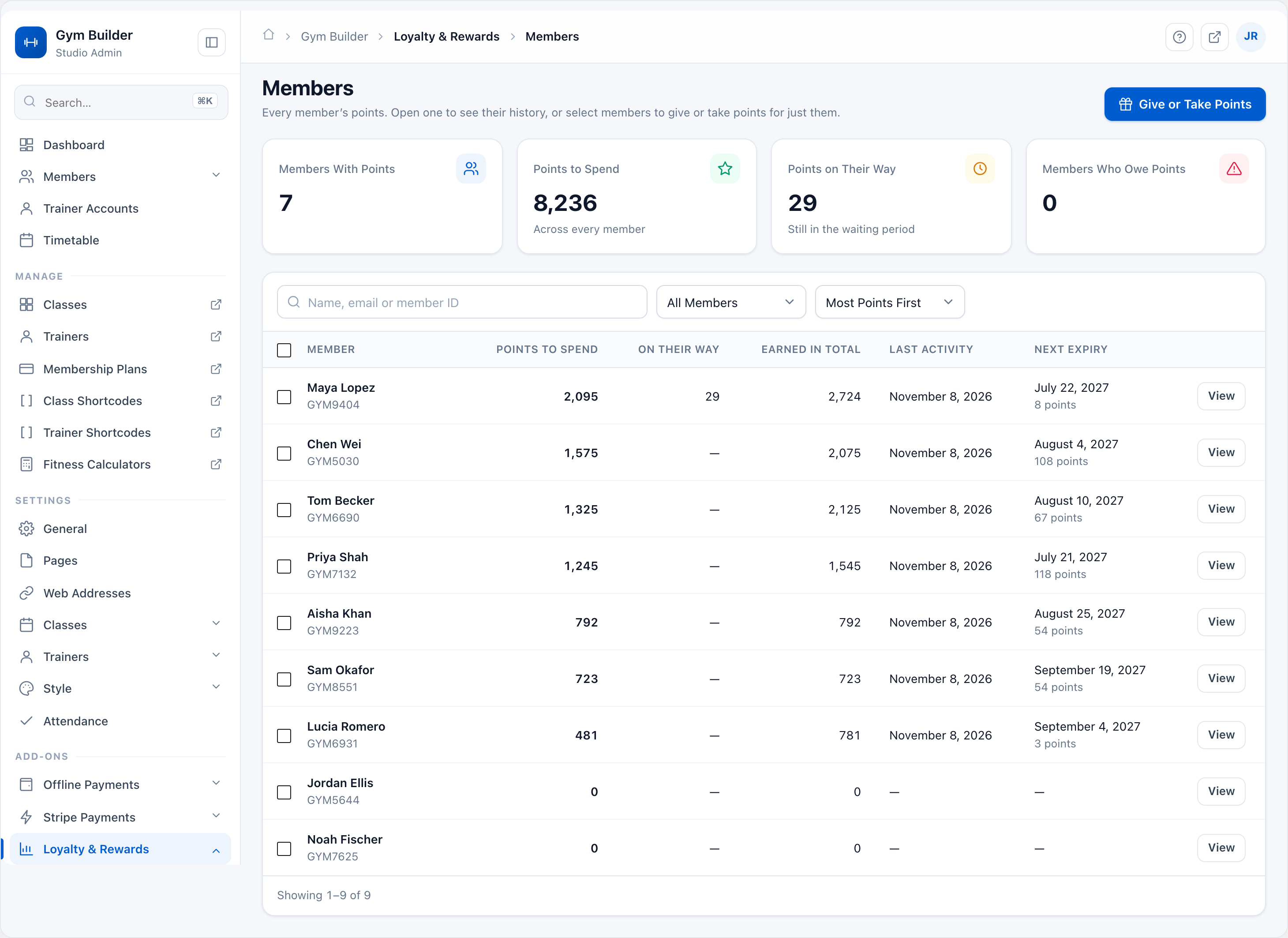
Gym Builder › Loyalty & Rewards › MembersADMIN
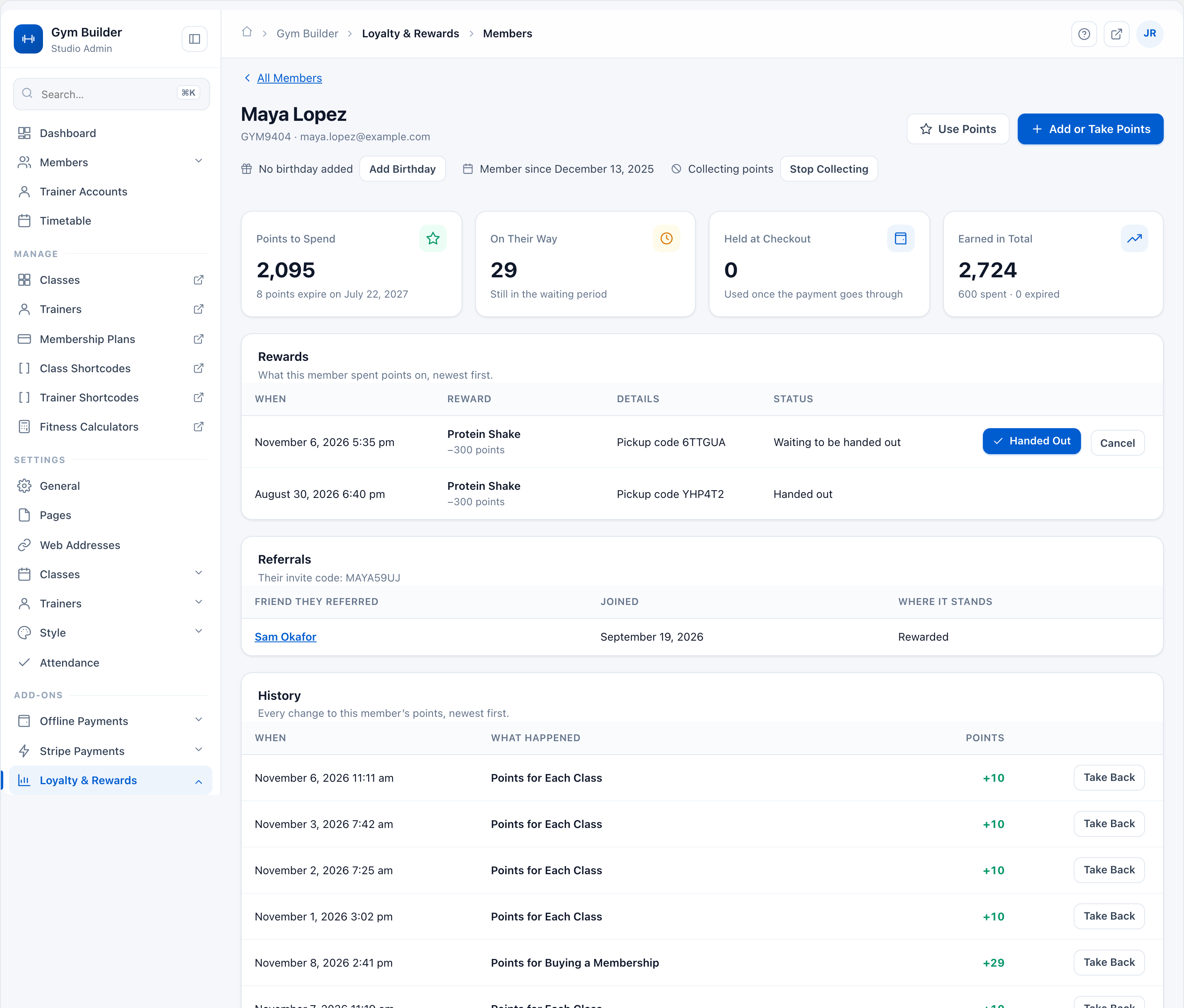
Members › one memberADMIN
Answer any question at the desk.
One member, the whole story
- Use Points for a member at the desk, or Add or Take Points with a reason only staff see.
- Points to spend, points on the way, points held at checkout, and everything earned, spent and expired.
- The rewards they redeemed, with Handed Out and Cancel, and the friends they referred.
- A full History with Take Back on any line.
- Add their birthday, or Stop Collecting for a member who doesn’t want to take part.
Events, challenges, apologies.
Thank many members at once
- Give or take points for Everyone, Active Members or Members on a Plan — or just the members you ticked.
- Pick a staff rule such as Helped at an Event, or Something Else with your own points and reason.
- Check who gets the change before you confirm.
- When it’s done you see who got the points and who was skipped, and why. Nobody goes below zero.
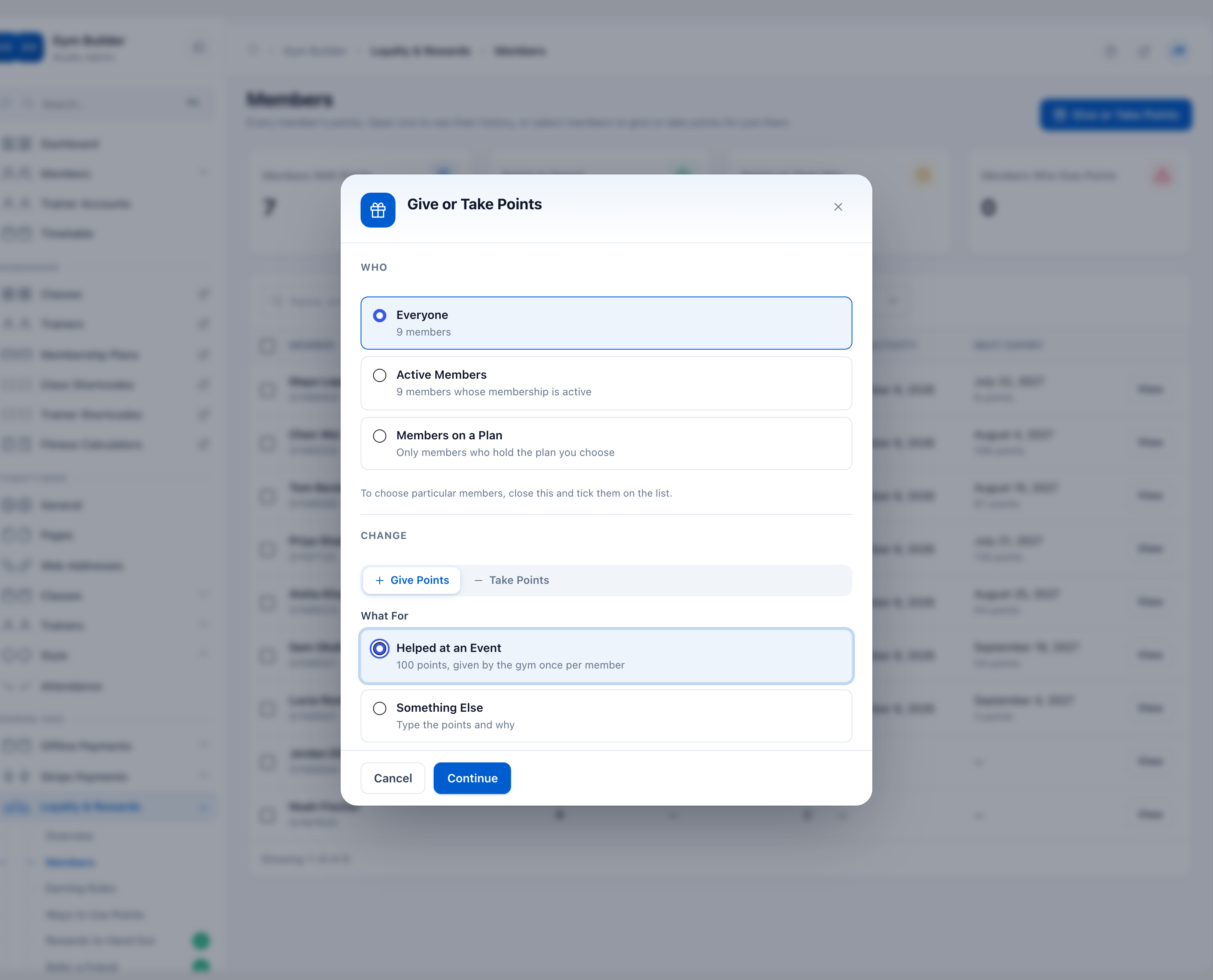
Members › Give or Take PointsADMIN
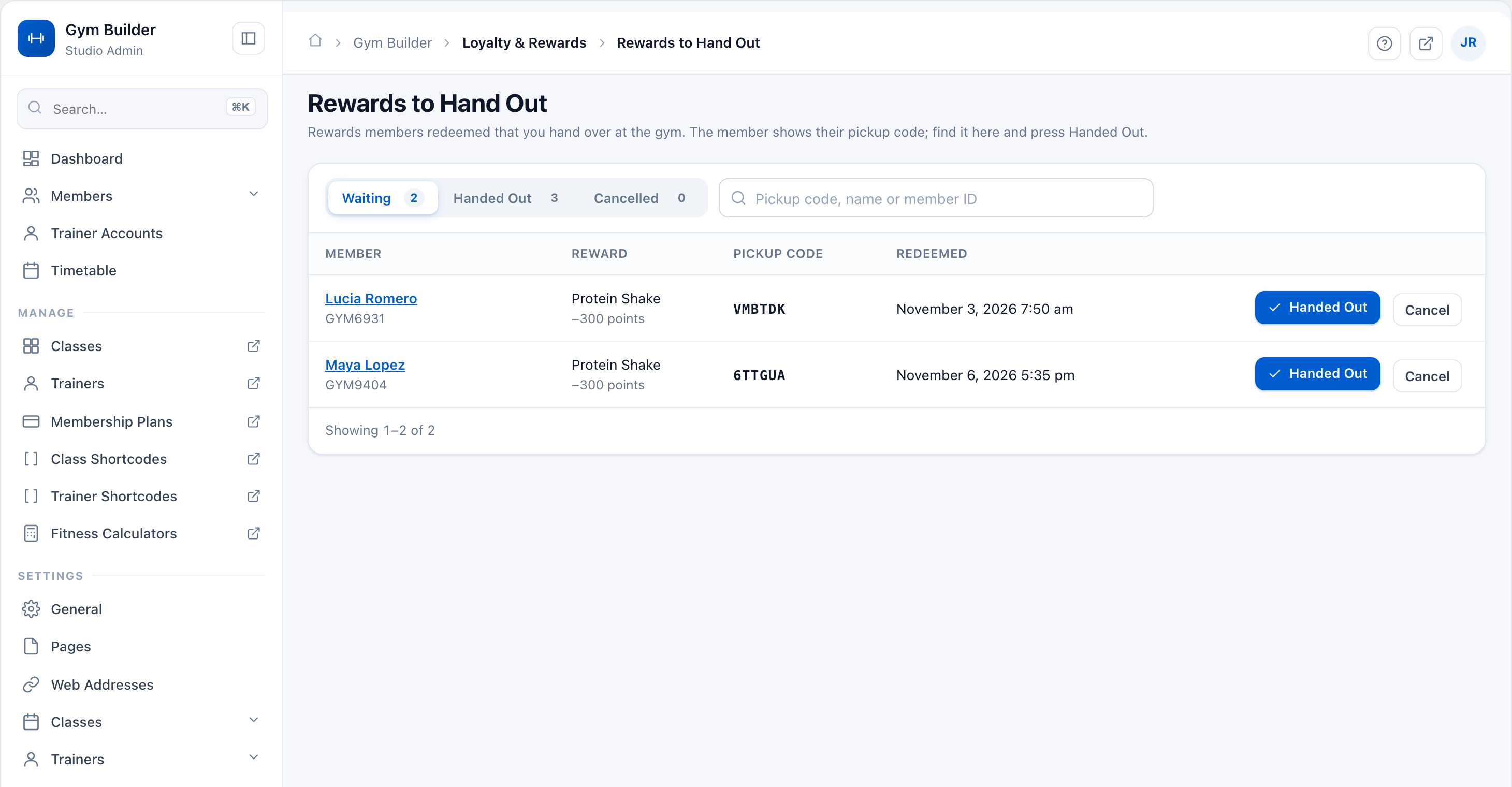
Gym Builder › Loyalty & Rewards › Rewards to Hand OutADMIN
Find the code, press Handed Out.
Hand out rewards at the desk
- Every reward waiting to be handed over, with the member, the reward and its pickup code.
- Type the code or the member’s name, hand it over, and click Handed Out.
- Cancel with a reason gives the points back and stops the code working.
- The menu shows how many are waiting, and Needs You reminds you of any left more than 3 days.
- You get an email whenever a member redeems a reward to hand out.
Sent in your gym’s name.
Emails that keep them coming back
- Points Earned — one a day at most, with yesterday’s points and how many rewards they can redeem now.
- Points Expiring Soon and Code Expiring Soon — a nudge before anything runs out.
- Reward Redeemed, Reward Handed Out and Reward Cancelled, with the code or what to do next.
- Referral Points to both members, and Birthday Points on the day.
- Each one can be switched off, and members can stop the points emails themselves. Send Me Samples shows you every one.
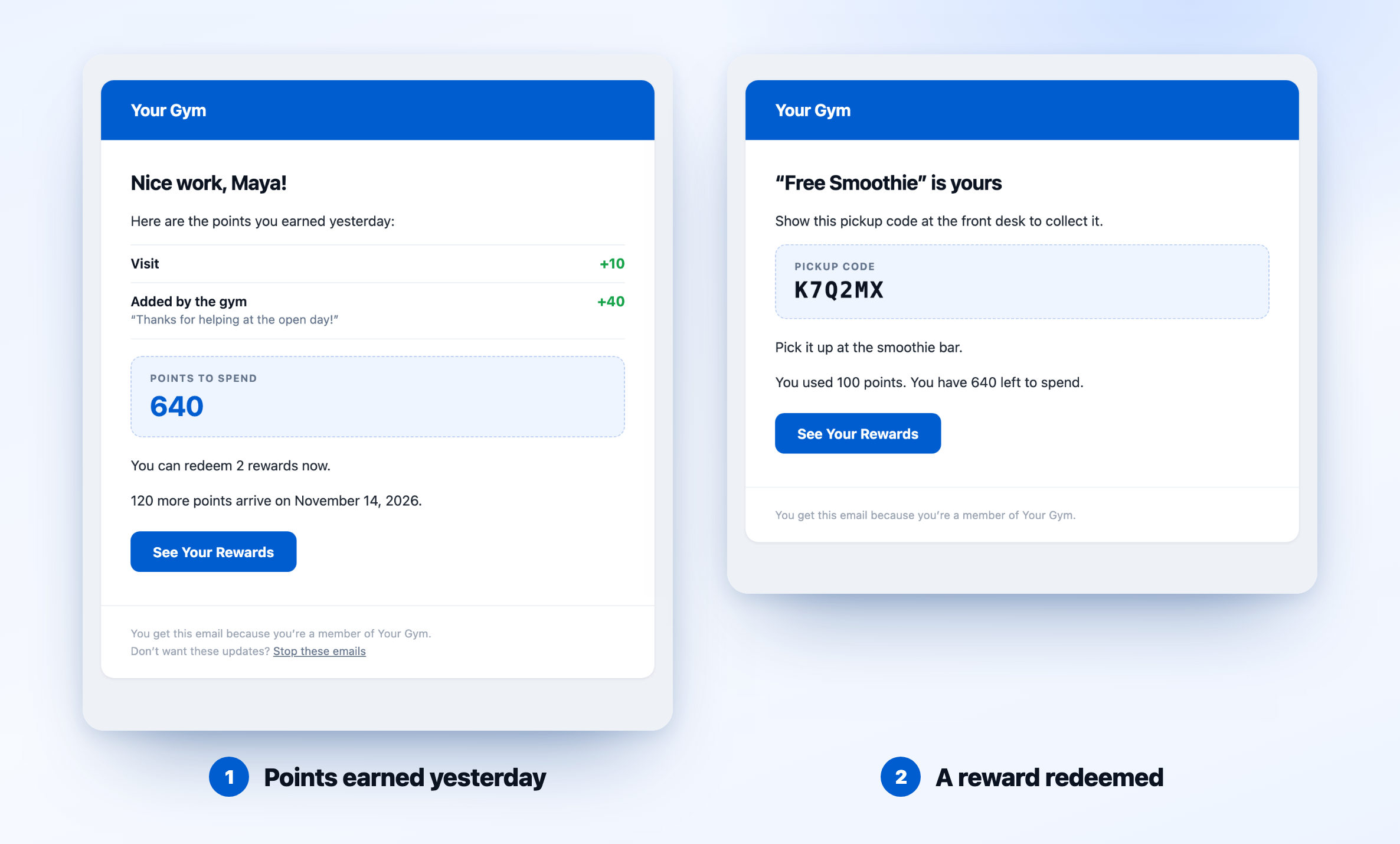
Emails to membersMEMBER
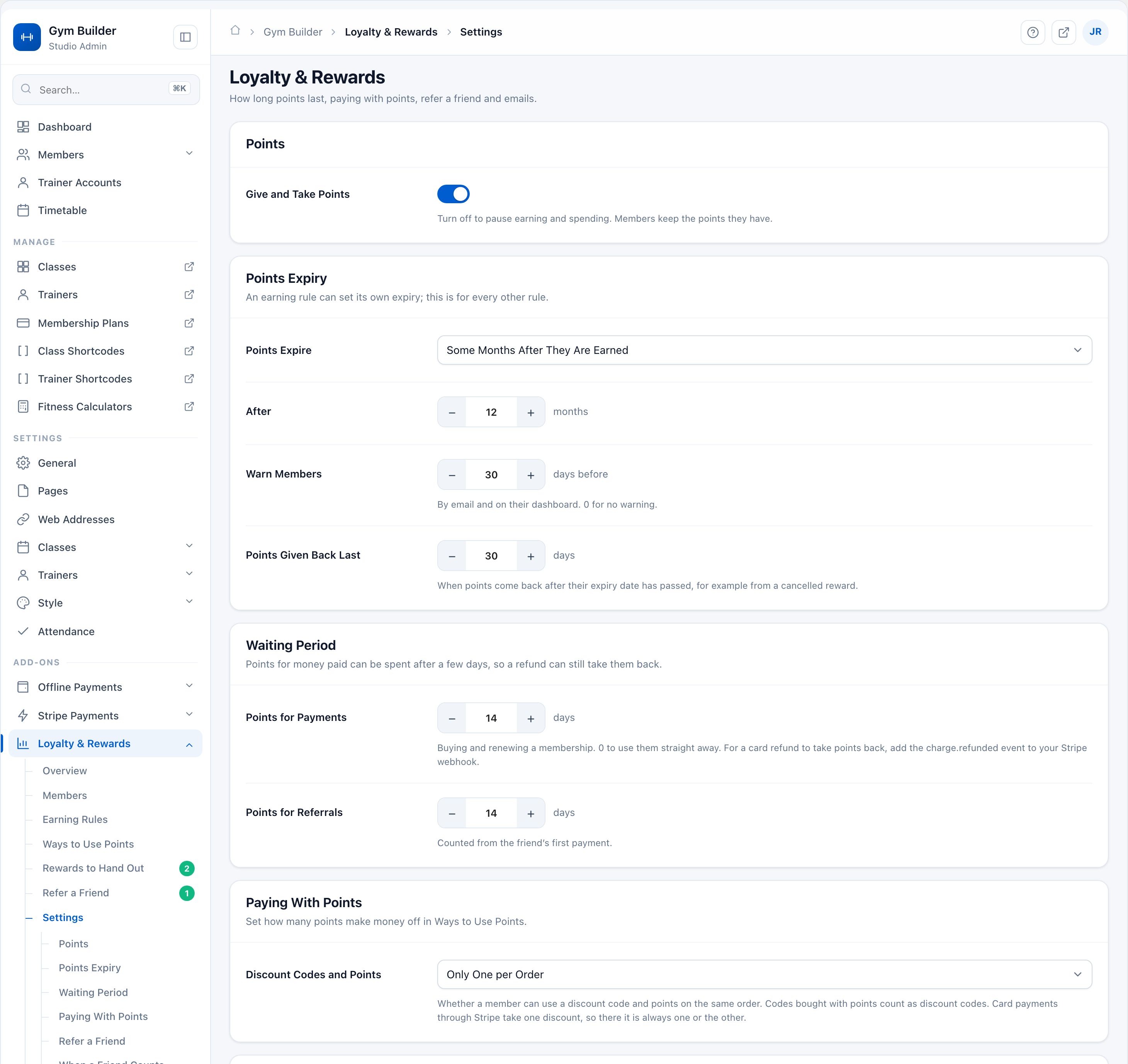
Gym Builder › Settings › Loyalty & RewardsADMIN
One page.
Settings that fit your gym
- Give and Take Points — pause the whole program at any time; members keep their points.
- Points Expiry — never, some months after they are earned, or after months without activity, with a warning first.
- Waiting Period — points for payments and referrals can be spent after a few days, so a refund can still take them back.
- Paying With Points — a discount code or points on an order, or both together.
- Refer a friend, birthdays, each email, and whether to keep the data if the plugin is deleted.
Next to your other figures.
Points on the Gym Builder Dashboard
- Points given this month sits with your studio figures, compared with this time last month.
- Open Loyalty goes straight to the Overview.
- Needs You lists rewards waiting to be handed out and friends who need your check.
- Each member’s Gym Builder page gets a Loyalty Points panel too.
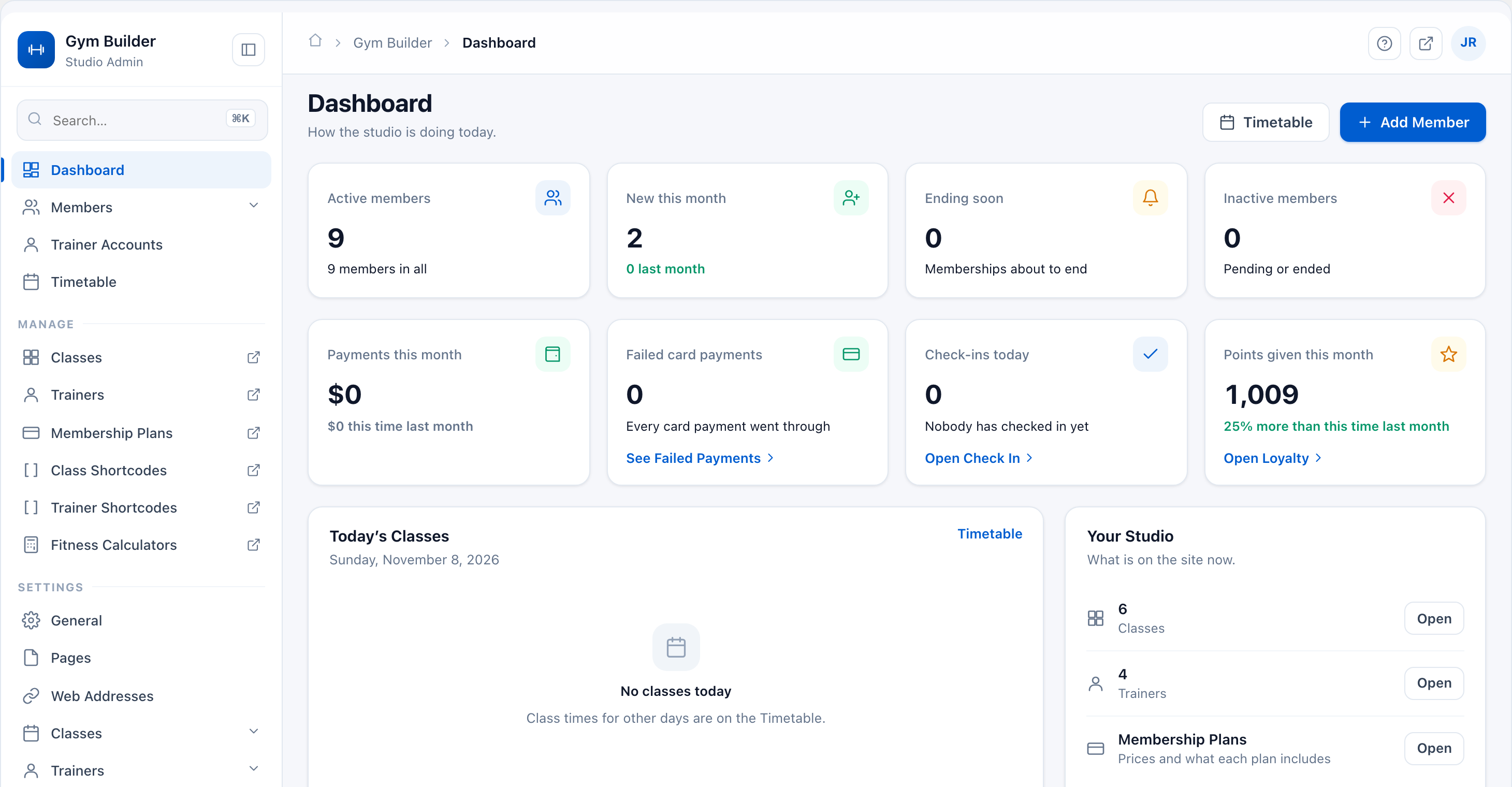
Gym Builder › DashboardADMIN
Frequently asked questions
Do I need the Gym Builder plugin to use this?
Yes. GB Loyalty & Rewards is an add-on for Gym Builder 3.1.0 or newer. With an older Gym Builder it stays switched off and shows a notice with an Update link — your site keeps working normally.
Which other add-ons does it need?
None to start: birthdays, anniversaries, joining, referrals and points your staff give work with Gym Builder alone. Points for check-ins, visits and streaks need GB Attendance System. Points for payments need a payment add-on — Stripe Payments, Offline Payments, or Class Booking & Payment with WooCommerce. A discount-code reward needs Promotions & Trials.
How much is a point worth?
You decide, in the Pay With Points reward — for example 100 points for $1 off. The Overview shows what all your members’ points are worth at checkout.
What happens when a payment is refunded?
Card and shop refunds take back the points that payment earned, in the same share: half the money, half the points. If the member already spent them, they owe the rest and it comes off their next points — nobody goes below zero. Points for payments wait 14 days by default before they can be spent, so most refunds are caught first. An approved offline order can’t be undone, so you take those points back by hand with Take Back.
Do points expire?
Only if you want them to: never (the default), some months after they are earned, or after some months without earning or spending. A rule can have its own expiry, and members are warned by email and on their dashboard before points run out.
Do members need an app?
No. Everything is on the Member Dashboard they already use, and it works on a phone.
Can members game the referral program?
A friend from the referrer’s own network, or a referrer over the monthly limit, waits for your check. Referral points wait out the refund window, a refunded first payment means no points for either member, and a member can’t refer themselves.
Do members who were already here get welcome points?
No. Joining points are for members who join after you start. Tick Members You Import Too to include members you import later.
Can I run a double-points month?
Yes. Add a second rule with the extra points and set its dates under More Options → When the Rule Runs.
Can a member get points back after redeeming?
Only through the front desk: cancel the reward and the points go back.
Can a member choose not to take part?
Yes. Stop Collecting on their page stops new points; they keep what they have. Members can also stop the points emails from their Rewards tab or a link in any email.
How is members’ data handled?
Points accounts are included in WordPress’s Export Personal Data and Erase Personal Data tools. Deleting the plugin keeps everything unless you switch on Delete Everything When the Plugin Is Deleted.
Which languages does it ship in?
German, Spanish, Mexican Spanish, French, Italian, Dutch and Polish — admin pages, the member’s Rewards tab, checkouts and emails alike. Set your site language and the add-on follows. A complete .pot file is included for any other language.
Simple, no-renewal-trap pricing
Pick the license that fits your number of sites — 1-year updates or lifetime. Every plan includes a 30-day money-back guarantee.
Single Site
For one production site
$39.99 / year
or $119.99 lifetime
- ✓1 site activation
- ✓All features included
- ✓1 year of updates
- ✓1 year priority email support
- ✓30-day money-back guarantee
MOST POPULAR
5 Sites
For agencies & multi-location gyms
$99.99 / year
or $299.99 lifetime
- ✓5 site activations
- ✓All features included
- ✓1 year of updates
- ✓1 year priority email support
- ✓30-day money-back guarantee
Unlimited
For agencies with many client sites
$599.99 / year
- ✓Unlimited site activations
- ✓All features included
- ✓1 year of updates
- ✓1 year priority email support
- ✓30-day money-back guarantee