
Sell Places in Your Classes with WooCommerce
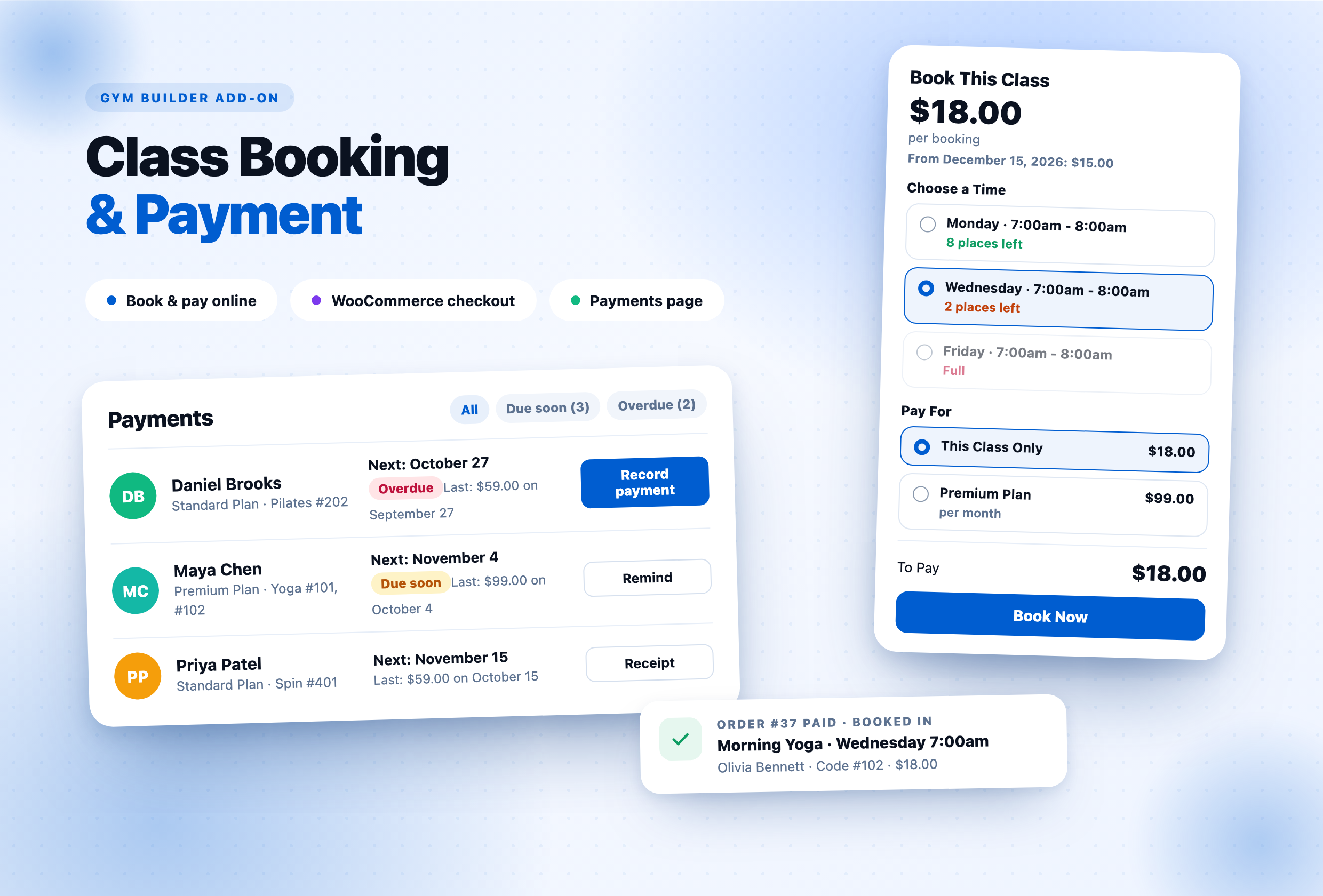
GB Class Booking & Payment turns any Gym Builder class into something visitors can buy. They pick a class time on the class page or your timetable, pay through your WooCommerce checkout, and are booked in the moment the order is paid — with a plan option, a later season price, a closing date and your own code for every class time. Payments taken at the desk get a page of their own, with receipts and reminders.
Why this add-on exists
Some people do not want a membership: they want one place in one class, or to try a plan without phoning the gym. Gym Builder shows your timetable; this add-on makes it something you can sell. Every class time keeps its own number of places, a paid booking takes one, and the last place cannot be sold twice — while an order waits for payment, its place is held for it. Buyers who are not members yet become members with a login when they pay. Everything runs through the WooCommerce checkout you already have, with the payment methods you already set up, and the money people pay at the desk is tracked on its own page with receipts and reminders.
Everything you need
From the class page to the receipt — for visitors, members and your front desk.
Book and Pay Online
A booking card beside each class: price, class times with places left, a countdown to when booking closes, and Book Now.
Book Buttons Everywhere
Class times sold online show Book on the class page and on your timetable; class cards get Book Now. Full times say so.
Pay for a Plan
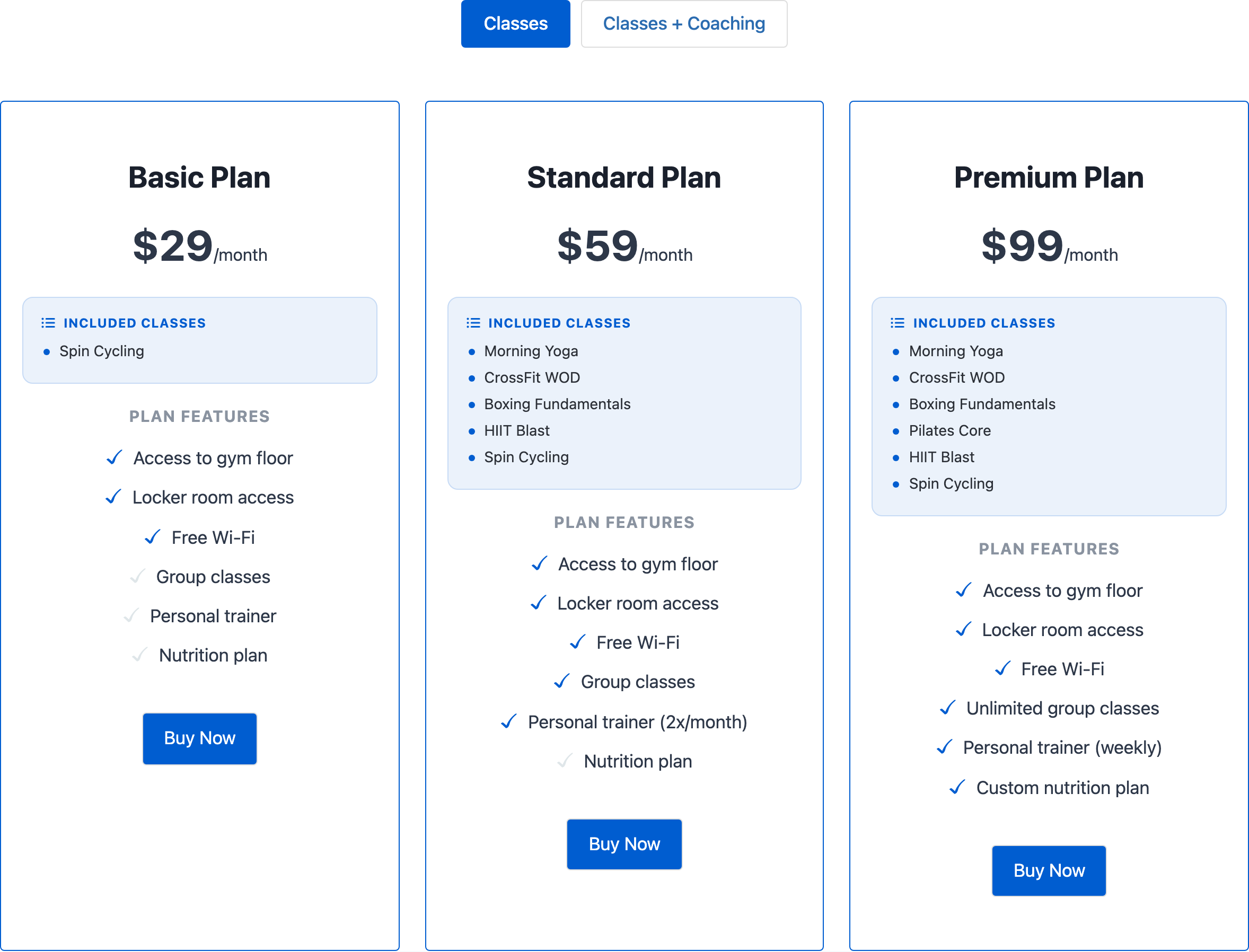
A plan that includes the class can be bought right on the class page — or with Buy Now on your pricing cards.
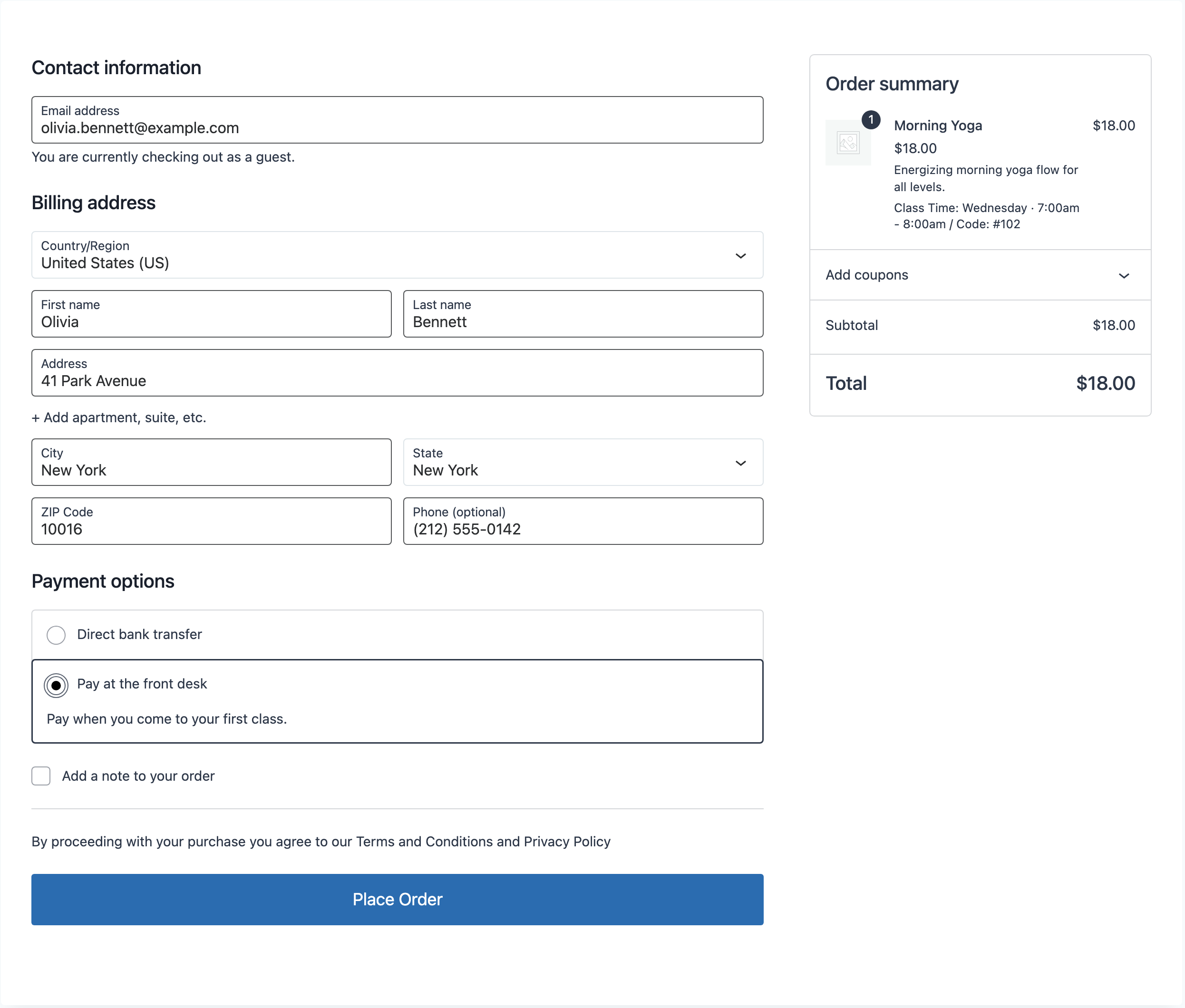
WooCommerce Checkout
Your cart, checkout, payment methods and order emails. The class time, code and plan show on every one.
No Double-Booked Places
While an order waits for payment its place is held, so two people cannot pay for the same last place.
Later Price & Closing Date
A second price from a date of your choice, and a moment booking closes — with a countdown on the card.
Your Code on Every Class Time
Keep your own reference, such as #102. It follows the booking to the order, emails, Payments page and receipts.
Members Made for You
A buyer who is not a member becomes one when they pay, with a login for the member dashboard.
Payments Page
Record cash, card or bank transfer payments, see who is due or overdue, print receipts and send reminders.
Pick a time, pay, done.
A booking card beside every class
- Book This Class shows the price per booking — or Free — and a later price when one is coming: “From December 15, 2026: $15.00”.
- Choose a Time lists every class time with its places left. A full time says Full and cannot be chosen.
- Booking closes on the date and time you set, with a countdown — “49 days 4 hours left”.
- Book Now puts the booking in the WooCommerce cart and goes straight to checkout.
- If a time fills up while someone decides, the card says why and keeps their choices.
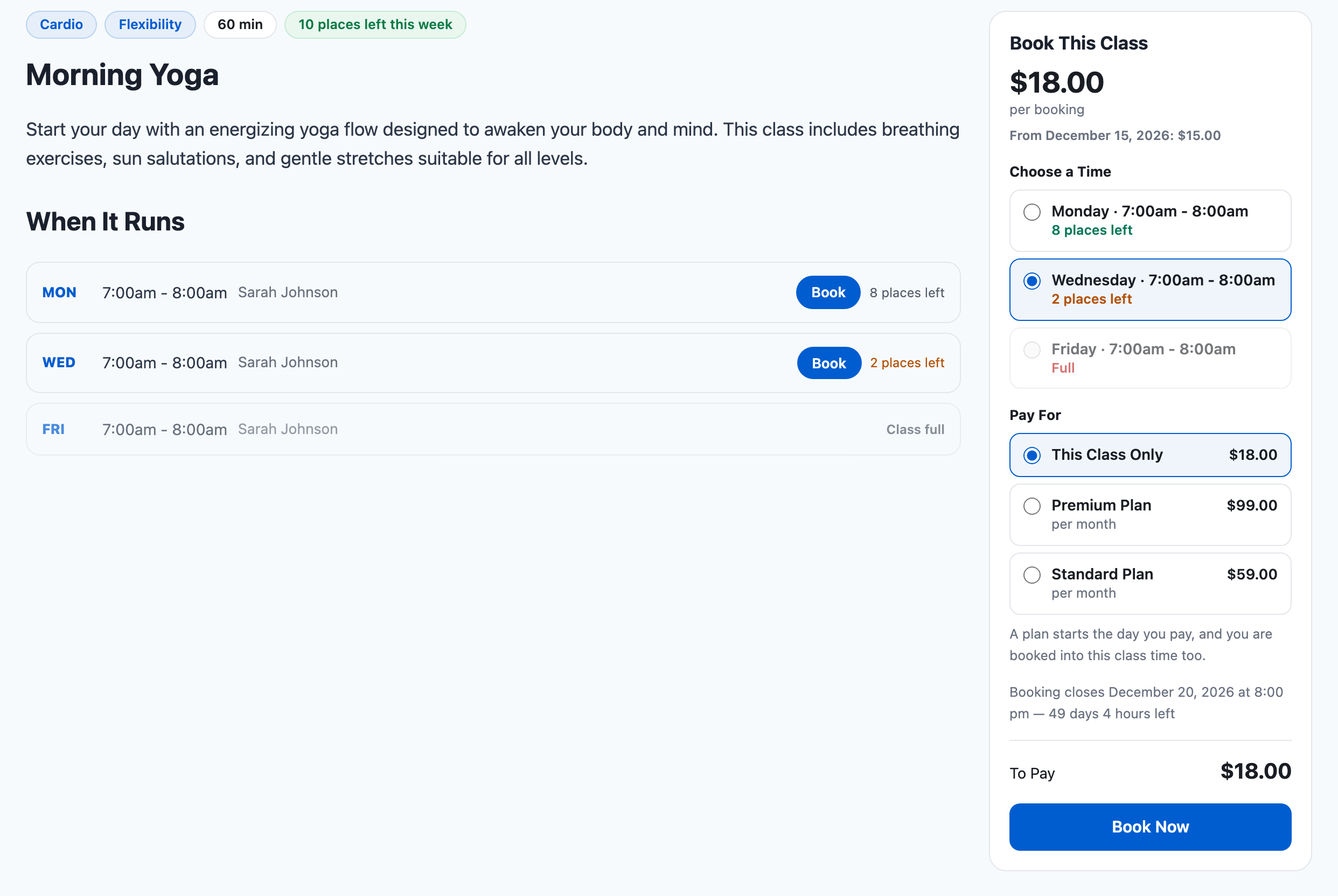
A class page on your websiteFRONTEND
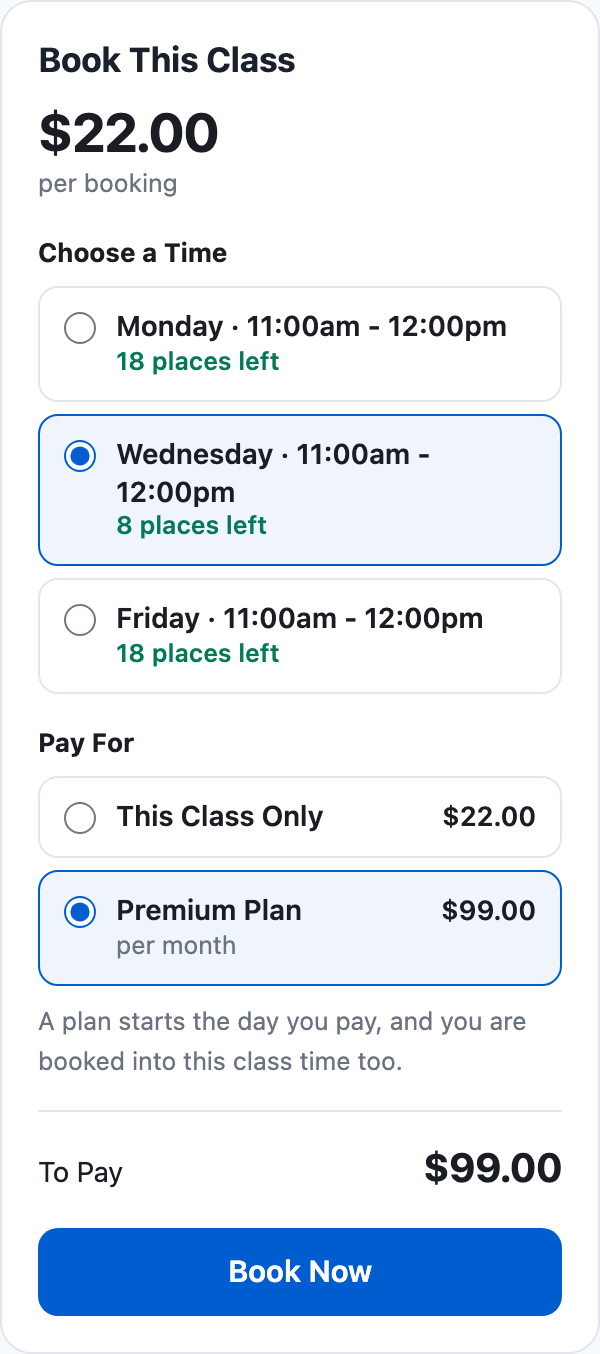
Booking card › Pay ForFRONTEND
One card, two ways to buy.
Sell a place, or a whole plan
- When a plan with a price includes the class, the card adds Pay For: This Class Only or the plan.
- To Pay changes with the choice.
- Paying with a plan gives both: the plan, and a place in the class time picked.
- The plan starts the day the order is paid and runs for its period; buying it again follows on from the current one.
Book where people look.
Book straight from your timetable
- Every class time sold online shows Book; other classes keep Register.
- Places left show beside each time, and a full time says Class full.
- Book opens the class page with that time already picked on the card.
- Class cards in your class lists get Book Now too.
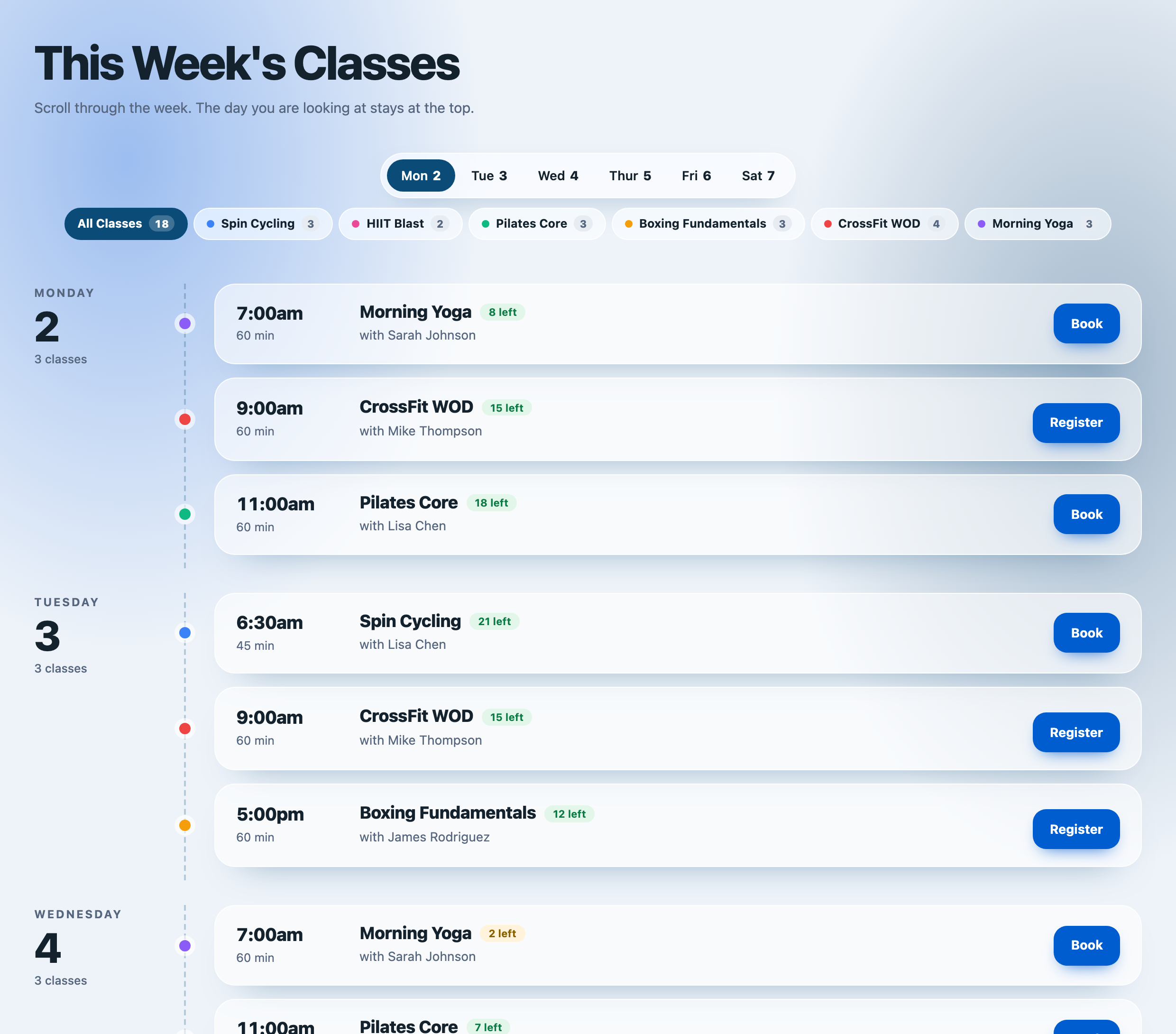
Your Gym Builder timetableFRONTEND
Your pricing pageFRONTEND
Plans straight to checkout.
Buy Now on your plan cards
- Every plan with a price gets a Buy Now button on Gym Builder’s plan cards.
- It puts that plan in the cart and opens checkout.
- When the order is paid the buyer holds the plan, exactly as when it is picked on a class page.
- Plans without a price keep your own button.
The checkout you already have.
Checkout through WooCommerce
- Payment runs entirely through your WooCommerce cart and checkout, with the payment methods you set up there — card, bank transfer, pay at the desk.
- Under the class, the booking details show in words: “Class Time: Wednesday · 7:00am – 8:00am / Code: #102”.
- The quantity is always one, so there is no quantity box to get wrong.
- The cart and checkout check every class again: a time that filled up or a booking that closed is stopped before payment.
WooCommerce › CheckoutFRONTEND
WooCommerce › Orders › an orderADMIN
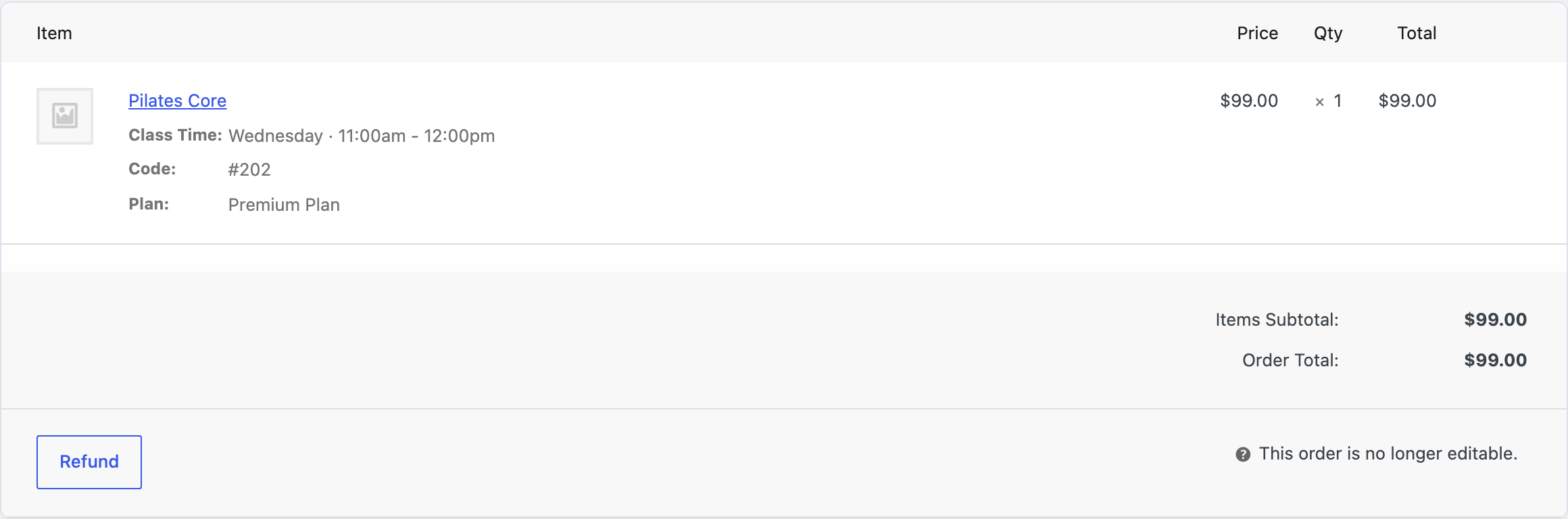
Nothing to look up.
Every booking detail on the order
- Class Time, Location (when you use class locations), Code and Plan are saved on the order line.
- When the order becomes Processing or Completed, the member is found — or created — given the plan, and booked in.
- An order waiting for payment holds its place for WooCommerce’s hold time, then lets it go.
- Refund or cancel the order and the places it added are freed and the plan taken back — a place another paid order covers stays.
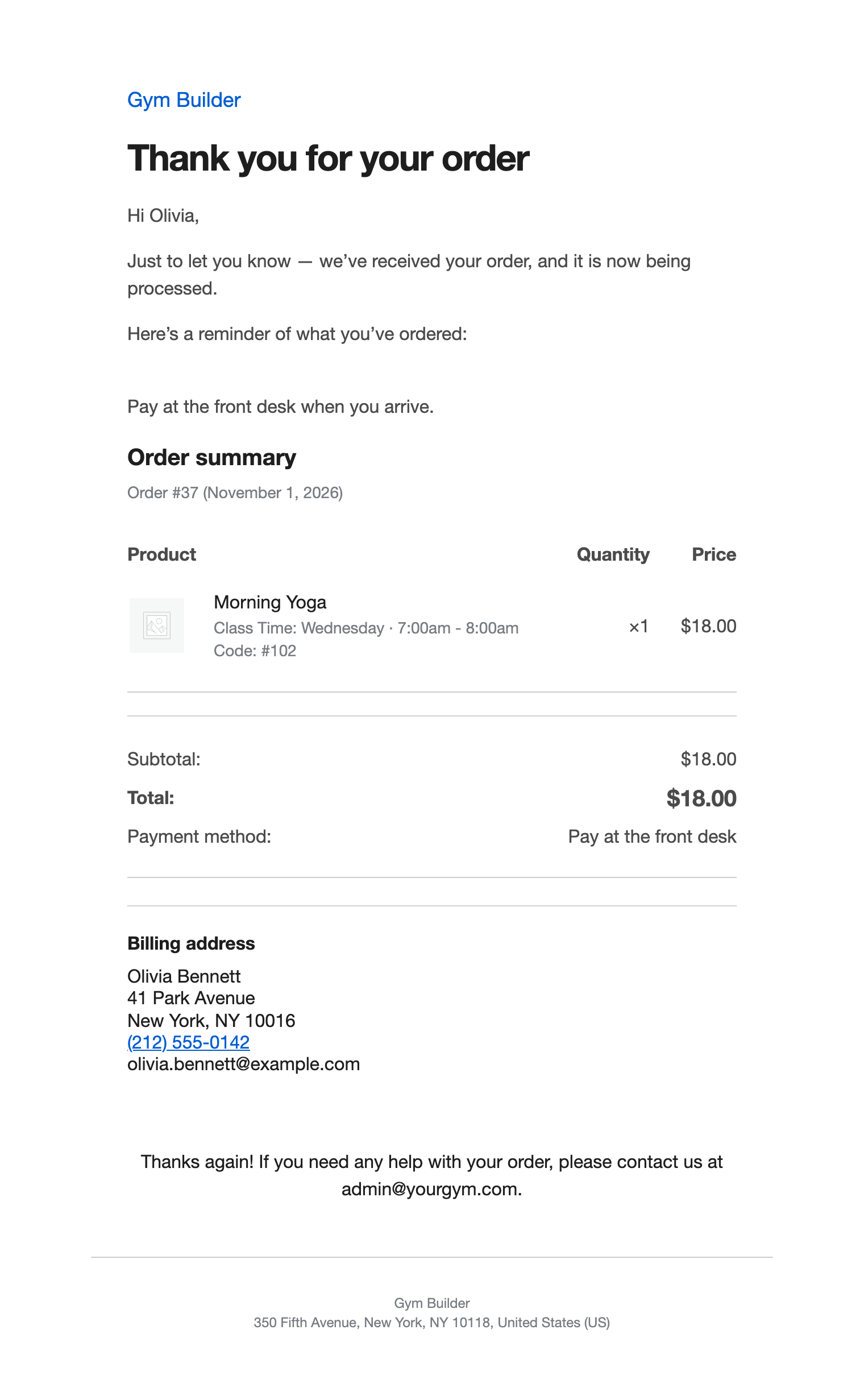
Clear for the buyer.
In the emails WooCommerce sends
- WooCommerce’s own order emails list the class time, location, code and plan on each line.
- The add-on adds “You are booked in” (or “Your plan is active”) with the class time and, for a new member, their member ID.
- New members also get Gym Builder’s login details email.
- Sent in your studio’s name, from the address you set in Gym Builder.
Email › WooCommerce orderMEMBER
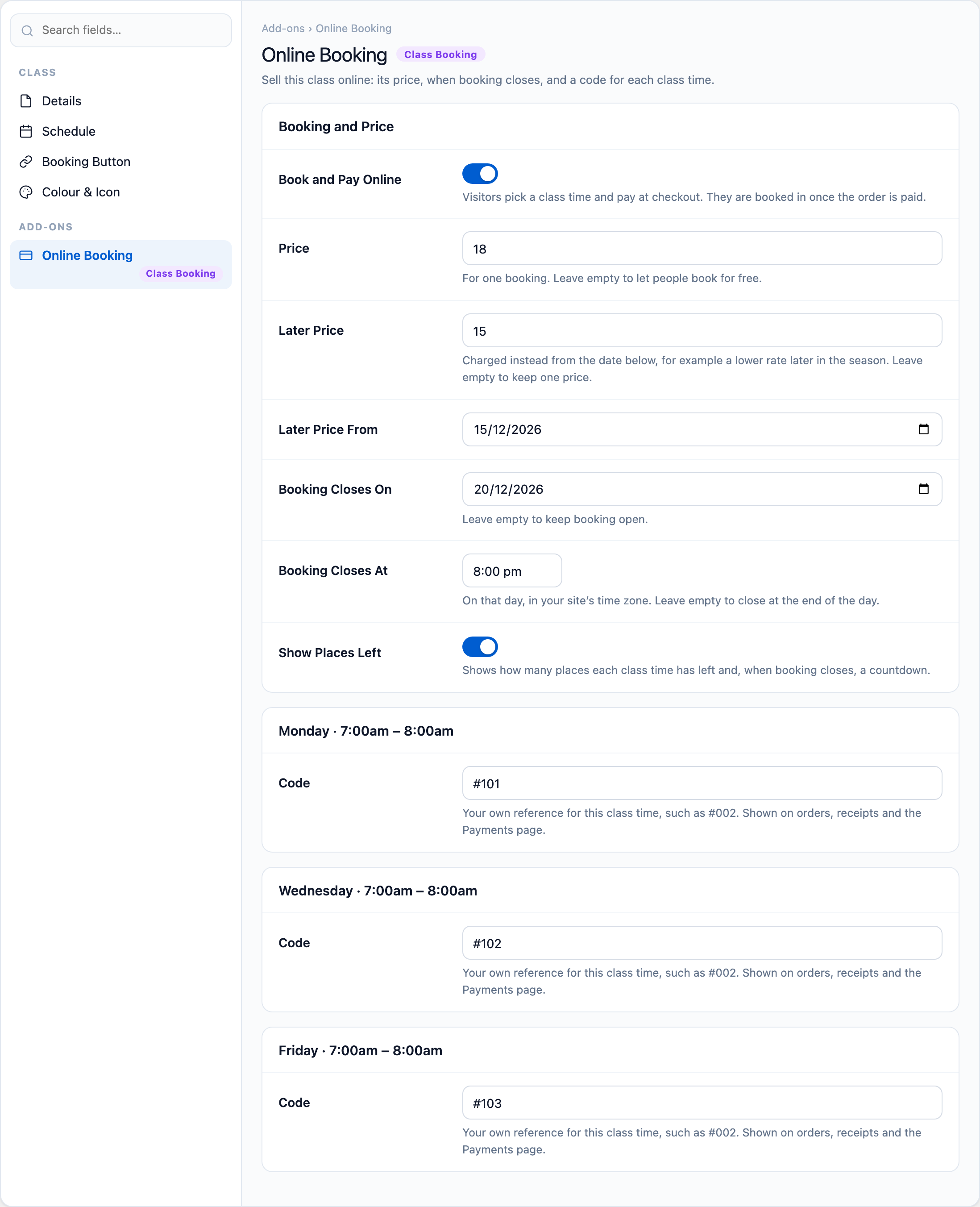
Classes › a class › Online BookingADMIN
No separate settings page.
Set it up on the class
- Book and Pay Online switches a class on; the rest of the card appears.
- Price, Later Price and Later Price From for a season rate.
- Booking Closes On / At, in your site’s time zone, and Show Places Left.
- One Code box per class time — your own reference, such as #101.
From buyer to member.
Members made for you
- A buyer who is not a member yet becomes one when the order is paid — found first by account, email or phone.
- The plan shows as Paid online with the WooCommerce order number and its dates.
- Pausing the membership moves the plan’s end date; Extra Days from the member list extends it too.
- Their class places are on their member page and member dashboard.
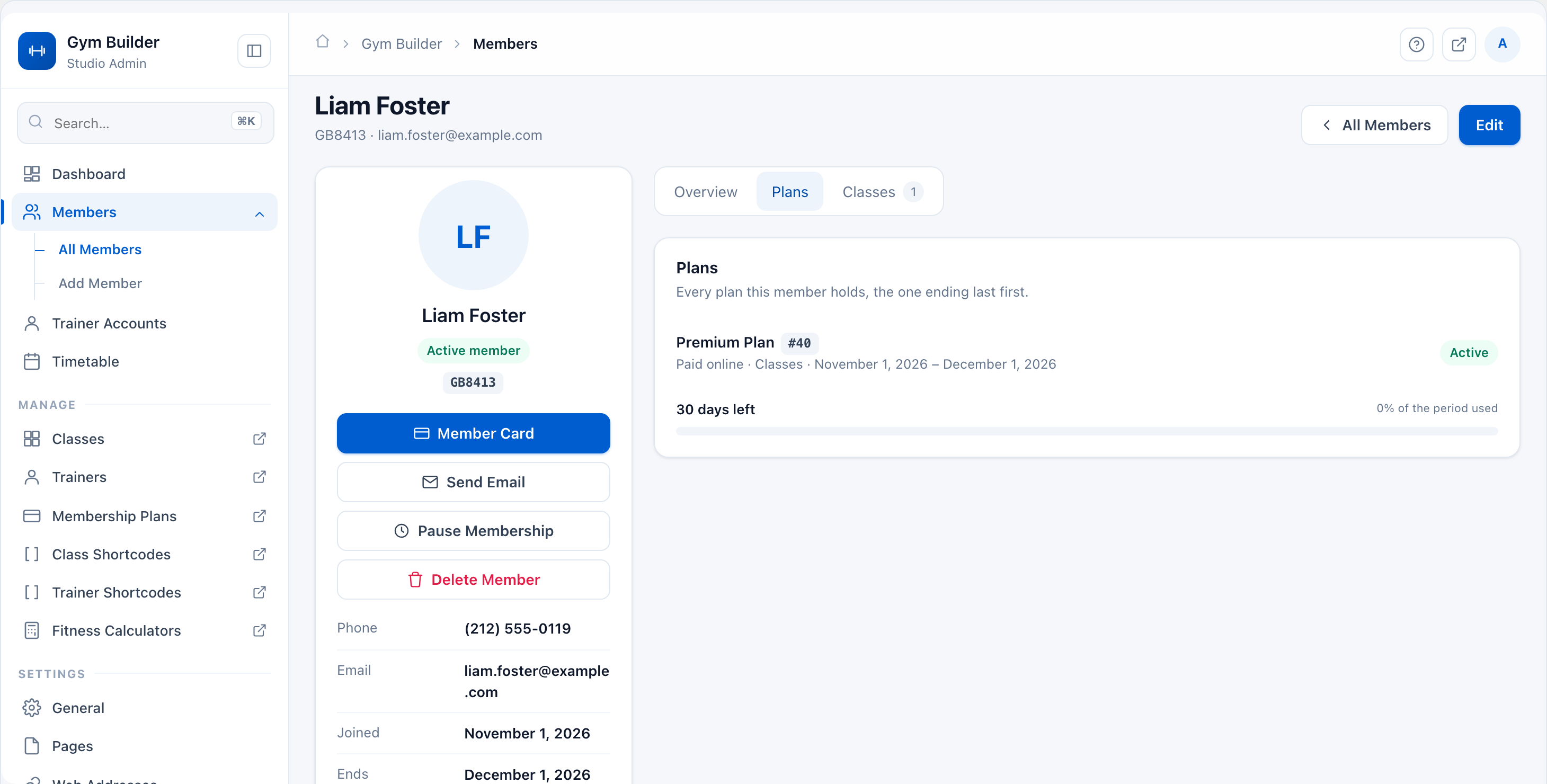
Gym Builder › Members › a member › PlansADMIN
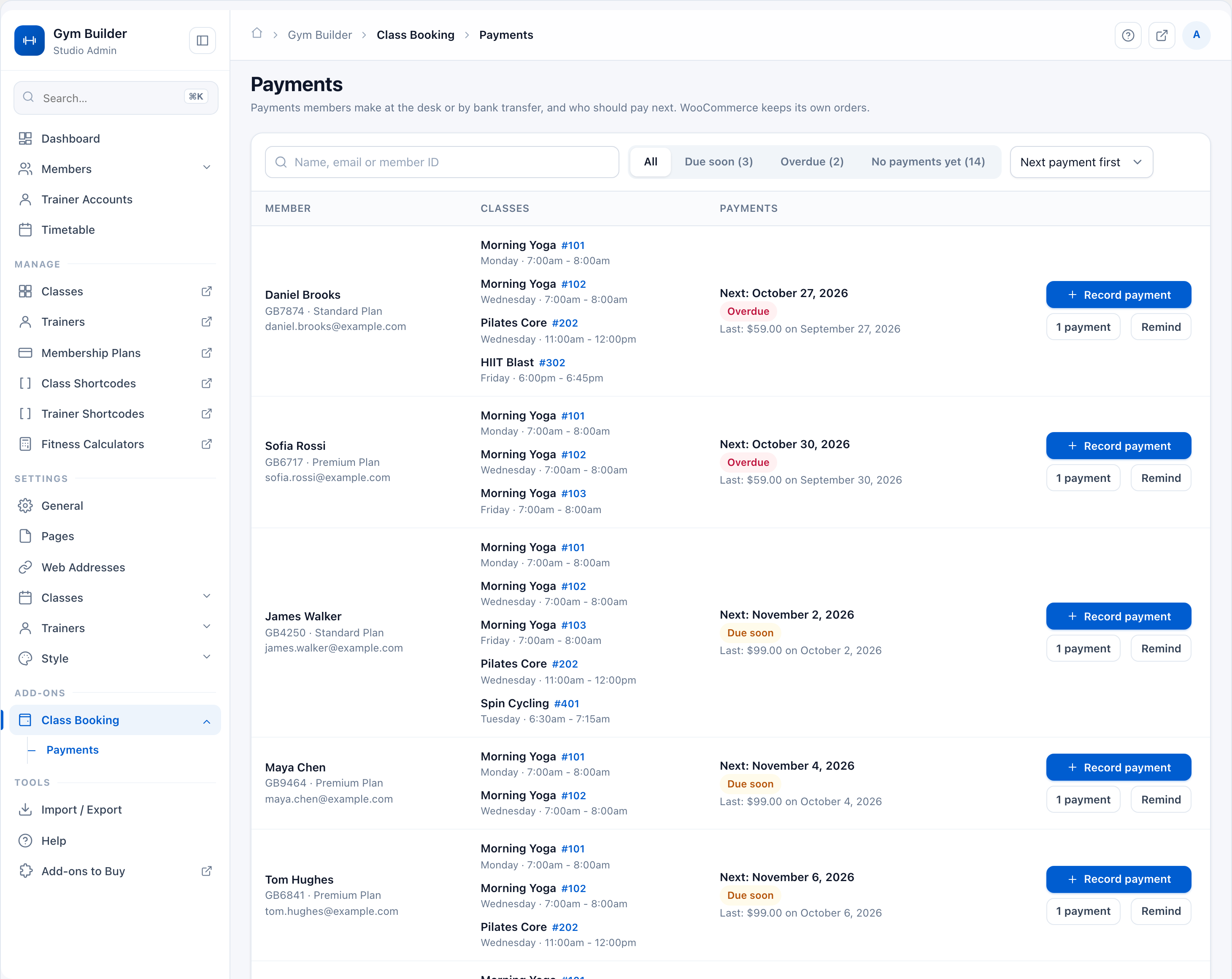
Gym Builder › Class Booking › PaymentsADMIN
Who paid, who is next.
Payments taken at the desk
- Every member with their plan, classes (with class time, location and code) and payments.
- Next: November 4 — the next payment due, marked Due soon within 7 days or Overdue once it has passed.
- Filters for All, Due soon, Overdue and No payments yet; search by name, email or member ID.
- WooCommerce orders stay in WooCommerce; this page is for money paid by hand.
Cash, card or transfer.
Record a payment in seconds
- Amount, Paid by (Cash, Card, Bank transfer, Cheque — or your own) and Next payment due, a month ahead to start with.
- An optional Note, and Email a receipt to the member.
- Each payment gets its own reference, such as #GBP-826308.
- History lists every payment for a member; one recorded by mistake can be deleted.
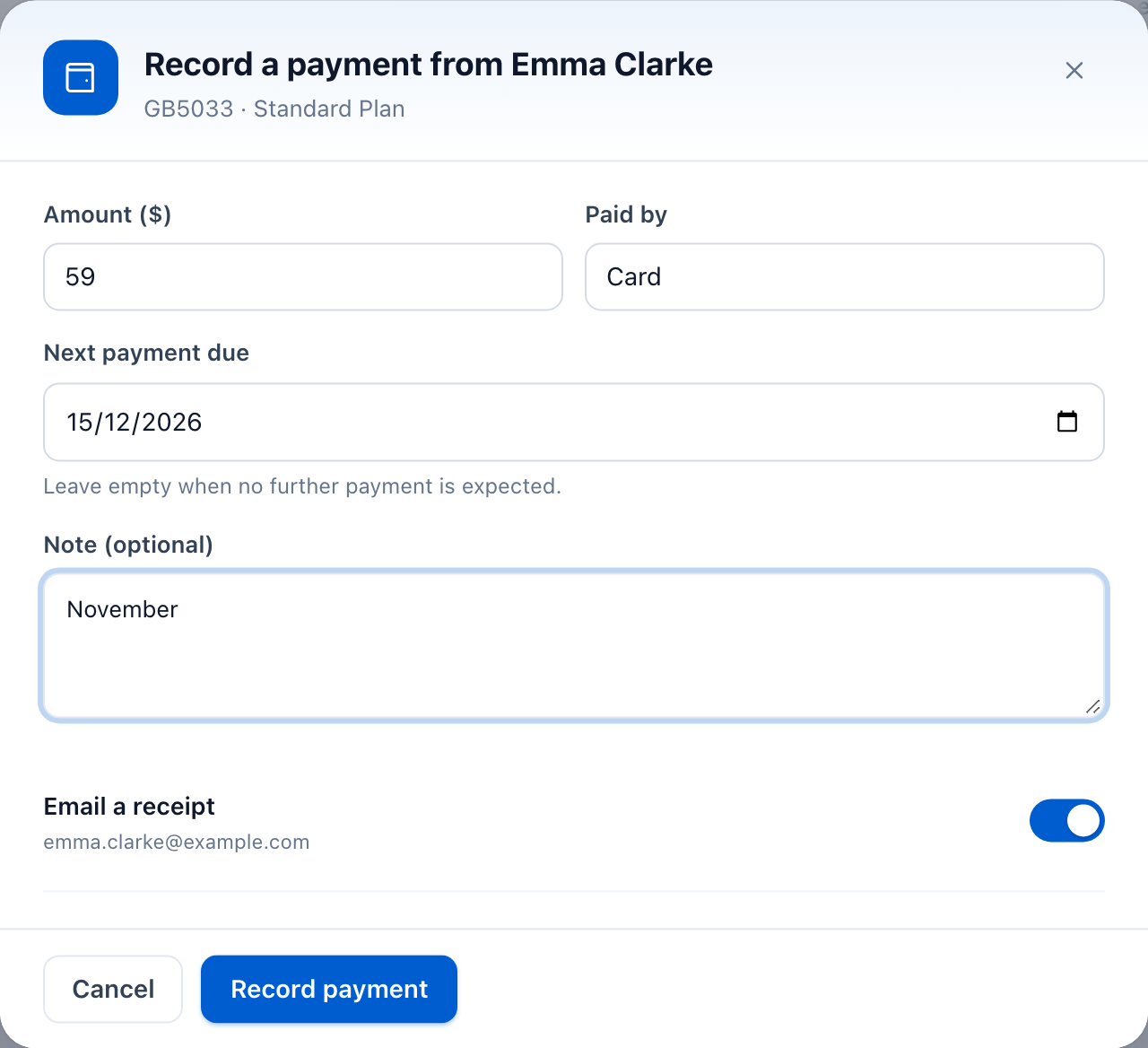
Payments › Record paymentADMIN
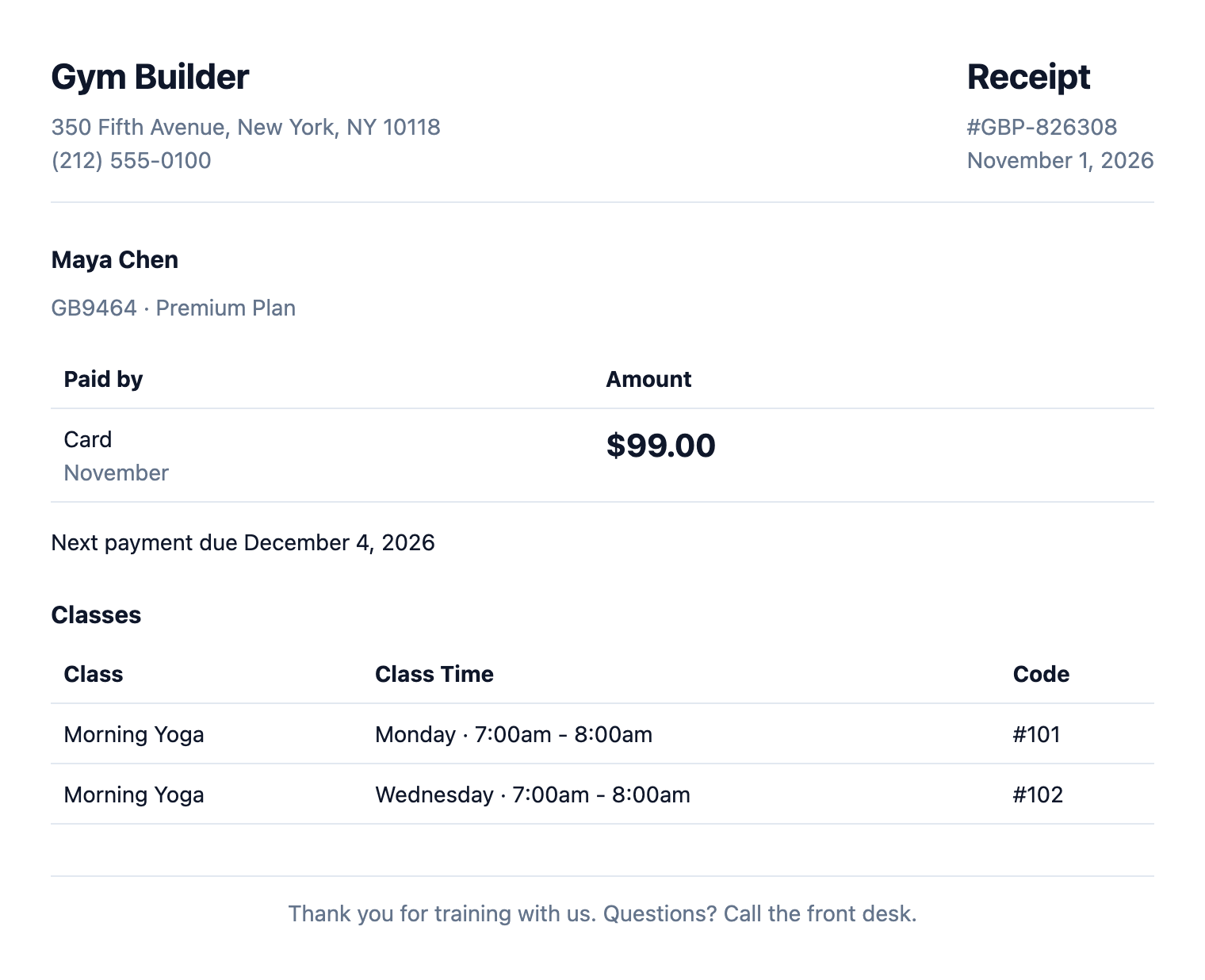
Payments › ReceiptADMIN
Your studio’s name on it.
A receipt, printed or emailed
- Print receipt opens your browser’s print window — print it or save it as a PDF.
- Your studio name, address and phone at the top, your card note at the bottom.
- The amount, how they paid, the reference, the next due date and the member’s classes with their codes.
- The same details go in the “Thank you for your payment” email.
One click, your words.
A friendly reminder when it is due
- Remind on a member’s row opens a message filled in for you — “This is a friendly reminder that your next payment is due on …”.
- Change it as you like, then Send reminder.
- Sent from your Gym Builder sender address, after “Hello” and their name.
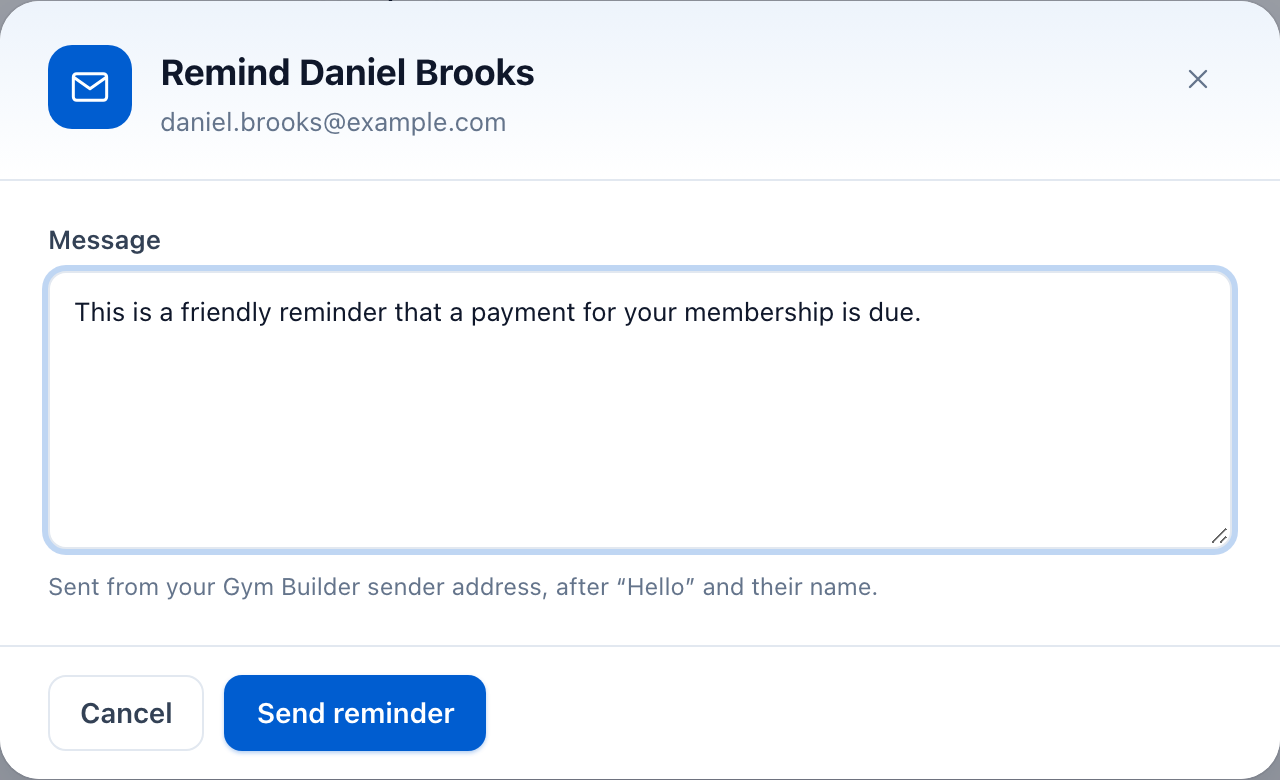
Payments › RemindADMIN
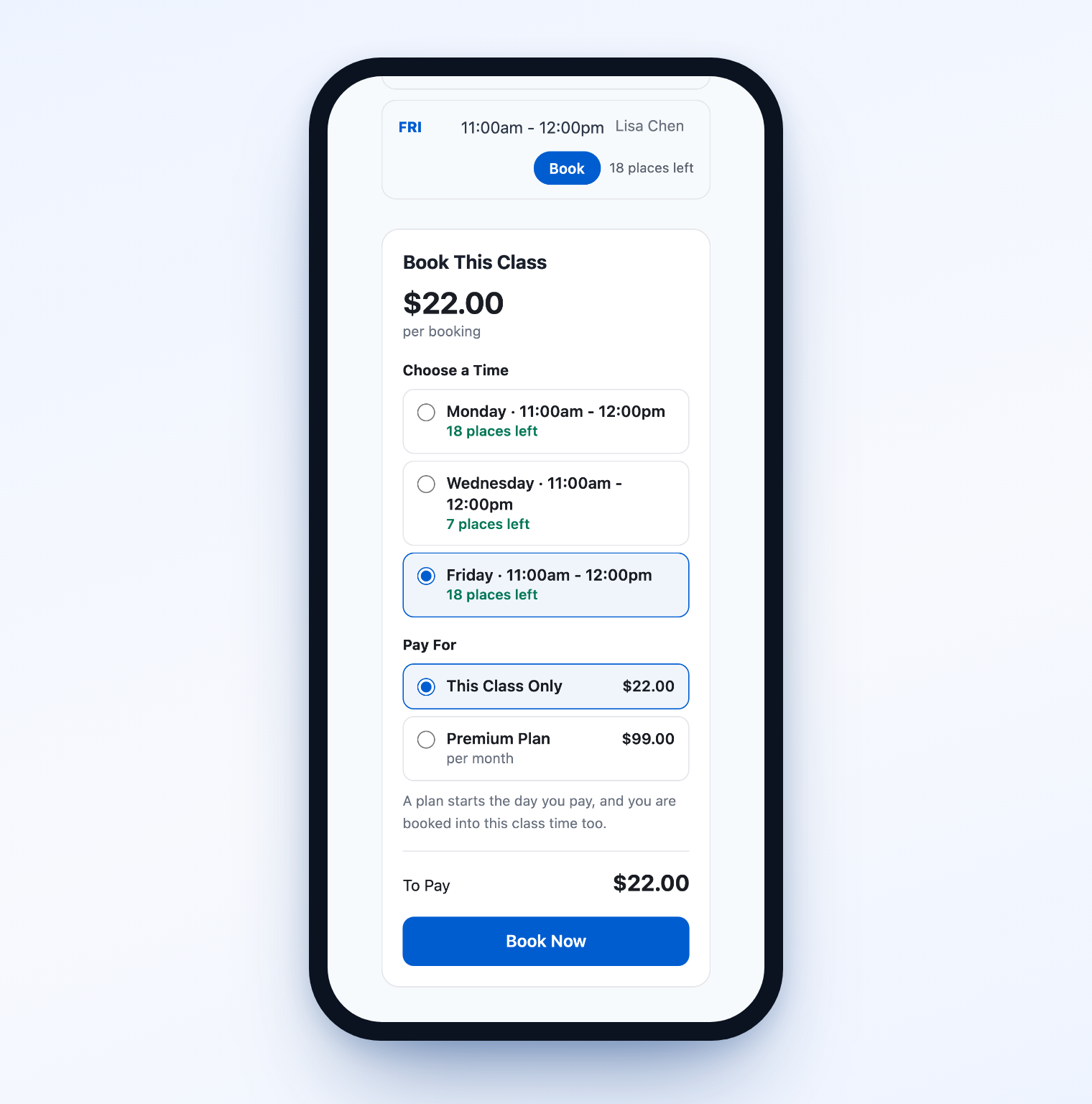
A class page on a phoneFRONTEND
Most bookings are made on one.
Built for phones
- On a phone the booking card sits under the class details, at full width.
- Large choices for the class time and the plan, the total, and one Book Now button.
- Checkout is WooCommerce’s own, ready for phones.
Frequently asked questions
What do I need?
Gym Builder 3.0.0 or newer and WooCommerce with at least one payment method set up. Each class you sell needs at least one class time on its Schedule, with its number of places.
Can I use it with Stripe Payments or Offline Payments?
No — they cannot be switched on at the same time. With this add-on, card payments (and bank transfer or cash on delivery, if you switch those on in WooCommerce) go through WooCommerce, and money paid at the desk is recorded on the Payments page.
When does someone get their place?
When the WooCommerce order becomes Processing or Completed — normally right after an online payment. An order waiting for payment books nothing yet, but holds the place for WooCommerce’s Hold stock time.
Can two people pay for the same last place?
No. A place is held for an order while it waits for payment, and the cart and checkout check every class again before the order is placed.
Do buyers need an account first?
No. If the buyer is not a member yet, they become one when the order is paid, with a login for the member dashboard. Whether people can check out without an account is up to your WooCommerce settings.
Is a booking for one date or every week?
A booking is for a class time — for example “Tuesday · 9:30 – 10:30” — the same way Gym Builder books a member into a class. It takes one of that time’s places.
How do I offer a class for free?
Switch on Book and Pay Online and leave Price empty. The card shows Free, people still go through checkout to give their details, and they are booked in when the order is placed.
How do I change the price later in the season?
Fill in Later Price and Later Price From. Until that date the card shows the later price under the current one; from that date it is the price charged.
What happens when I refund an order?
Set the order to Refunded or Cancelled in WooCommerce. The places it added are freed and any plan it gave is taken back. A place the member still pays for through another order — a renewal, for example — stays theirs.
Does recording a payment change the membership?
No. The Payments page records the money and the next due date. Change the member’s plan or dates on their member page, or give Extra Days from the member list.
Where does the class time’s code show?
On the cart, checkout, the WooCommerce order and its emails, the Payments page and printed receipts — not on the class page.
Which languages does it ship in?
German, Spanish, Mexican Spanish, French, Italian, Dutch and Polish — admin, booking card and emails alike. Set your site language and the add-on follows. A complete .pot file is included for any other language.
Simple, no-renewal-trap pricing
Six licence tiers — pay yearly for a year of updates and support, or once for lifetime. Every plan includes a 30-Days Money Back Guarantee.
Single Site
For one production site
$29.99 / year
or $89.99 lifetime
- ✓1 site activation
- ✓All features included
- ✓1 year of updates
- ✓1 year priority email support
- ✓30-Days Money Back Guarantee
MOST POPULAR
5 Sites
For agencies & multi-location gyms
$79.99 / year
or $239.99 lifetime
- ✓5 site activations
- ✓All features included
- ✓1 year of updates
- ✓1 year priority email support
- ✓30-Days Money Back Guarantee
10 Sites
For a growing client roster
$129.99 / year
or $389.99 lifetime
- ✓10 site activations
- ✓All features included
- ✓1 year of updates
- ✓1 year priority email support
- ✓30-Days Money Back Guarantee
20 Sites
For larger studio groups
$179.99 / year
or $539.99 lifetime
- ✓20 site activations
- ✓All features included
- ✓1 year of updates
- ✓1 year priority email support
- ✓30-Days Money Back Guarantee
50 Sites
For established agencies
$199.99 / year
or $599.99 lifetime
- ✓50 site activations
- ✓All features included
- ✓1 year of updates
- ✓1 year priority email support
- ✓30-Days Money Back Guarantee
Unlimited
For agencies with many client sites
$299.99 / year
or $799.99 lifetime
- ✓Unlimited site activations
- ✓All features included
- ✓1 year of updates
- ✓1 year priority email support
- ✓30-Days Money Back Guarantee
100% Money Back Guarantee
30-Days Money Back Guarantee
Safe & Secure Payment
Cards & PayPal payments supported
Quality & Support
Quality and support are the cornerstones of our approach
WpDreamers develops innovative WordPress plugins and themes with seamless customization, intuitive design and reliable performance — with easy installation and dedicated support for all your website needs.
GB Class Booking & Payment
Sell places in your Gym Builder classes through WooCommerce, with plans, held places and a Payments page for the front desk.
© Copyright WpDreamers 2026 | All Rights Reserved.
100% Money Back Guarantee
30-Days Money Back Guarantee
Safe & Secure Payment
Cards & Paypal Payments Supported
Quality and Support
Quality and support are the cornerstones of our approach.