
Bank Transfer, Cash & Cheque Payments — Built Into Gym Builder
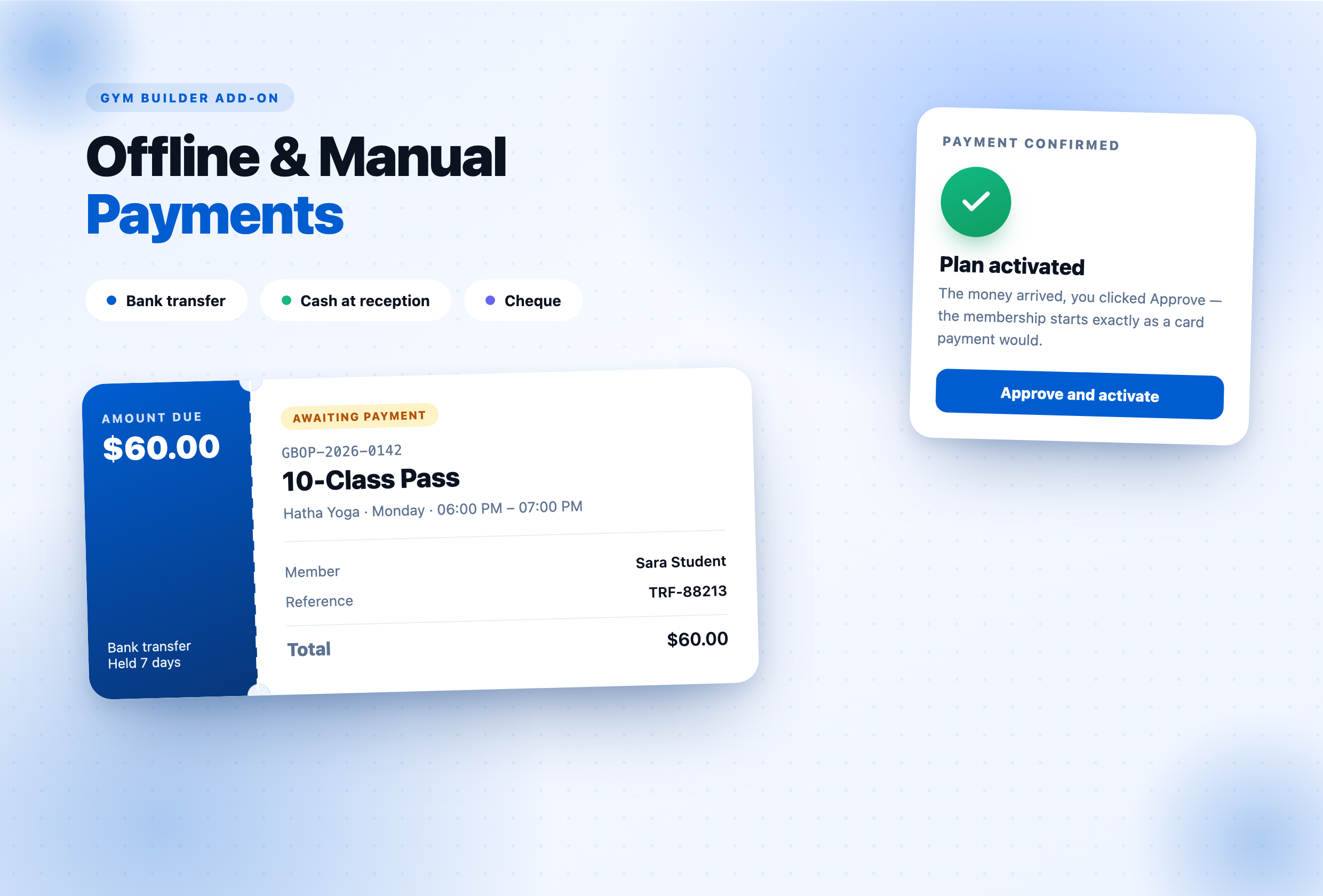
GB Offline Payments lets a member pay by bank transfer, cash at reception or cheque. The plugin holds their place, files a pending order with payment instructions, and activates the plan the moment you confirm the money arrived — exactly as a card payment would.
Why this add-on exists
Plenty of studios take money that never touches a card. A bank transfer, cash at the desk on the first visit, a cheque in the post — all normal, and all invisible to a gym plugin built around a gateway. Until now that meant creating the member by hand and hoping you remembered who had actually paid. GB Offline Payments turns that into a real checkout: the member picks an offline method, sees exactly how to pay, and lands in a queue you approve. Their place is held while they pay, expired holds free themselves, and every order is on record. Works alongside GB Stripe Payments, so a plan can offer card and cash side by side — or works entirely on its own, with no gateway at all.
Everything you need
Everything a studio needs to take money away from the card reader.
Your Own Payment Methods
Bank transfer, cash at reception, cheque — or any method you name. Each carries its own instructions, its own reference requirement, and its own order in the checkout.
Approve and It Activates
One click turns a pending order into a live membership — the same activation a card payment triggers, including the class places the member booked.
Holds That Expire
A place is held for the number of days you choose. A daily task releases anything unpaid, so a seat is never lost to an order nobody completed.
Instructions & Reminders
Payment instructions on screen and by email, a reminder before the hold runs out, and approval or rejection notices — all switchable per site.
Proof of Payment
A member can attach a photo or a PDF of their transfer receipt to the order, so you can match the money without leaving the queue.
One Queue for Everything
Memberships, class bookings, one-to-one sessions and popup registrations all land in the same list — searchable, filterable and approvable in bulk.
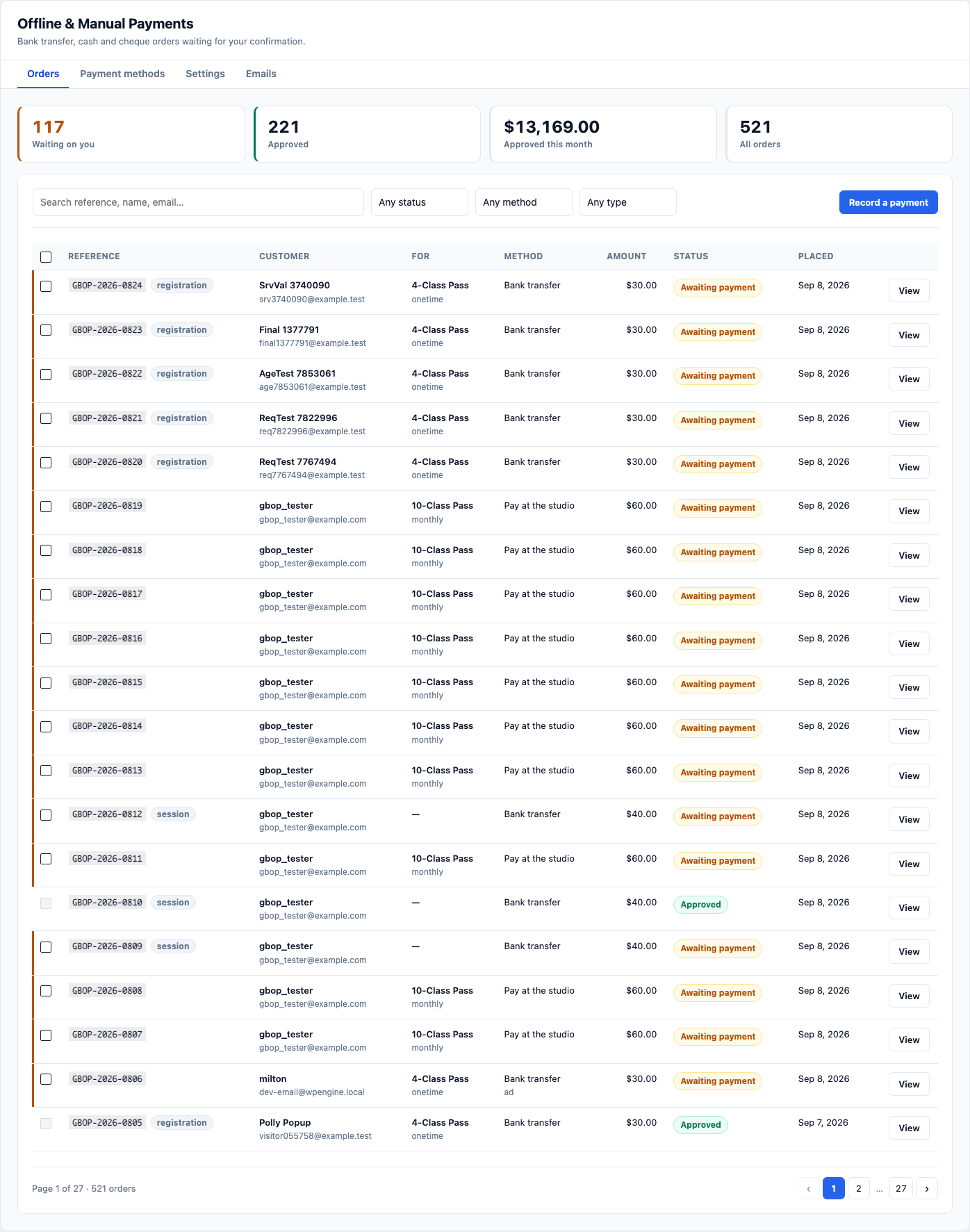
The queue you work from each morning.
Every payment you are waiting on, in one place
- Waiting-on-you, approved, this-month and all-orders totals at a glance.
- Search by reference, name or email; filter by status, method or type.
- Membership, class, session and registration orders in the same list.
- Select several and approve or reject them together.
- A paperclip marks the orders that arrived with a receipt attached.
Gym Builder › Offline PaymentsADMIN
Order detail › Approve and activateADMIN
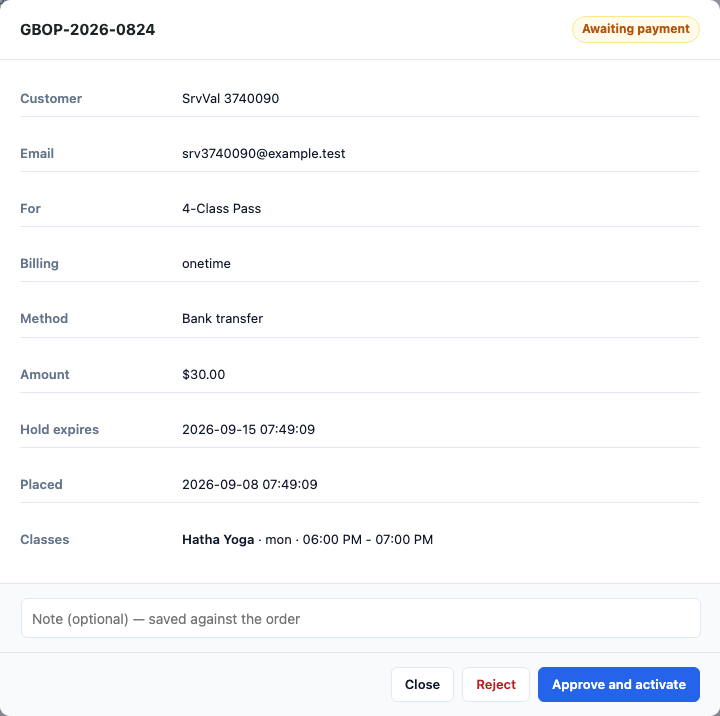
No second screen, no manual member entry.
Approve once — the membership starts
- Who ordered, what they chose, how they said they would pay.
- The reference they gave you, to match against your bank statement.
- When the hold expires, so you know what is urgent.
- Approve activates the plan and books the class places they picked.
- Reject releases the seats and tells them why, in one action.
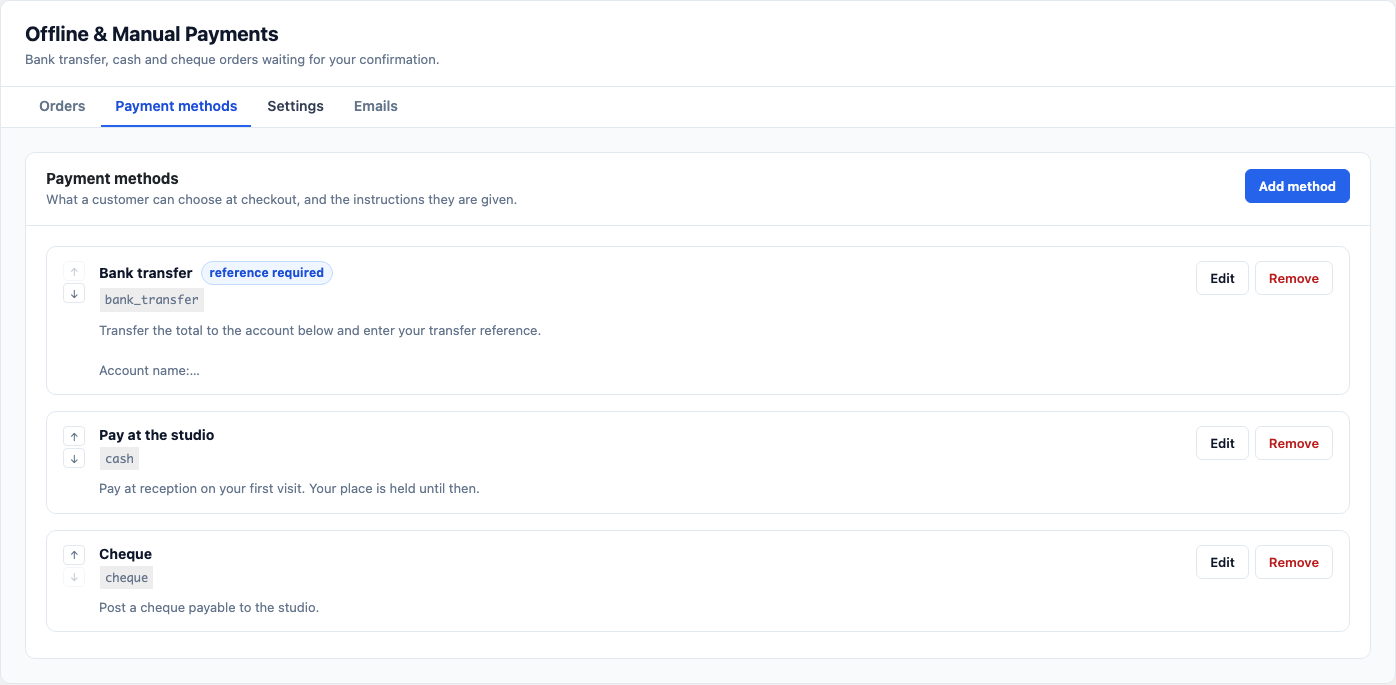
Name them, order them, explain them.
The ways your studio actually takes money
- Add any method — bank transfer, cash, cheque, anything you call it.
- Per-method instructions shown at checkout and repeated in the email.
- Ask for a payment reference only where it makes sense.
- Turn a method off without losing how it was set up.
- Reorder them so the one you prefer appears first.
Offline Payments › Payment methodsADMIN
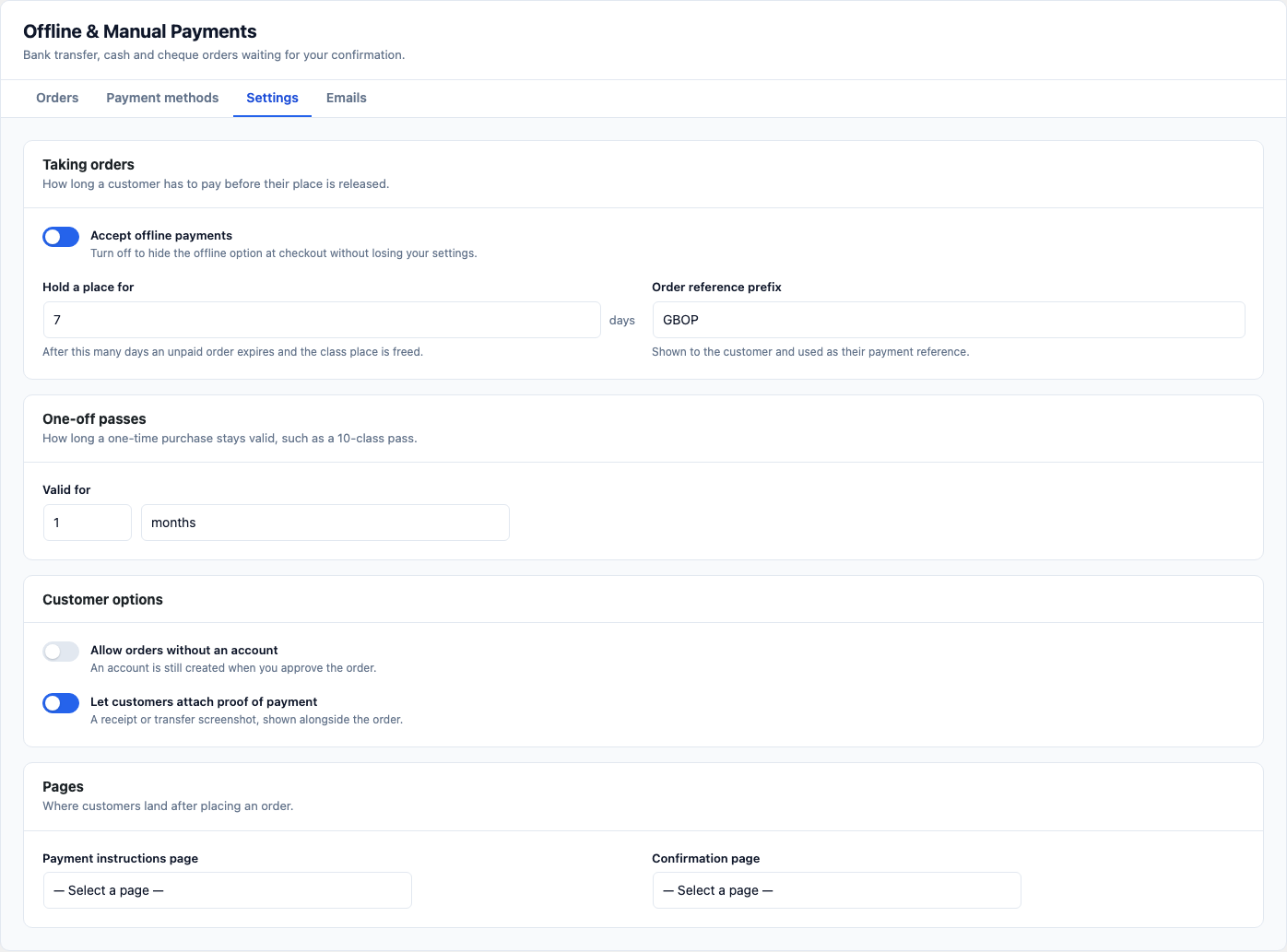
Offline Payments › SettingsADMIN
Sensible defaults, everything adjustable.
Controls that stay out of the way
- How many days a place is held before the order expires.
- Your own order reference prefix.
- Whether someone can order without an account.
- Whether members may upload proof of payment.
- How long a one-time pass stays valid after approval.
The buyer chooses — you do not have to.
Card and cash, side by side
- Renders through Gym Builder’s own gateway hooks, not by hijacking a template.
- With GB Stripe active, both buttons appear on the same plan.
- With no gateway at all, offline is simply the way to buy.
- A plan Stripe cannot sell still gets a working buy button.
- Works on plan cards, class pages, blocks and Elementor widgets alike.
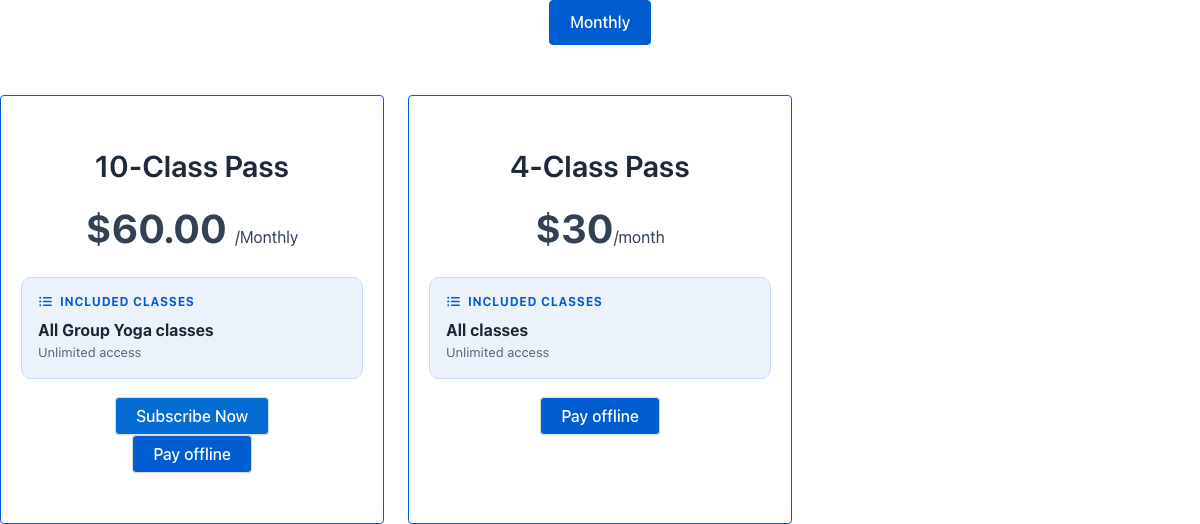
Your pricing plans pageFRONTEND
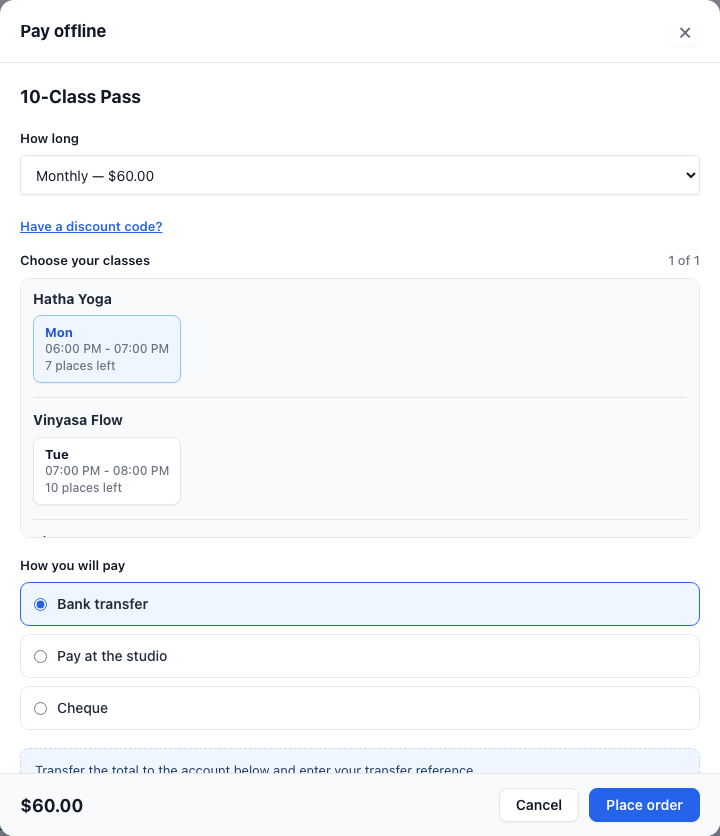
Offline checkoutFRONTEND
Instructions before they commit, not after.
A checkout that tells them how to pay
- Pick the billing period, the classes and the payment method in one panel.
- Bank details appear before the order is placed, not only afterwards.
- A reference field where the method needs one, validated as they type.
- Discount codes applied and re-priced on the server.
- Ends on a reference number and the exact amount to send.
One button per class, not one per plan.
Buy a class, pick the plan inside
- Every plan that sells the class is offered in the checkout.
- The class they clicked leads the timetable, tagged “This class”.
- Switching plan re-prices and re-loads the times it covers.
- Full slots are shown greyed out rather than hidden.
- Capacity is re-checked on the server when the order is placed.
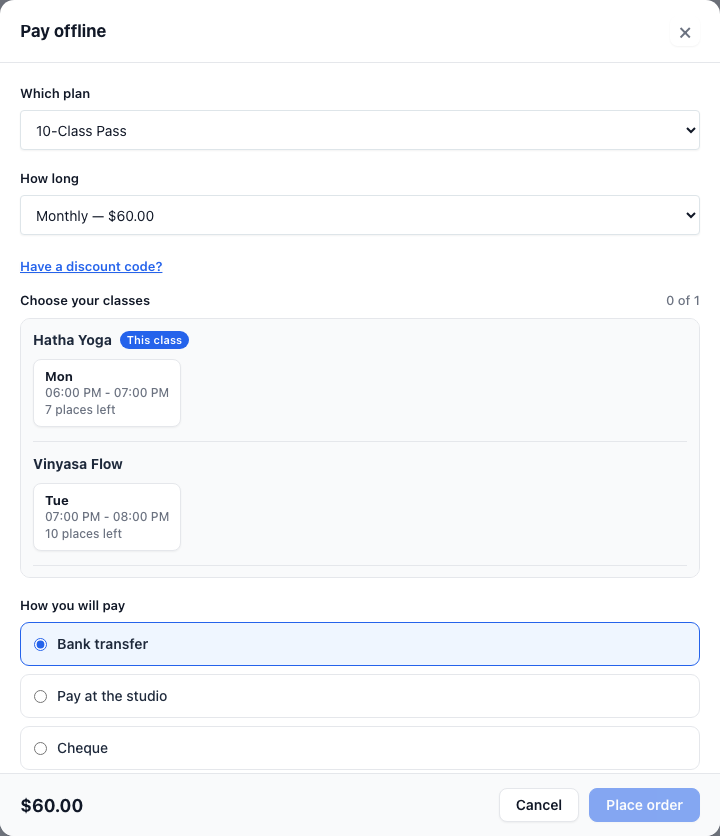
Class page › Pay offlineFRONTEND
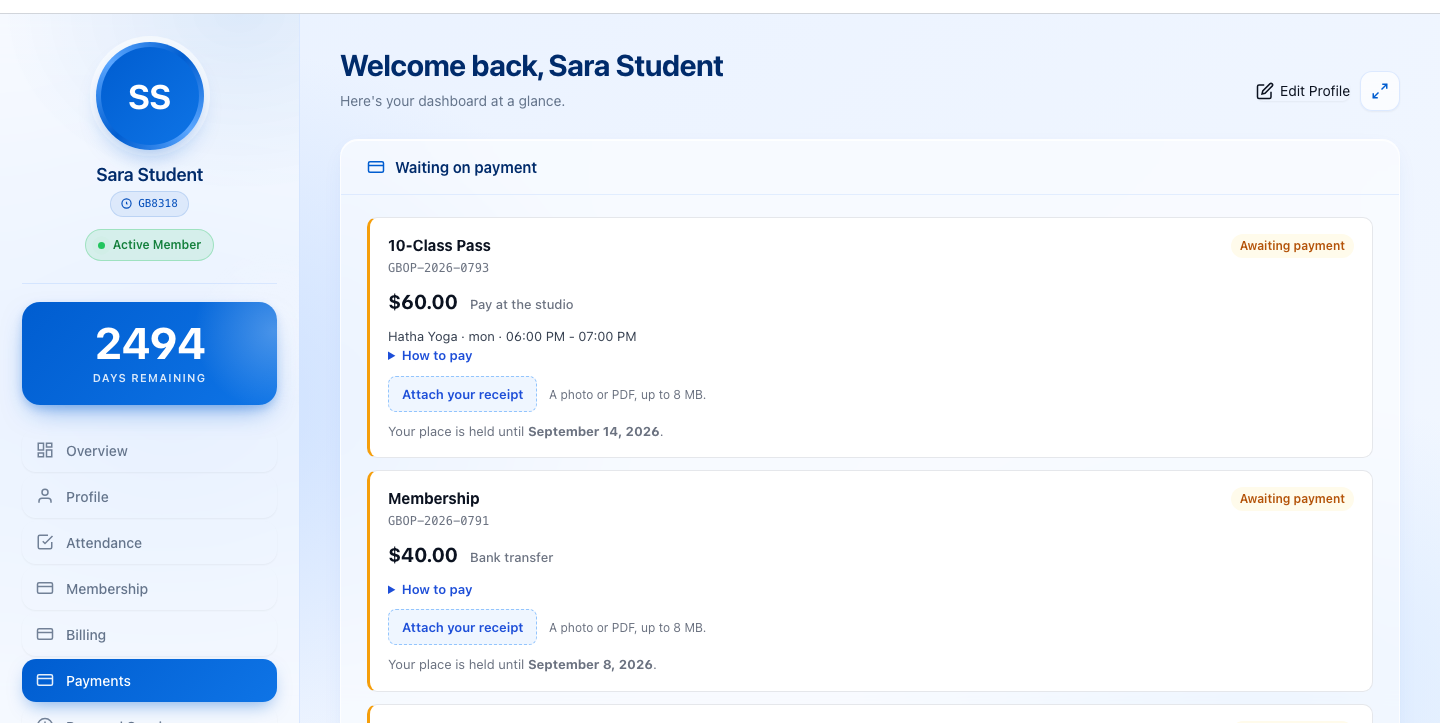
Student Dashboard › PaymentsMEMBER
Inside the dashboard they already use.
Members can see what they still owe
- Every order with its reference, amount and status.
- “How to pay” expands the instructions for the method they chose.
- Attach a receipt — a photo or PDF — straight from the dashboard.
- The date their place is held until, in plain language.
- Appears only for members who have actually ordered offline.
Frequently asked questions
Do I need the Gym Builder plugin to use this?
Yes. GB Offline Payments is a companion add-on and requires Gym Builder to be active. If it is missing the plugin shows an admin notice and exits cleanly — your site keeps working normally.
Do I need Stripe as well?
No. This add-on takes payment entirely outside a gateway, so it works on a site with no gateway configured at all. If GB Stripe Payments is active, the two sit side by side and the buyer picks card or offline on the same plan.
What actually happens when someone orders?
Their class places are held, a pending order is filed with a reference, and they are shown exactly how to pay. Nothing is activated until you approve it — and if they never pay, the hold expires on its own and the seats are released.
Can a member pay for a class, not just a membership?
Yes. The offline button appears on class pages, class archives, the class shortcode, the Block Tools blocks and the Elementor widgets. The checkout offers every plan that sells that class and preselects the one they clicked.
Does it handle one-to-one sessions and registrations?
Yes. Personal Sessions and the Registration Page Popup both hand payment to whichever gateway answers, so offline steps in through the filters those add-ons already expose. Neither needed changing.
Can members prove they paid?
If you allow it, they can attach a photo or a PDF of their transfer receipt to the order from their dashboard. The queue flags orders that arrived with one.
Will it conflict with my theme?
No. Every frontend class is prefixed gbop- and the checkout renders in its own scoped panel, so it survives whatever theme is active.
Where is the data stored?
In its own database table, created on activation and removed cleanly on uninstall. Approving an order writes through Gym Builder’s own member and booking models, so nothing about your existing data changes shape.
Simple, no-renewal-trap pricing
Pick the license that fits your number of sites — 1-year updates or lifetime. Every plan includes a 30-day money-back guarantee.
Single Site
For one production site
$29.99 / year
or $89.99 lifetime
- ✓1 site activation
- ✓All features included
- ✓1 year of updates
- ✓1 year priority email support
- ✓30-day money-back guarantee
MOST POPULAR
5 Sites
For agencies & multi-location gyms
$59.99 / year
or $179.99 lifetime
- ✓5 site activations
- ✓All features included
- ✓1 year of updates
- ✓1 year priority email support
- ✓30-day money-back guarantee
Unlimited
For agencies with many client sites
$149.99 / year
or $449.99 lifetime
- ✓Unlimited site activations
- ✓All features included
- ✓1 year of updates
- ✓1 year priority email support
- ✓30-day money-back guarantee
100% Money Back Guarantee
30-Days Money Back Guarantee
Safe & Secure Payment
Cards & Paypal Payments Supported
Quality and Support
Quality and support are the cornerstones of our approach.