
GB Registration Page Popup — Complete Guide
Show a class-registration form as an overlay on any page. Visitors click a button → form opens in a popup → they submit → they’re added as a Gym Builder member. Two shortcodes; works with class scheduling out of the box.
1. Welcome
GB Registration Page Popup adds two shortcodes that put a member-registration form on any WordPress page. The first puts the form in a popup that opens when a visitor clicks a button. The second renders the same form inline. Both create a Gym Builder member row on submission. An action hook lets other add-ons (Block Tools, Elementor Widgets) pop the form from their own UI.
What you get
- Shortcode 1 — popup button:
[member_registration_form_popup_button]. - Shortcode 2 — inline form:
[member_registration_form]. - Class-aware — pre-fills class, day, time slot when triggered from a class listing.
- Atomic slot booking with capacity check.
- Programmatic launch hook:
do_action('gym_builder_schedule_booking', $info). - Auto-enqueued frontend assets at priority 15.
2. Installation
2.1 Requirements
- WordPress 5.8+ and PHP 7.4+.
- Gym Builder plugin — installed and activated.
- At least one Gym Builder class with a published schedule.
2.2 Install & activate
- 1Download the
.zip. - 2In WordPress: Plugins → Add New → Upload Plugin.
- 3Choose the
.zipand click Install Now. - 4Click Activate.
- 5A new Registration Page Popup submenu appears under Gym Builder.
3. The Two Shortcodes
3.1 [member_registration_form_popup_button] — popup button
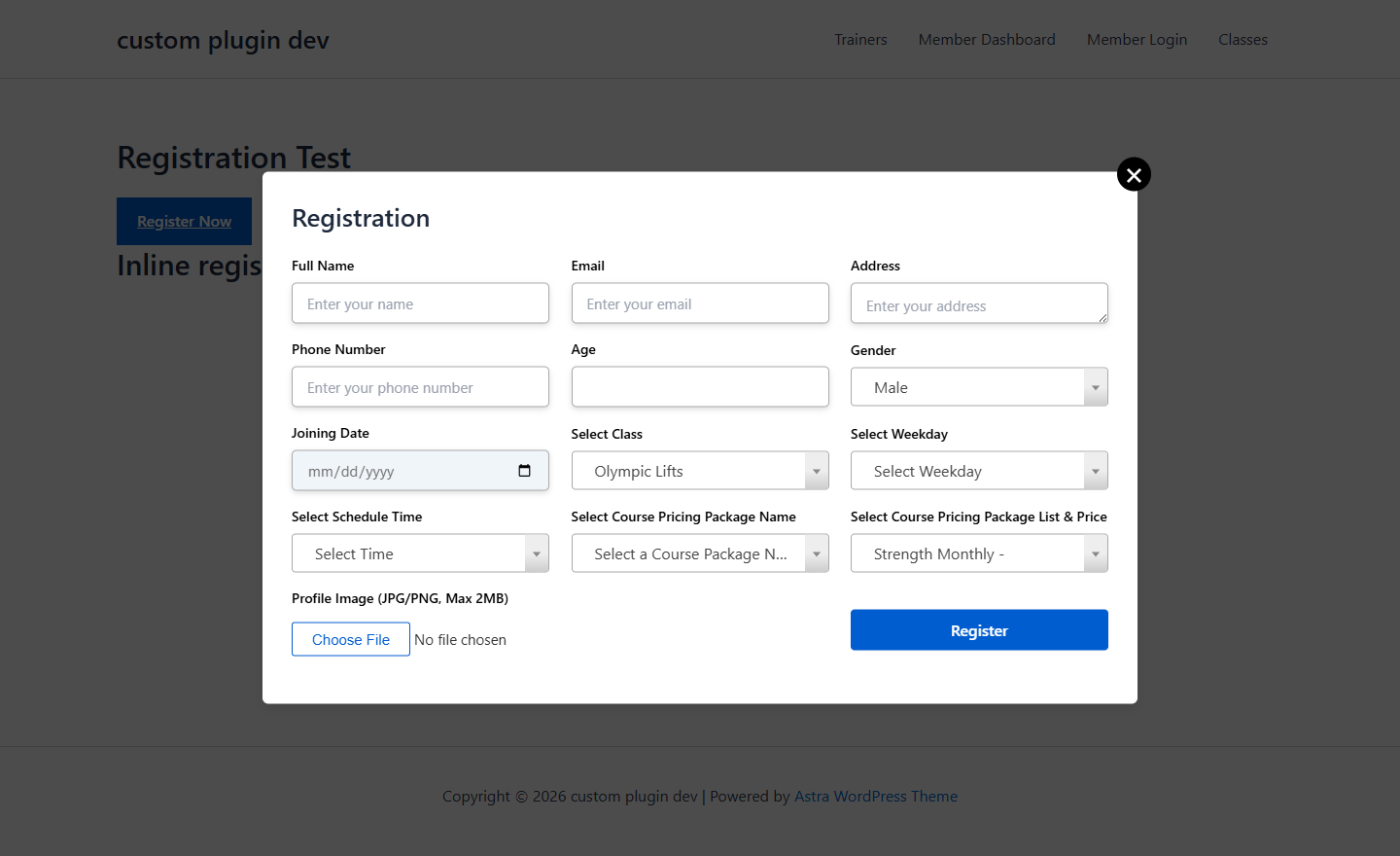
Drop this shortcode anywhere you want a “Register Now” CTA. The shortcode renders a styled button. Clicking it opens the registration form in a centered modal overlay.

- 1Edit any WordPress page.
- 2Insert a Shortcode block (Gutenberg) or Shortcode widget (Elementor).
- 3Paste
[member_registration_form_popup_button]. The shortcode takes no attributes — the button label and behaviour are controlled by the plugin’s Settings page. - 4To pre-select a class on click, your theme/plugin code fires
do_action('gym_builder_schedule_booking', $info)with a 5-key payload (see section 4). - 5Publish. Visitors see the button. Click → form appears.
3.2 [member_registration_form] — inline form
Show the form directly on the page instead of behind a button.
- 1Insert
[member_registration_form]in a Shortcode block. - 2The form renders inline — name, email, phone, password, class picker.
- 3On submission, a member row is created in
gym_builder_membersand a WP user is added with thegym_builder_studentrole. - 4The visitor receives the standard Gym Builder welcome email with credentials.
4. Class Booking Integration
The plugin’s most powerful feature is its programmatic launch hook. Any plugin or theme can fire do_action('gym_builder_schedule_booking', $info) with a 5-key payload, and the popup opens pre-filled.
class_id (int), class_name (string), time_range (e.g. "6:00am - 7:00am"), class_day (long day name, e.g. "Monday"), available_slot (int).Example PHP, called from a class-listing template:
do_action( 'gym_builder_schedule_booking', [
    'class_id'       => 42,
    'class_name'     => 'Morning Spin',
    'time_range'     => '6:00am - 7:00am',
    'class_day'      => 'Monday',
    'available_slot' => 12,
] );
Who uses this hook
- Gym Builder core fires it from the
shortcode rendering. - Gym Builder Block Tools fires it from the Class Routine Gutenberg block.
- GB Elementor Widgets fires it from Class Card and Class Routine widgets.
5. Settings & Customisation
The plugin’s settings page lives at Gym Builder → Registration Page Popup. The page has 5 inner tabs:
Join the Gym or Membership Sign-Up. Button Text: Register or Create Account. Registration Confirmation Text: Welcome! Check your email for login details. Enable Discount Text: OFF unless you actually offer promo codes. reCAPTCHA Settings: add a v2/v3 key pair before going live — public registration forms are spam magnets. Email Settings: set the welcome subject + body on-brand.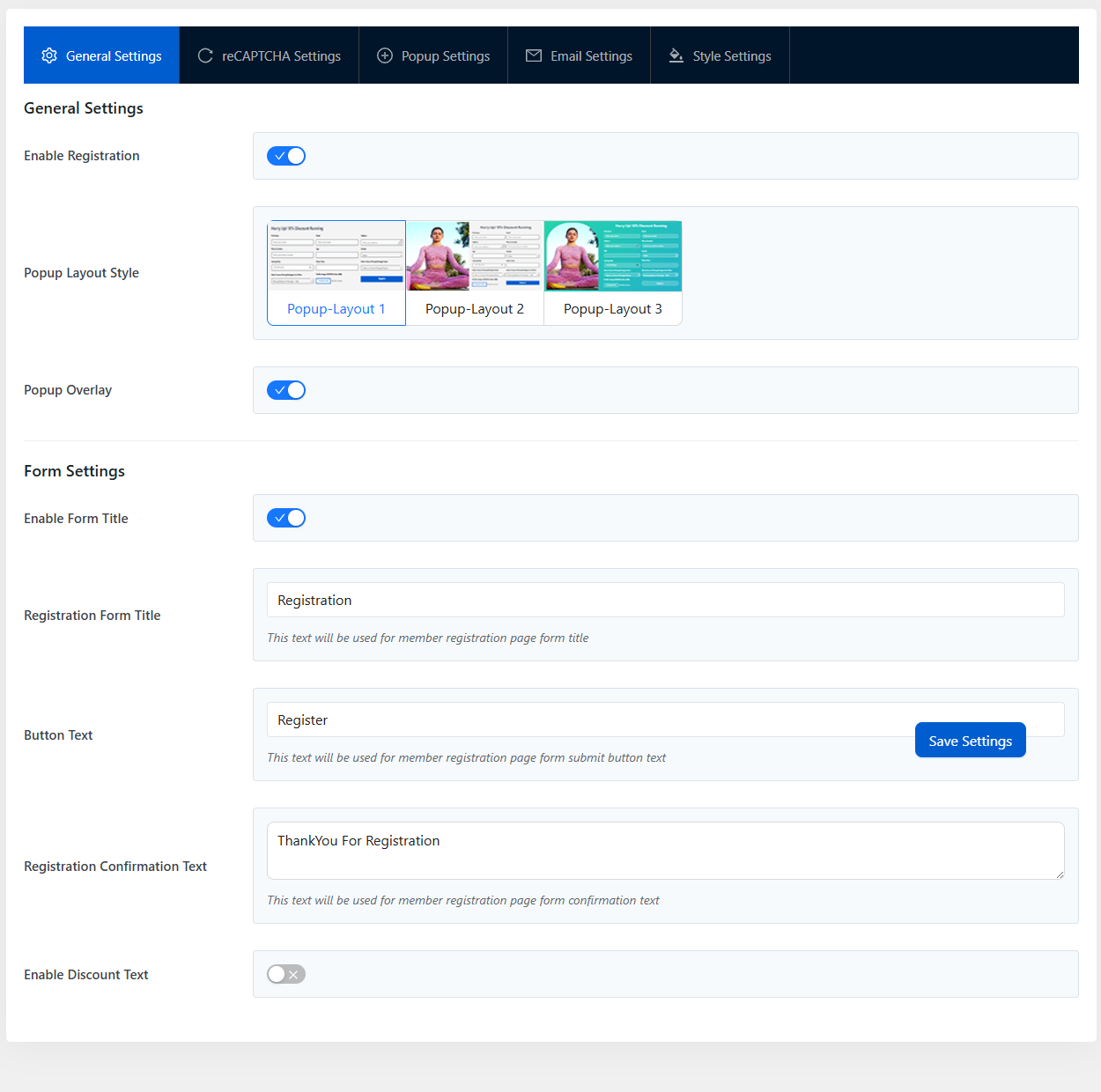
- 1General Settings — Enable Registration master toggle, Popup Layout Style picker (3 layouts), Popup Overlay toggle. Plus Form Settings: Enable Form Title, Registration Form Title text, Button Text, Registration Confirmation Text, Enable Discount Text.
- 2reCAPTCHA Settings — site key + secret key fields. When filled, the popup form adds Google reCAPTCHA v2/v3 protection.
- 3Popup Settings — popup behaviour: button text, popup width, popup animation, popup delay.
- 4Email Settings — subject + body of the welcome email sent after registration. Placeholders for member name, email, password, etc.
- 5Style Settings — colour pickers for the popup overlay, form fields, submit button.
- 6Click Save Settings in any tab to persist.
6. Tips & Best Practices
- Use the popup button on landing pages for above-the-fold conversion. Inline form belongs on dedicated /join pages.
- Pre-fill class context whenever you can.
- Combine with GB Stripe Payments for one-step sign-up + pay.
- Test on mobile — verify form fields don’t overlap your theme styling.
7. FAQ
Q: Does the form charge the visitor?
No — registration is free in v1. To collect payment at sign-up, install GB Stripe Payments.
Q: Can I add custom fields to the form?
Not in v1. The form fields are hard-coded (name, email, address, phone, age, gender, joining date, class, weekday, schedule time, package, profile image). For custom fields, fork the plugin’s registration_from_frontend() method or open a feature request.
Q: What if the chosen class is full?
The plugin checks slot availability on submission. If it filled up between page load and submit, the visitor sees an error and can pick another slot.
Q: Does it support multi-language sites?
Yes. All strings wrapped in __(). .pot file in languages/ with text domain gb-registration-page-popup.
Q: Can I open the popup from JavaScript?
The internal helper is window.gbRegistrationPagePopup.GlobalFun.showPopup(classData) but it’s not a stable public API in v1. The supported way is to fire the PHP action gym_builder_schedule_booking server-side (see section 4) — the plugin renders an invisible trigger that handles the click on the client.
8. Troubleshooting
Popup doesn't open when I click the button
Check that the plugin’s frontend assets loaded — view page source and search for gb-registration-page-popup. If missing, another plugin may be deregistering it.
Form submits but no member is created
Common cause: the email already exists in gym_builder_members — the plugin doesn’t create duplicates. Remove the existing member or change the form email.
Schedule pre-fill isn't working
The hook payload must have all 5 keys. If any are missing the popup opens without class context.
Popup styling clashes with my theme
The modal uses a high z-index but if your theme has a higher one, its content can cover the popup. Override z-index with custom CSS.
9. The Gym Builder Plugin Family
GB Registration Page Popup is one of ten plugins in the Gym Builder family.
GbRegistration Page Popup v1.0.4 · A WpDreamers product · Requires Gym Builder · PHP 7.4+ · WordPress 5.8+
© WpDreamers — registration popup with class scheduling for Gym Builder.