
Pre-built Templates — Complete Guide
One-click demo import for both Gutenberg and Elementor. Six niche-specific full-page layouts (Yoga, Fitness, Gym, Boxing, Karate, Swimming) ready to drop into your gym site. Pick your editor, pick your niche, click Import.
2. Two Sources, Same 6 Niches
Because Gym Builder supports two block editors, the templates ship in two complementary plugins:
- Gym Builder Block Tools — bundles the Gutenberg versions of all 6 templates.
- WpDreamers Template — a separate plugin bundling the Elementor versions of all 6 templates.
Pick the one matching your editor. You can install both if your site mixes editors.
3. Gutenberg via Block Tools
3.1 Install
- 1Download Gym Builder Block Tools
.zip. - 2In WordPress: Plugins → Add New → Upload Plugin → Install Now → Activate.
- 3A new GB Templates menu appears.
3.2 Import a Gutenberg template
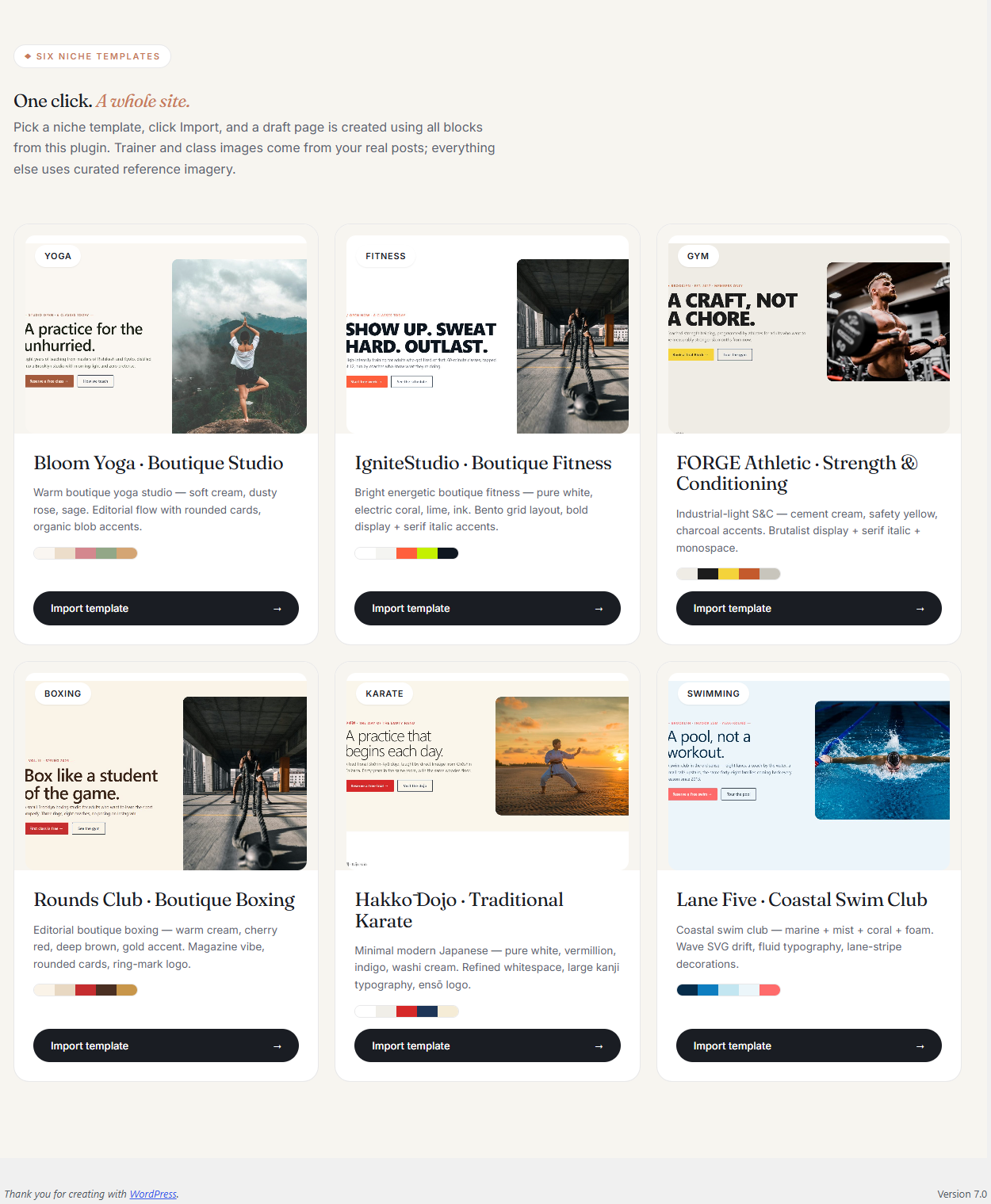
- 1Go to WordPress Admin → GB Templates.
- 2You see a 2×3 grid of niche-template thumbnails.
- 3Click Preview on any to see it.
- 4Click Import. The import runs in 5 steps: theme check, content, media, settings, finalise.
- 5When done, click through to the new page in Pages. Edit like any normal WordPress page.
4. Elementor via WpDreamers Template
4.1 Install
- 1Download WpDreamers Template
.zip. - 2In WordPress: Plugins → Add New → Upload Plugin → Install Now → Activate.
- 3Make sure Elementor is also installed and active.
- 4A new WpDreamers Template menu appears.
4.2 Import an Elementor template
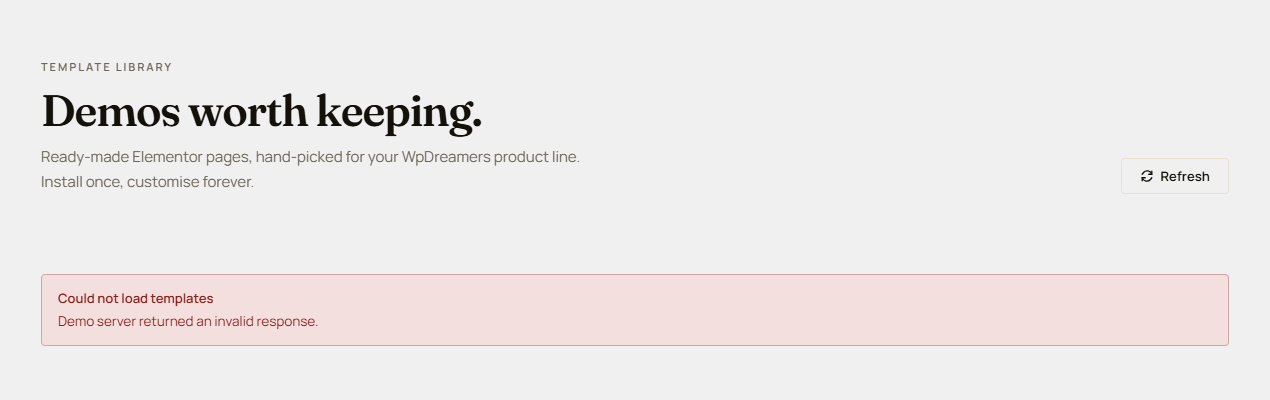
- 1Go to WordPress Admin → WpDreamers Template.
- 2The plugin queries the WpDreamers catalog (remote endpoint at
demo.gymbuilder.com/wp-json/wpdreamers/v1/) and shows the library, grouped by product. The plugin does not bundle local templates; if the remote is unreachable, you’ll see a “Could not load templates” message — retry with Refresh. - 3Filter to Gym Builder to see the 6 niche templates.
- 4Click Preview on any.
- 5Click Import — creates a new Draft Page in WordPress Admin → Pages (not an Elementor template). The page’s
_elementor_datameta is pre-populated with the imported layout. - 6Open the page: go to Pages, click the new draft, then Edit with Elementor. Customize and Publish.
page post — not an entry in Elementor’s Templates → Saved Templates library. If you want a reusable template, save the imported page as one yourself via Elementor’s “Save as Template” action.5. The 6 Niche Templates
Both editor sources ship identical content for the same 6 niches:
- Yoga — calm pastel palette, classes-by-discipline, instructor highlights, meditative imagery.
- Fitness — bold orange/black, energetic CTAs, group classes + PT promos.
- Gym — classic gym with equipment galleries, member testimonials, full schedule.
- Boxing — dark sport palette, knockout-style imagery, fight stats.
- Karate — martial-arts inspired, belt-rank trainer highlights, dojo schedule.
- Swimming — blue/aqua palette, lane-time scheduling, pool images.
Each template includes: Hero + “Why choose us” 3-card row + Class grid (auto-populated) + Class routine + Trainer grid (auto-populated) + Pricing + Testimonial + CTA + footer.
6. Customising After Import
Imported pages are 100% editable.
- Update hero images — replace demos with your gym’s real photos.
- Update hero headline — change demo headline to your actual value proposition.
- Class grid auto-fills — published classes appear automatically.
- Trainer grid auto-fills — same for trainers.
- Pricing section reads
gb_pricing_planCPT. - Colors — change via Customizer (Gutenberg) or Elementor site settings.
- Footer text — usually a plain text widget, edit directly.
7. FAQ
Q: Do I need both Block Tools and WpDreamers Template?
Only if you use both Gutenberg and Elementor. For single-editor sites, install the matching plugin.
Q: Can I edit the templates before importing?
Import first, then customise inside the editor.
Q: Does the importer overwrite my existing pages?
No. Each import creates a NEW page (Gutenberg) or NEW Elementor template. Existing content untouched.
Q: Are the templates responsive?
Yes — every template is mobile-first across 320px, 768px, 1280px breakpoints.
Q: Can I export an imported template?
Elementor: yes via My Templates → Export. Gutenberg: copy block markup from the editor.
Q: Do I have to set up Gym Builder classes/trainers before importing?
No, but auto-populated grids stay empty until you do. Recommended order: install Gym Builder → add classes & trainers → install templates plugin → import.
Q: Are new templates added over time?
Yes. WpDreamers Template auto-pulls new templates from the WpDreamers server. Block Tools ships new templates with plugin updates.
8. Troubleshooting
Import fails at "media import"
File-system permission issue on wp-content/uploads. Make sure the folder is writable (chmod 755).
Imported page shows blank class grid
You haven’t added classes yet. Add at least one class to gym_builder_class and refresh.
Elementor importer shows "Failed to connect to catalog"
WpDreamers Template queries an external catalog. Causes: outbound HTTPS blocked, catalog server temporarily down, firewall blocking wpdreamers.com.
After import, fonts look wrong
Set the template’s Google Fonts in Elementor Site Settings → Typography.
Hero image is too dark / missing
Some demos use external image hosting. Replace with your own images via the image control.
9. The Gym Builder Plugin Family
Pre-built Templates are delivered by two of the ten plugins in the Gym Builder family — Block Tools and WpDreamers Template.
Pre-built Templates · A WpDreamers product · Two plugins: Gym Builder Block Tools + WpDreamers Template
© WpDreamers — niche-template starter pages for Gym Builder.