Documentation hub

Gym Builder — Complete Guide

The free WordPress plugin for gym, fitness, and yoga websites. Classes, trainers, member management, membership packages, fitness calculators, and class scheduling — all in one plugin. The foundation for the entire Gym Builder family.

1. Welcome

Gym Builder is the free WordPress plugin powering gym, fitness studio and yoga websites. It gives you the building blocks: classes, trainers, members, packages, calculators, and login dashboards. It also forms the foundation for nine optional pro add-ons that extend it with Stripe payments, personal session booking, attendance tracking, fitness tracking, and more.

What you get

  • Classes — CPT with schedule meta supporting per-day, per-time-slot capacity. 3 list layouts.
  • Trainers — CPT with social links, categories, profiles. 2 list layouts.
  • Membership Packages — pricing-plan CPT with tiers, categories, features.
  • Members — custom DB table with profile, joining date, expiry, class enrolment, schedule.
  • Trainer Login System — trainers log in to a custom dashboard.
  • Student Login System — members log in to their dashboard.
  • Fitness Calculators — BMI, body fat, protein intake, water intake.
  • 4 Shortcodes — class listing, trainer listing, fitness calculator, packages.
  • React-based admin UI for members, settings, export/import.
  • Export/Import demo content with one click.

2. Installation

2.1 Requirements

  • WordPress 5.8+.
  • PHP 7.4+ (PHP 8.x recommended).
  • A WordPress theme compatible with custom post types.

2.2 Install & activate

  1. 1Go to WordPress Admin → Plugins → Add New.
  2. 2Search for “Gym Builder”.
  3. 3Click Install Now on the official WpDreamers result.
  4. 4Click Activate.
  5. 5A new Gym Builder top-level menu appears.
  6. 6Visit Gym Builder → Dashboard for a quick-start overview.

3. Settings

Open Gym Builder → Settings. Settings live in 7 option groups, surfaced as tabs.

Recommended starting values (typical gym)Global: Currency = local, Currency Position = Left ($99.99), Sender Email Address = a real From on your domain (e.g. [email protected]). Class: Time Format = 12-hours (US) or 24-hours (elsewhere), Archive Style = Layout 1, Posts Per Page = 9, Grid Columns = 3. Trainer: Archive Style = Layout 1, Posts Per Page = 8, Grid Columns = 4. Style: Primary = brand color, Secondary = accent. Pages: leave the four auto-created ones. Permalinks: for cleaner URLs, change Class Base to classes and Trainer Base to trainers, then re-save WP’s permalinks at Settings → Permalinks.

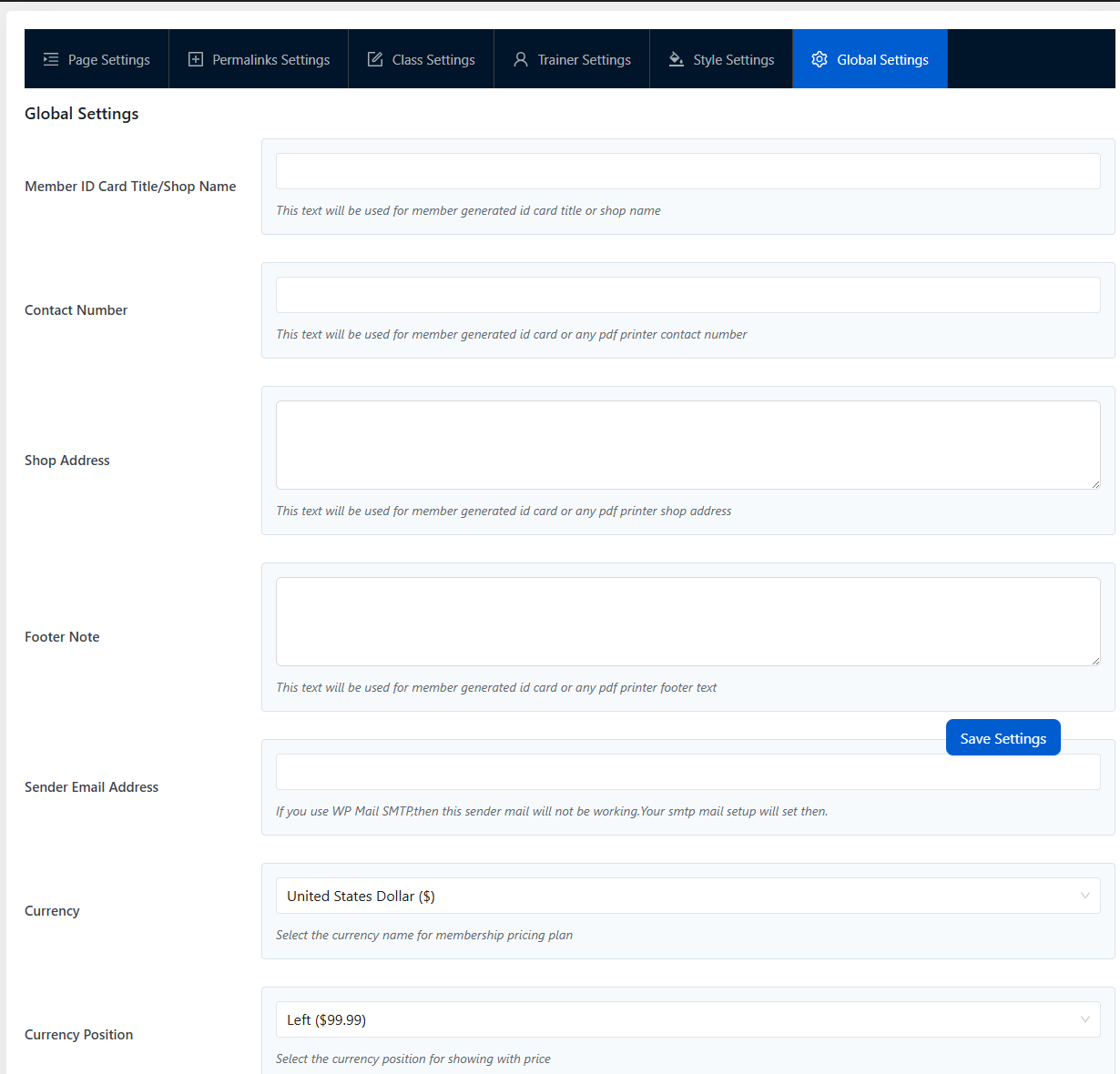
3.1 Global Settings

  • Member ID Card Title / Shop Name — heading on printed member ID cards.
  • Contact Number — printed on ID cards and PDFs.
  • Shop Address — same.
  • Footer Note — extra line for ID cards / PDFs.
  • Sender Email Address — From address on every email Gym Builder sends.
  • Currency — pick from 150+ currencies. Used by every package price.
  • Currency Position — left, right, with/without space.
Gym Builder Global Settings tab showing currency, member ID card, contact details
Gym Builder → Settings → Global Settings. ID card title, contact, sender email, currency — site-wide defaults.

3.2 Class Settings

Defaults for class archives and single-class pages. Per-shortcode overrides are also possible.

  • Class Time Format — 12-hours or 24-hours, site-wide.
  • Class Archive Style — Layout 1 (grid), Layout 2 (list), or Slider.
  • Posts Per Page, Grid Columns, Page Layout.
  • Class Thumbnail Width / Height + Image Hard Crop.
  • Include Class / Exclude Class / Class Categories filters.
  • Class Order By + Class Order.
  • Single Page Layout.

3.3 Trainer Settings

Same idea, for trainers.

  • Trainer Archive Style — Layout 1 or Layout 2.
  • Posts Per Page, Grid Columns, Page Layout.
  • Trainer Thumbnail Width / Height + Image Hard Crop.
  • Include Trainer / Exclude Trainer / Trainer Categories.
  • Trainer Order By + Trainer Order.
  • Single Page Layout.

Social icons (Facebook, Twitter, LinkedIn, Skype, YouTube, Pinterest, Instagram, TikTok) are entered per-trainer on the trainer edit screen, not globally.

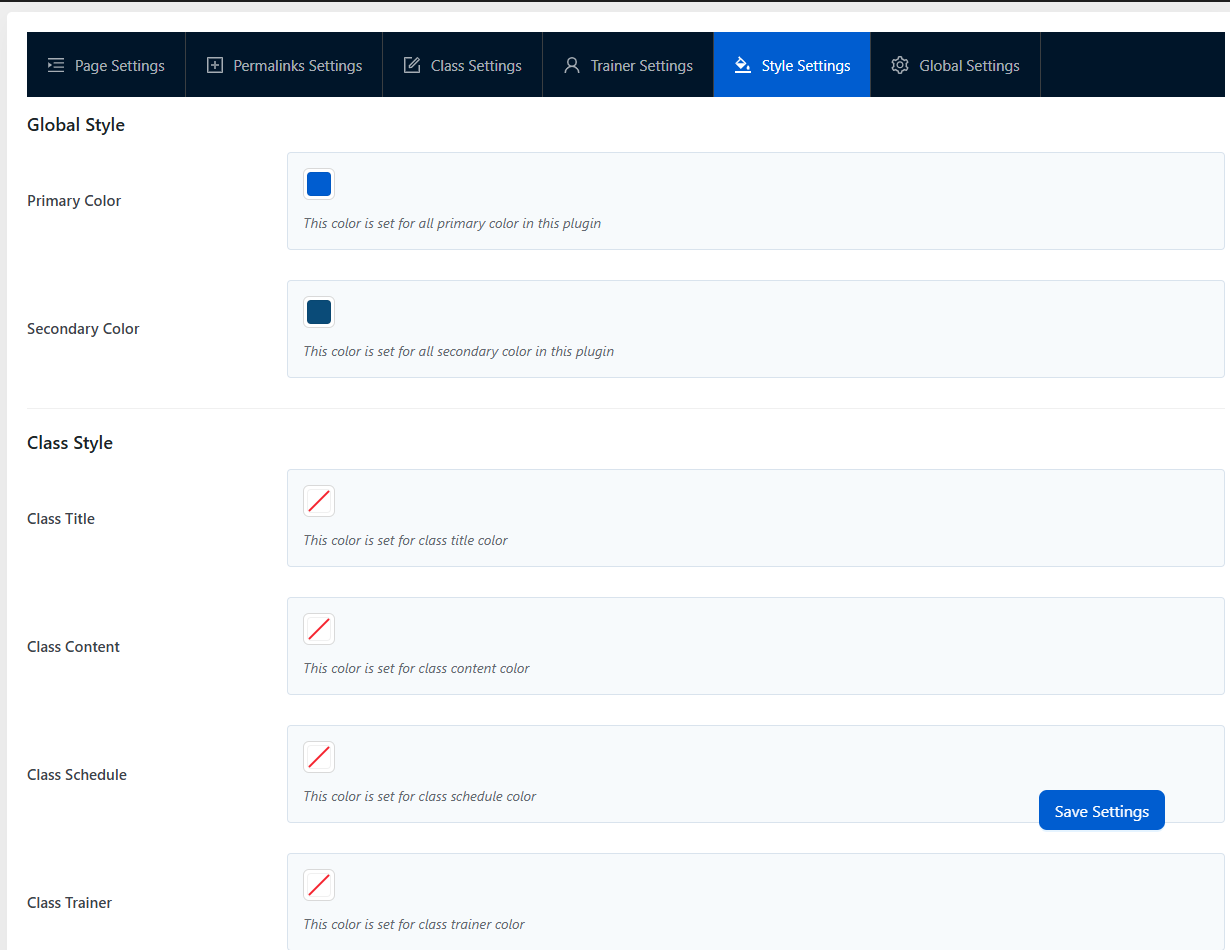
3.4 Style Settings

  • Primary Color — default #005dd0. Rendered as the --gym-builder-primary-color CSS custom property; flows through every Gym Builder UI and add-on.
  • Secondary Color — accent for hover states.
  • Class Style + Trainer Style sections — per-element color pickers (Class Title, Class Content, Schedule, Trainer Title, Trainer Designation, etc.) when you need to override the cascading defaults.
Gym Builder Style Settings tab showing Primary/Secondary color and per-element color pickers
Style Settings — Primary & Secondary colors cascade through every Gym Builder UI and add-on.

3.5 Page Settings & Permalinks Settings

Two tabs that together set which WP pages back each Gym Builder area, and what URL slug those areas use.

Page Settings — map a WP page to each role:

  • Classes Page — the class archive.
  • Trainers Page — the trainer archive.
  • Member Registration Page — page hosting your registration shortcode (e.g. GB Registration Page Popup’s [member_registration_form]).
  • Member Dashboard Page — where logged-in members land.

Permalinks Settings — change the URL slugs (defaults are the CPT names):

  • Class Base — defaults to gym_builder_class. Change to e.g. classes for cleaner URLs.
  • Class Category Base.
  • Trainer Base.
  • Trainer Category Base.
i
Always re-save Permalinks after changingWordPress caches rewrite rules. After editing any Base, also click Save Changes on Settings → Permalinks once, or your new URLs return 404s.

4. Managing Classes

Classes are the core. Each is a custom post with one Schedule metabox holding many time-slot rows (each row = one weekday + start/end + trainer + capacity).

  1. 1Go to Classes → Add New Class.
  2. 2Fill in: Title, Featured image, Content (description), and Class Category in the sidebar.
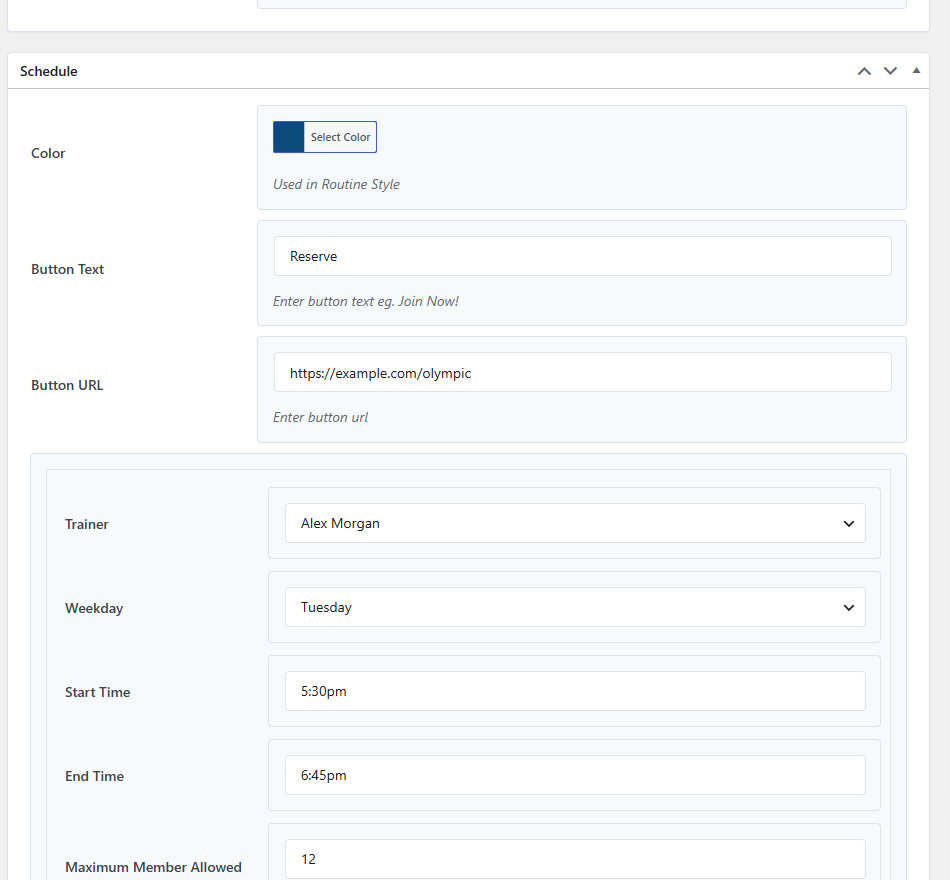
  3. 3Scroll to the Schedule metabox. At the top, set Color (used by the Class Routine layout), Button Text (e.g. Reserve), Button URL.
  4. 4For each time-slot the class runs, click Add New and fill: Trainer, Weekday, Start Time, End Time, Maximum Member Allow Booking. Trainer assignment is per-slot, not per-class.
  5. 5(Optional) Use the Course Pricing Info & Details metabox to show a per-class price on the class page. Membership-based pricing is handled separately under Membership Package.
  6. 6Click Publish.
Edit Class screen showing the Schedule metabox with trainer, weekday, start/end time and capacity fields
Class edit — the Schedule metabox holds every time-slot. Each row is one trainer + weekday + start/end + capacity.
The class schedule meta drives everythingThe schedule meta (gym_builder_v2_class_schedule) is read by every shortcode and every add-on. Set it correctly here and your weekly routine, slot booking, attendance tracking, and Stripe checkout all just work.

5. Managing Trainers

  1. 1Go to Trainer → Add New Trainer Member.
  2. 2Fill in: Title (name), Featured image (photo), Content (bio), and Trainer Category in the sidebar.
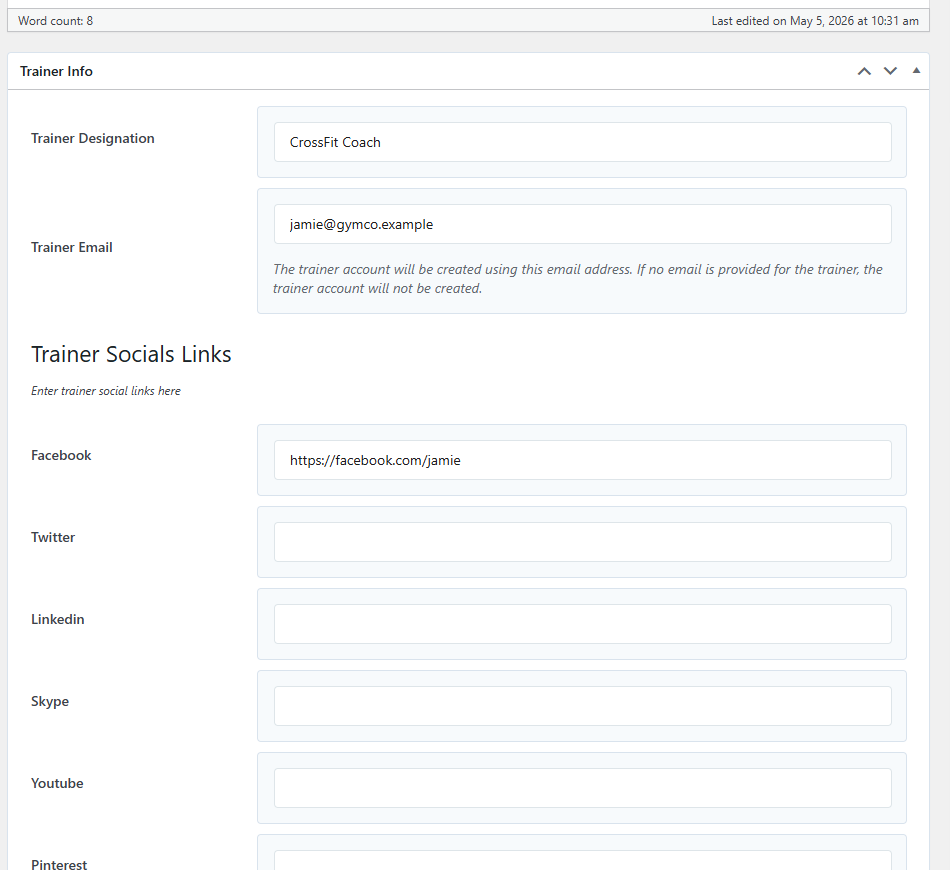
  3. 3Scroll to the Trainer Info metabox: Trainer Designation (job title shown on the card) and Trainer Email. The email is what maps this trainer to a WP user — match it to a WP user’s email and they automatically get the gym_builder_trainer role and Trainer Login System access.
  4. 4Scroll to the Trainer Socials Links metabox — paste full URLs. Supported networks: Facebook, Twitter, LinkedIn, Skype, YouTube, Pinterest, Instagram, TikTok. Leave any field blank to hide that icon.
  5. 5Click Publish.
Edit Trainer screen showing Trainer Info (designation, email) and Trainer Socials Links (Facebook, Twitter, LinkedIn, Skype, YouTube, Pinterest)
Trainer edit — Designation and Email populate the trainer card; the email maps this trainer to a WP user for the Trainer Login System.

6. Membership Packages

  1. 1Go to Membership Package → Add New.
  2. 2Fill in: Title (e.g. “Basic Monthly”), Content, Package Type (sidebar taxonomy — Basic / Premium / Pro etc.).
  3. 3Membership Package Options metabox: set Package Price + Package Price Duration label, then Feature Item Icon + Package Feature Item rows for the bullet points on the pricing card.
  4. 4(Optional) Button Text + Button URL override the global CTA on the pricing card.
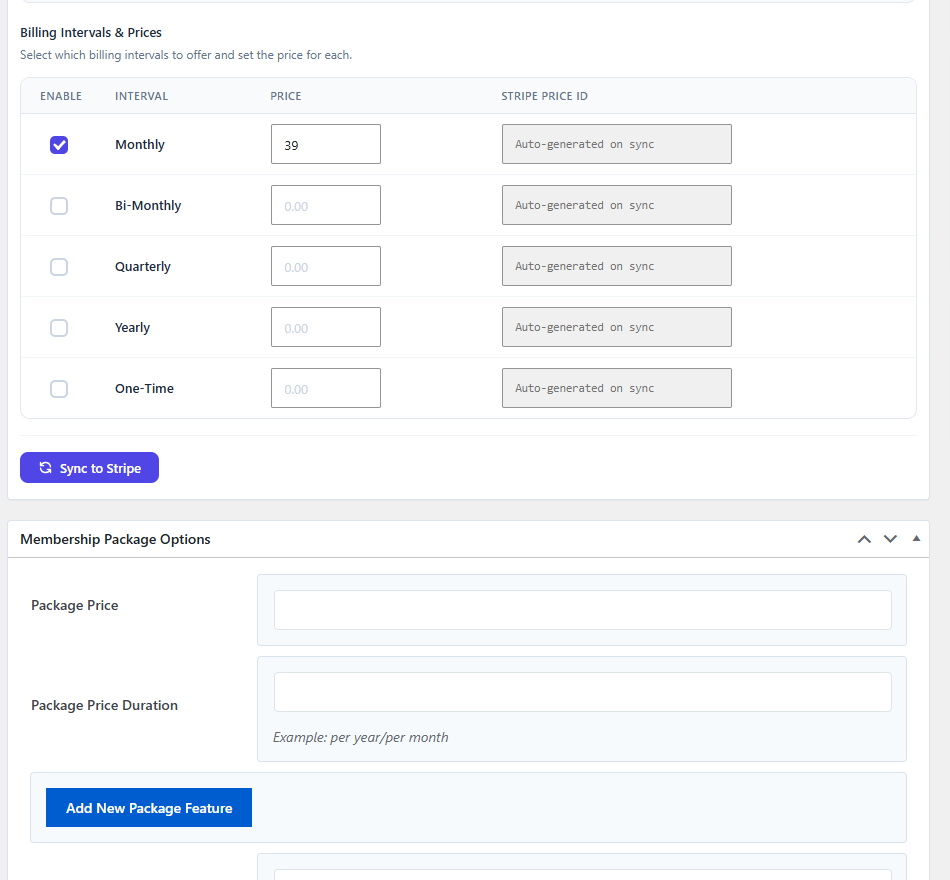
  5. 5(Optional, needs GB Stripe Payments) Stripe Billing Settings metabox — enable any combination of Monthly / Bi-Monthly / Quarterly / Yearly / One-Time intervals, set a price per interval, click Sync to Stripe.
  6. 6Click Publish.
Edit Membership Package screen showing Billing Intervals (Monthly/Bi-Monthly/Quarterly/Yearly/One-Time) with Sync to Stripe button
Package edit — Stripe Billing Settings (top) gives you 5 interval options; Membership Package Options below holds price, features and CTA button.
i
Membership packages alone don’t charge anyoneThe free core handles package definition but not payment. Install GB Stripe Payments to accept payments. Without Stripe, subscription is manual — mark members as subscribed via the All Members page.

7. Members & Login

Members are stored in a custom DB table. Each has personal info, joining date, package, end date, class enrolment.

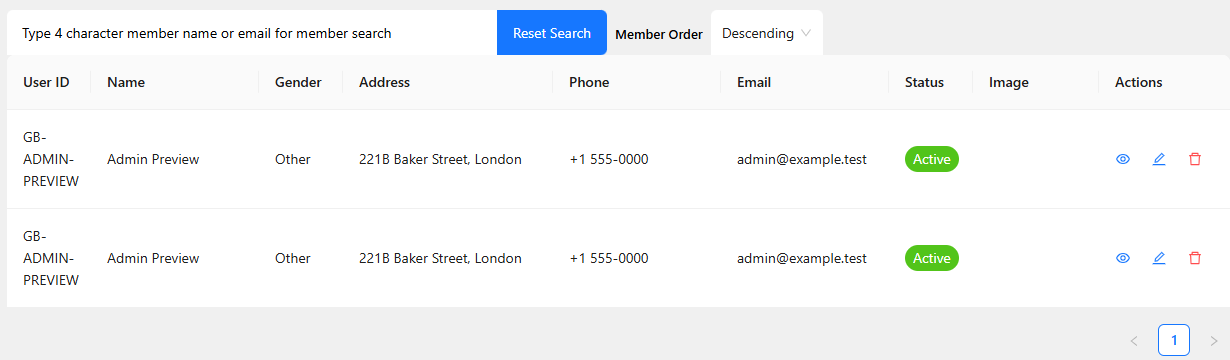
Gym Builder All Members React table showing user ID, name, gender, address, phone, email, status and per-row actions
Gym Builder → All Members. The React table shows every member with status, contact, and view/edit/delete actions.

Adding a member manually

  1. 1Go to Gym Builder → Add Member.
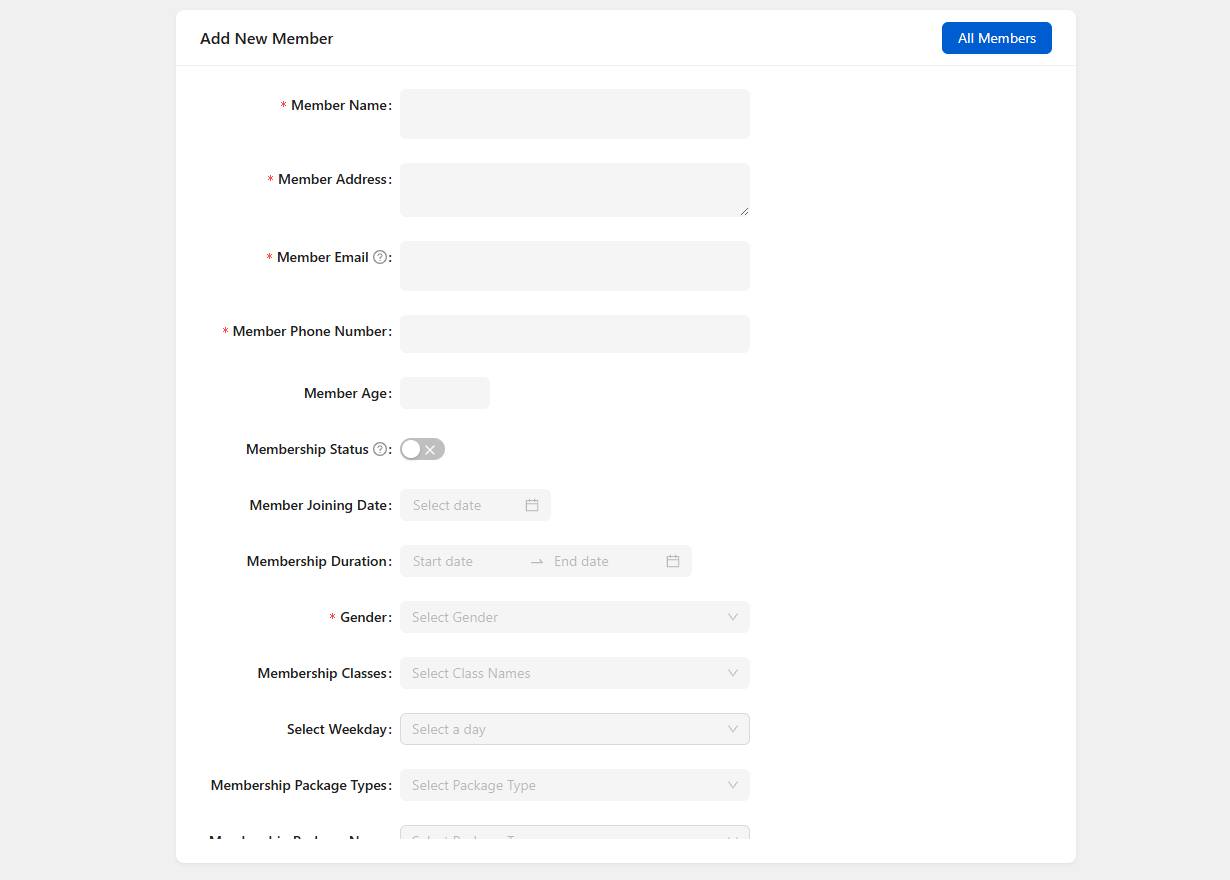
  2. 2Fill in: Name, Email, Phone, Address, Age, Gender.
  3. 3Pick a membership package.
  4. 4Pick a class, day of week, time slot.
  5. 5Click Save. The plugin creates: member row + WP user + welcome email + decrements class capacity.
Gym Builder Add Member form showing all required fields including class and weekday pickers
Add Member form — when you pick a class + weekday + time slot, the booking decrements that slot’s capacity automatically.

Member self-registration

  • WP standard register page at /wp-login.php?action=register (if enabled in WP general settings).
  • Install GB Registration Page Popup for styled popup registration with class scheduling.

Member & trainer dashboards

  • Member Dashboard: members log in, see profile, current membership, classes, schedule. Pro add-ons inject tabs.
  • Trainer Dashboard: trainers (mapped by email) see their classes, schedule, member roster.

8. Shortcodes

Gym Builder ships 4 shortcodes for embedding on any page.

  • Class listing

    Fintess Class

    It is a long established fact that a reader will be distracted by the readable content of a page when..

    • Trainer : Rock Schedule : Sat: 9:00am-10:00am
    • Trainer : Randy Schedule : Sun: 10:00am-11:00am

    Yoga Class

    It is a long established fact that a reader will be distracted by the readable content of a page when..

    • Trainer : Rebeeca Schedule : Tue: 3:30pm-4:30pm
    • Trainer : Rebeeca Schedule : Wed: 11:00am-12:00pm
    • Trainer : Rebeeca Schedule : Tue: 3:00pm-4:00pm

    Body Building

    It is a long established fact that a reader will be distracted by the readable content of a page when..

    • Trainer : Dim Schedule : Mon: 10:00am-11:00am
    • Trainer : Randy Schedule : Tue: 2:00pm-4:00pm
    • Trainer : Rock Schedule : Fri: 6:00pm-8:00pm
    — references a saved Class Shortcode config.
  • Trainer listing

    Rock

    Boxing Trainer

    This is content

    Randy

    Body Builder

    It is a long established fact that a reader will be distracted by the readable content of a page when..

    Rebeeca

    Yoga Trainer

    It is a long established fact that a reader will be distracted by the readable content of a page when..

    Dim

    Boxing Trainer

    It is a long established fact that a reader will be distracted by the readable content of a page when..

    — references a saved Trainer Shortcode config.
  • Fitness calculator

    Fitness Calculators

    Body Mass Index

    BMI Weight Status
    Below 18.5 Underweight
    18.5 - 24.9 Normal
    25 - 29.9 Overweight
    30 and Above Obese
    — BMI, body fat, protein, water.
  • Membership packages

    Fitness Beginner Package

    Rs40/per month
    • Feature Item 1
    • Feature Item 2
    • Feature Item 3
    • Feature Item 4
    • Feature Item 5

    Fitness Premium Package

    Rs60/per month
    • Feature Item 1
    • Feature Item 2
    • Feature Item 3
    • Feature Item 4
    • Feature Item 5

    Fitness Advance Package

    Rs100/per year
    • Feature Item 1
    • Feature Item 2
    • Feature Item 3
    • Feature Item 4
    • Feature Item 5

    Yoga Beginner Package

    Rs20/per month
    • Feature Item 1
    • Feature Item 2
    • Feature Item 3
    • Feature Item 4
    • Feature Item 5

    Yoga Premium Package

    Rs40/per month
    • Feature Item 1
    • Feature Item 2
    • Feature Item 3
    • Feature Item 4
    • Feature Item 5

    Yoga Advance Package

    Rs60/per year
    • Feature Item 1
    • Feature Item 2
    • Feature Item 3
    • Feature Item 4
    • Feature Item 5

    Boxing Beginner Package

    Rs100/per month
    • Feature Item 1
    • Feature Item 2
    • Feature Item 3
    • Feature Item 4
    • Feature Item 5
    • Feature Item 6

    Boxing Premium Package

    Rs120/per month
    • Feature Item 1
    • Feature Item 2
    • Feature Item 3
    • Feature Item 4
    • Feature Item 5
    • Feature Item 6

    Boxing Advance Package

    Rs140/per year
    • Feature Item 1
    • Feature Item 2
    • Feature Item 3
    • Feature Item 4
    • Feature Item 5
    • Feature Item 6
    — supports limit, hide_package_type, include_package, order_by, order attributes.

9. Tips & Best Practices

For a new install

  • Use Export/Import demo content first to see the system working.
  • Set Global currency & primary color first — they cascade everywhere.
  • Add classes before trainers — trainer assignment needs existing classes.
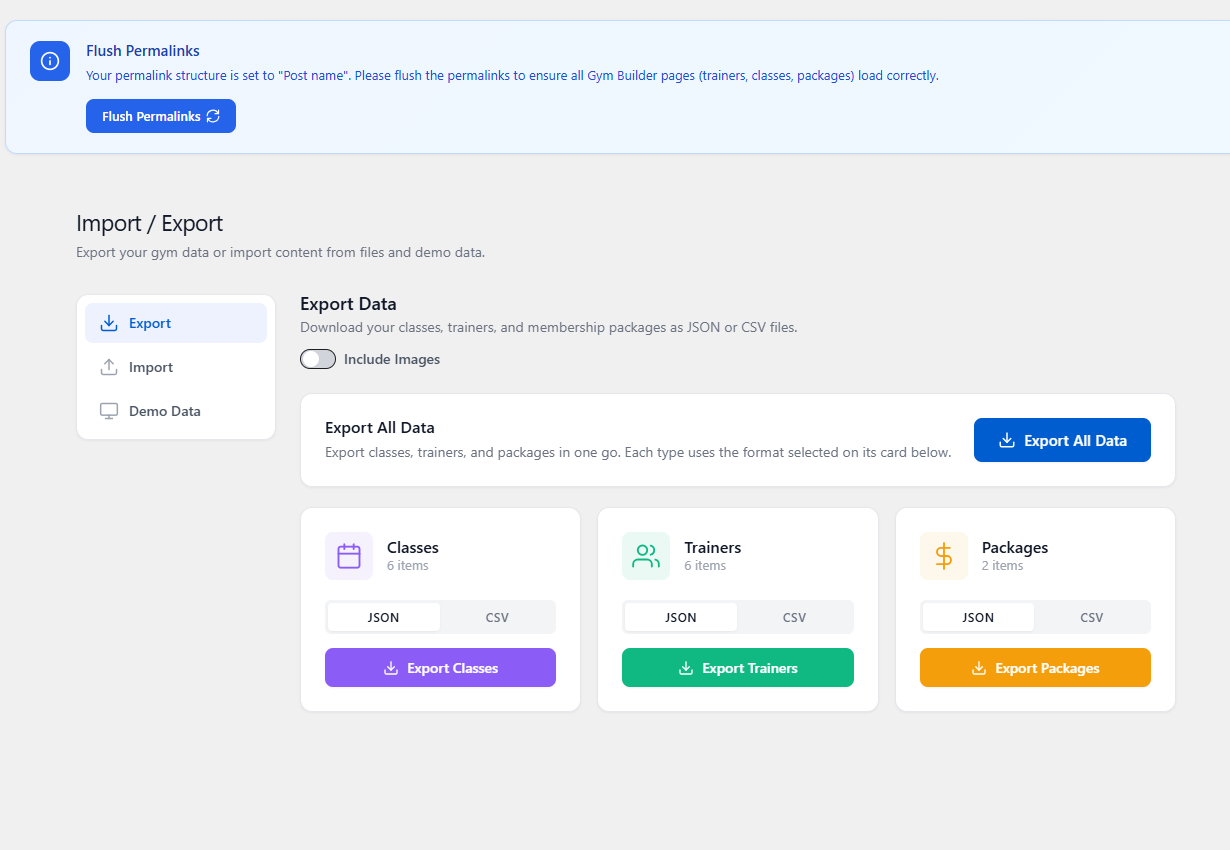
Gym Builder Import / Export admin page showing Export tab with Export All Data button and per-type Classes/Trainers/Packages cards (JSON or CSV)
Gym Builder → Import / Export. Bulk-export everything as JSON or CSV, or per-type (classes, trainers, packages). The Demo Data tab seeds your site with realistic sample content for testing.

For ongoing management

  • Keep class capacity realistic.
  • Mark inactive members in All Members — don’t delete, the record matters.
  • Use Style settings for everything — Primary color cascades to all add-ons.

For scaling up

  • Install pro add-ons strategically — start with Stripe Payments and Attendance.
  • Use pre-built templates for a fast polished site.

10. FAQ

Q: Is Gym Builder free?

Yes — the core plugin is 100% free on WordPress.org. Pro add-ons are paid.

Q: Can I use Gym Builder without any add-ons?

Yes. The core covers classes, trainers, members, packages, calculators, basic dashboards.

Q: How many classes / trainers / members can it handle?

No hard limit. Real installs handle 100+ classes, 50+ trainers, 5000+ members.

Q: Does it work with my theme?

Most modern themes work. Verified against Astra, Twenty Twenty-Five, GeneratePress and gym-niche themes. Themes can override plugin templates via {theme}/gym-builder/.

Q: Is it translatable?

Yes. All strings wrapped in __(). .pot file in languages/. Text domain: gym-builder.

Q: Does it support WPML / Polylang?

Yes. Standard CPTs are translatable by both. Pro add-ons inherit.

Q: Where is member data stored?

Custom table {prefix}gym_builder_members. Each row links to a WP user via wp_user_id.

Q: What happens to my data on uninstall?

Uninstall drops the members table, deletes all CPTs/taxonomies, removes auto-created pages. Make a backup first.

11. Troubleshooting

Classes don't show on the front end

Check: (1) class is Published, (2) id references a valid Class Shortcode, (3) permalinks flushed (Settings → Permalinks → Save).

Trainer login doesn't work

Trainers map to WP users by email. The trainer profile must share an email with a WP user. Check the user’s role has gym_builder_trainer capability.

Email sending fails

WordPress wp_mail() is unreliable on some hosts. Install WP Mail SMTP with a real SMTP provider.

Class capacity doesn't decrement

Capacity decrements when a member is created via admin Add Member with class/time-slot picked. Self-registration via WP register page doesn’t pick a class. Install GB Registration Page Popup.

Primary color isn't applying

Check the color is saved. Clear page caching. The color is a CSS custom property --gym-builder-primary-color on body; your theme may override.

12. The Gym Builder Plugin Family

Gym Builder is the free core. Nine optional pro add-ons extend it.

Gym Builder FREE
Free core plugin. Classes, trainers, members, schedules, packages.
GB Stripe Payments PRO
Stripe Checkout for membership packages — recurring & one-time billing.
GB Personal Session PRO
1-on-1 training session bookings, multi-step widget, refunds.
GB Attendance System PRO
Member check-in tracking with exportable attendance logs.
GB Fitness Tracking PRO
Trainer-assigned workouts, body metrics, progress charts & chat.
GB Registration Page Popup PRO
Auto-shown registration overlay with per-class scheduling form.
GB Zoom Integration PRO
Online classes via Zoom — virtual-class badges and metadata.
Gym Builder Block Tools PRO
9 Gutenberg blocks plus the Gutenberg template importer.
GB Elementor Widgets PRO
14 Elementor widgets covering every Gym Builder surface.
Pre-built Templates PRO
One-click demo import for Gutenberg + Elementor niche templates.

Gym Builder — Free core plugin · A WpDreamers product · PHP 7.4+ · WordPress 5.8+

© WpDreamers — the free WordPress fitness website builder.