
Gym Builder Block Tools — Complete Guide
Nine Gutenberg blocks for Gym Builder — class grids, trainer grids, sliders, CTAs, countdowns, info-boxes, advanced headings, wrappers and a class-routine block — plus a one-click niche template importer with six ready-made templates.
1. Welcome
Gym Builder Block Tools makes Gym Builder data buildable inside the WordPress block editor. Nine native Gutenberg blocks read directly from Gym Builder’s classes, trainers and pricing plans, so you don’t need shortcodes or page builders to compose your gym website. The plugin also bundles a Template Importer that installs six full-niche layouts (Yoga · Fitness · Gym · Boxing · Karate · Swimming) with one click.
What you get
- Nine native Gutenberg blocks — see section 3.
- Live integration with class CPT, trainer CPT, pricing-plan CPT, and class schedule meta.
- Class Routine block with day-of-week scheduling, capacity badges, and Stripe-button awareness.
- Template Importer — six niche-specific demo templates.
- No duplicate data — every block reads from gym-builder’s own data.
2. Installation
2.1 Requirements
- WordPress 6.7+ (latest Gutenberg required).
- PHP 7.4+.
- Gym Builder plugin — installed and activated.
2.2 Install & activate
- 1Download the Gym Builder Block Tools
.zip. - 2In WordPress: Plugins → Add New → Upload Plugin.
- 3Choose the
.zipand click Install Now. - 4Click Activate.
- 5Open any page in the block editor — search for “Gym Builder” in the block inserter.
- 6A new GB Templates top-level menu appears for the Template Importer.
3. The 9 Blocks
All blocks are listed under the Gym Builder Blocks category in the block inserter.
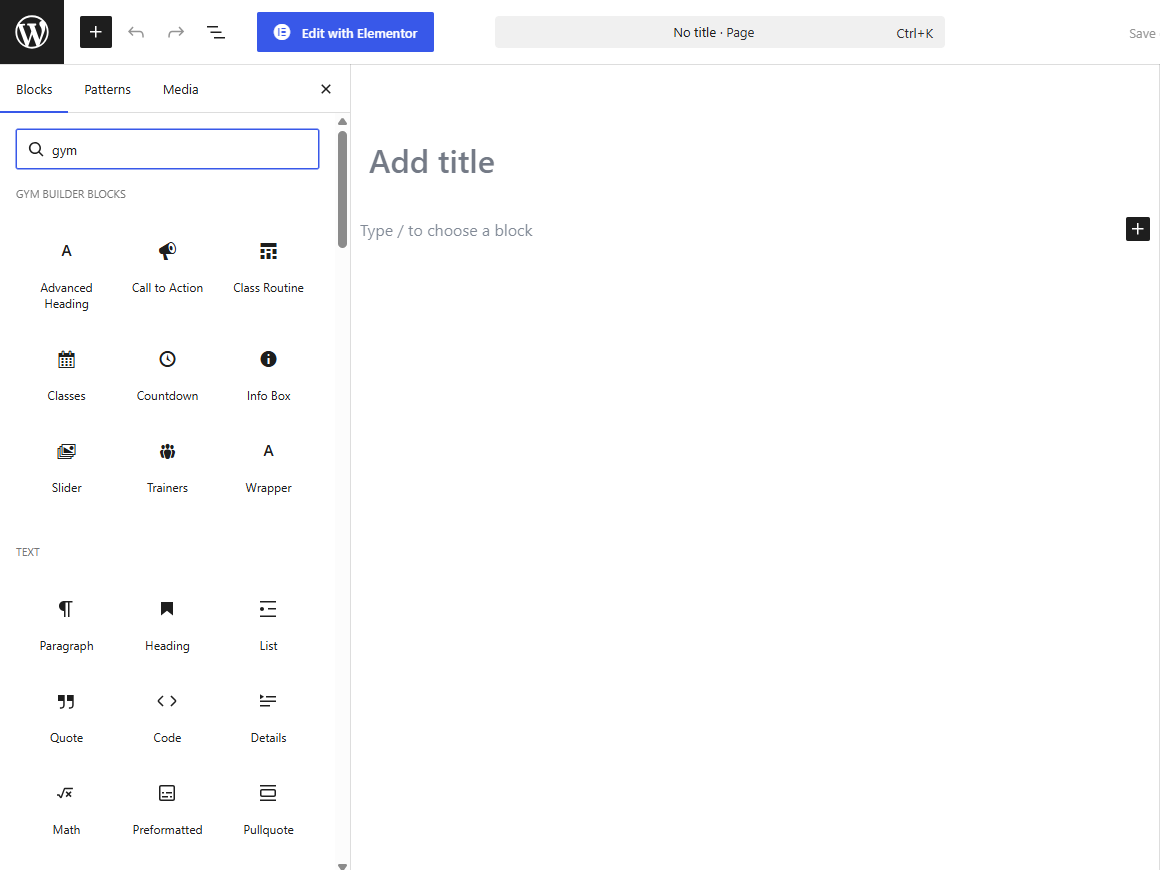
- Advanced Heading — heading with prefix/suffix segments, alignment, styling consistent with Gym Builder’s design.
- Call to Action — pre-styled CTA with title, body, 1–2 buttons, optional background image and gradient overlay.
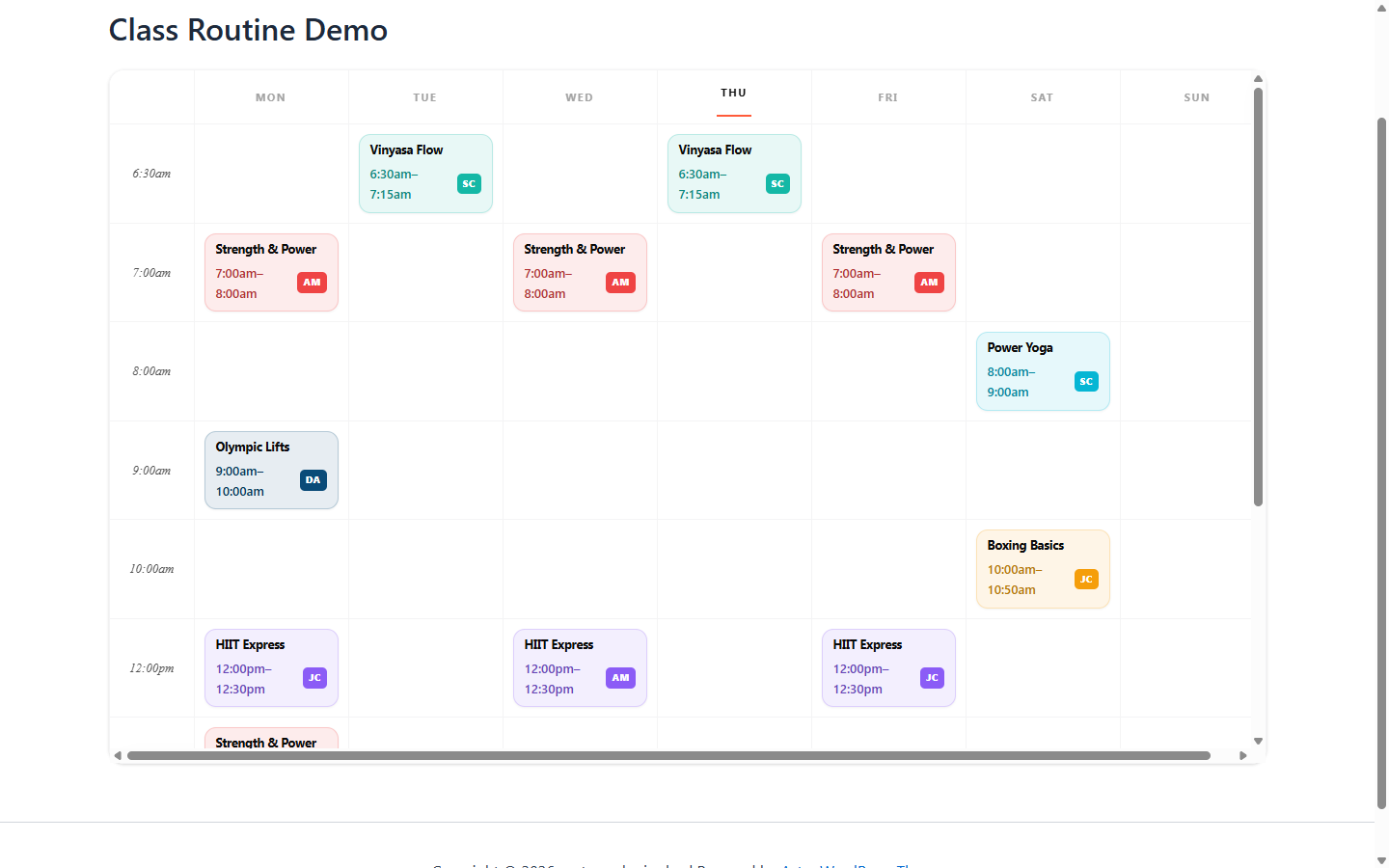
- Class Routine — weekly class schedule grouped by day. Reads class CPT + schedule meta. Stripe-aware Book buttons.
- Classes — grid or slider of class cards. Filter by category, choose layout, show image + title + duration + price.
- Countdown — days/hours/minutes/seconds to a target date.
- Info Box — icon + heading + body + optional link.
- Slider — image slider with full-width hero capability.
- Trainers — grid of trainer profiles.
- Wrapper — container with padding/margin/background controls.
Class Routine — the marquee block
The Class Routine block reads from your existing classes and renders the whole week as a timetable. Each cell shows the class name, time range, and an avatar badge for the assigned trainer. Below the table, gym-builder’s Stripe-aware “Book” button appears for each class.
4. Template Importer
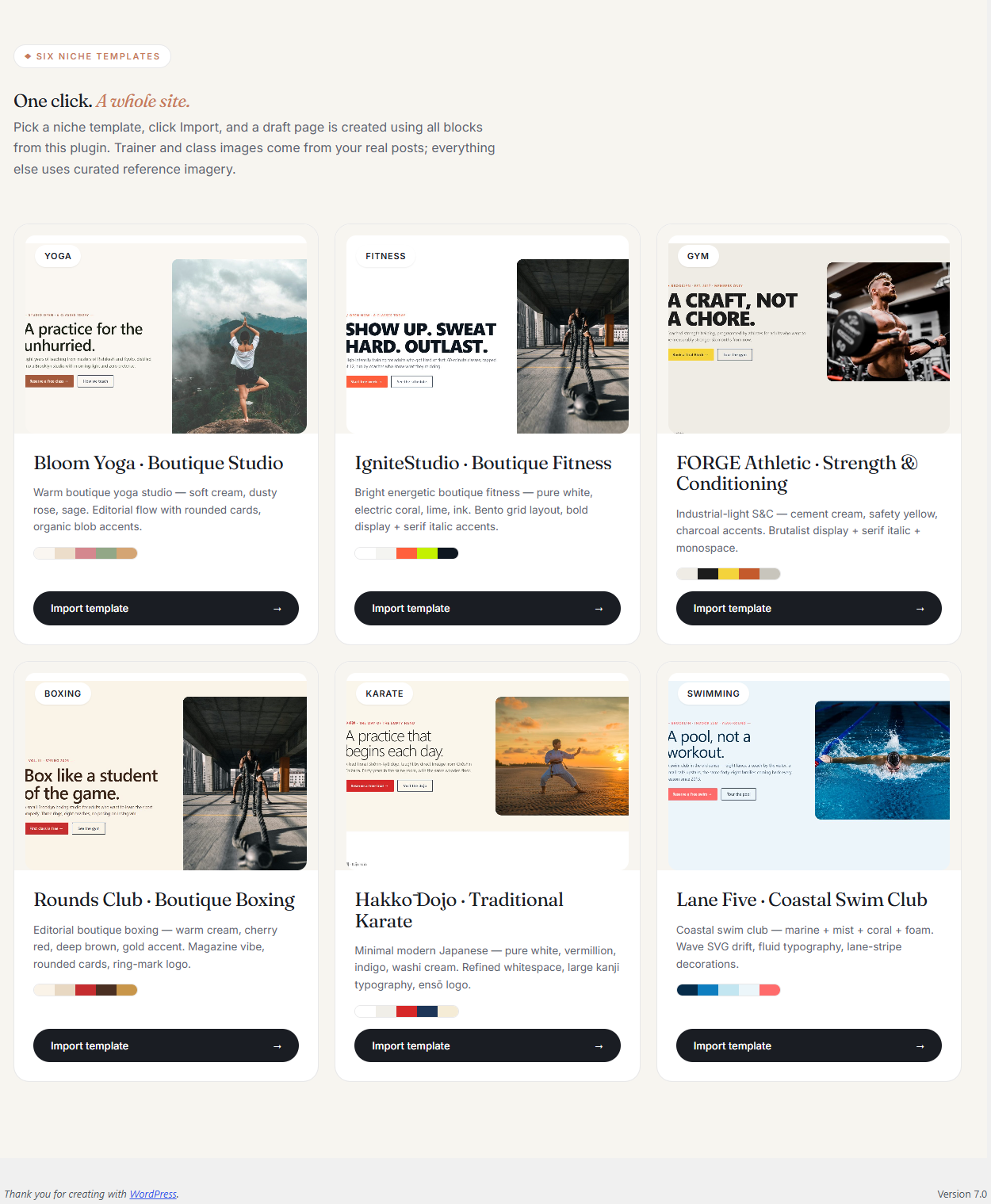
Six full-page templates ship with the plugin, each pre-built using the 9 blocks plus standard Gutenberg. One-click import creates the page in your Pages list.
The 6 niche templates
- Yoga — calm palette, classes by Discipline, instructor highlights.
- Fitness — bold orange/black, energetic CTAs.
- Gym — classic with equipment galleries, member testimonials.
- Boxing — dark sport palette, knockout-style imagery.
- Karate — martial-arts inspired, belt-rank trainer highlights.
- Swimming — blue/aqua palette, lane-time scheduling.
How to import
- 1Go to WordPress Admin → GB Templates.
- 2You see a 2×3 grid of template thumbnails.
- 3Click Preview on any thumbnail to see the template in a new tab.
- 4Click Import on the template you want.
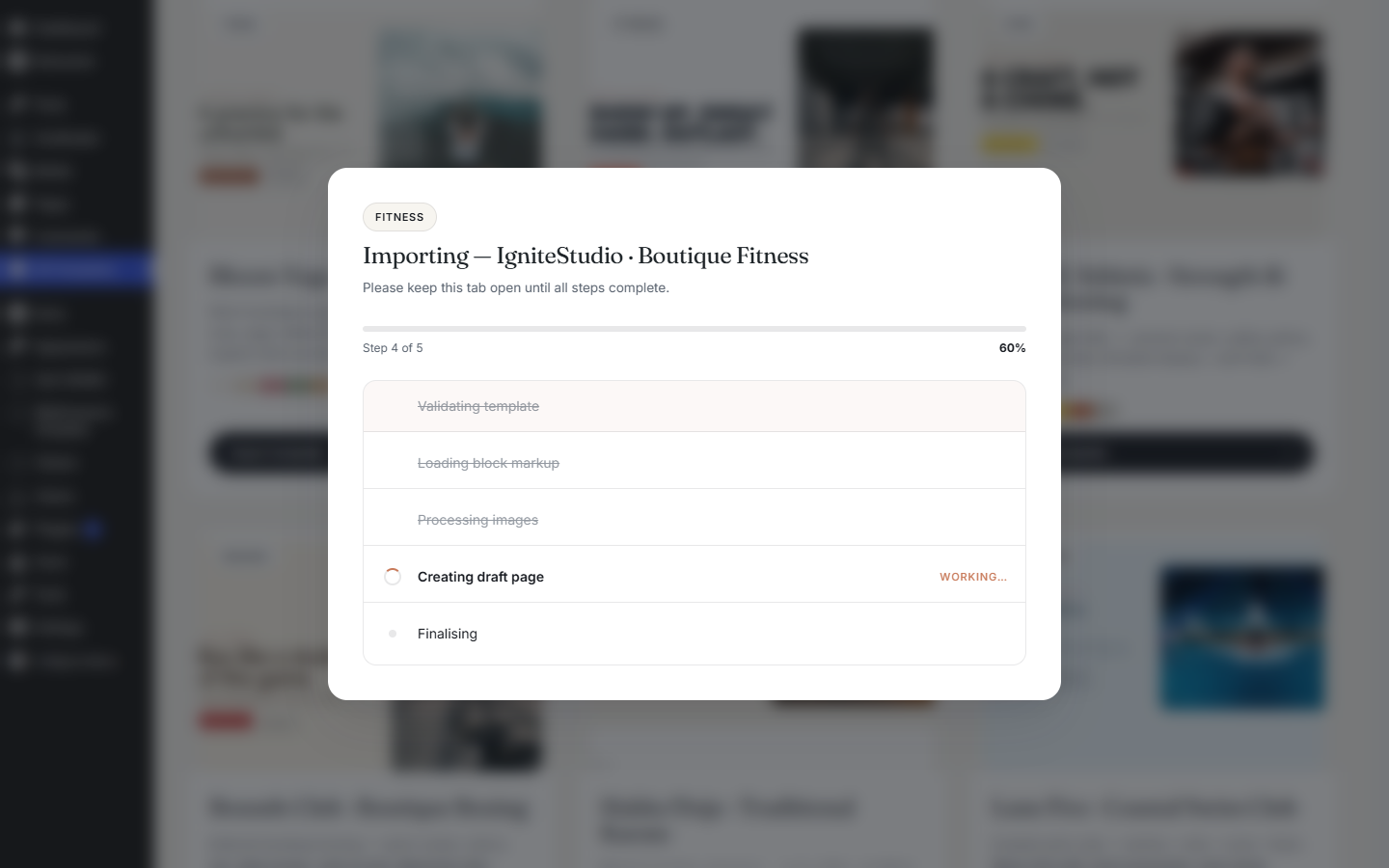
- 5The import runs in 5 steps with progress: validate template, load block markup, process images, create draft page, finalise.
- 6When done, click through to the newly-created page in Pages.
- 7Edit the page like any normal WordPress page — every block is fully editable.
5. Using a Block
Every block follows the same pattern: insert it, configure in the sidebar, save the page.
- 1Edit any WordPress page or post.
- 2Click the + Add block button.
- 3Search “gym” or open the Gym Builder Blocks block category.
- 4Click the block you want — inserted at your cursor.
- 5The right sidebar shows block-specific settings: data source, layout, style.
- 6Use the block toolbar for alignment, duplicate, move-up/down.
- 7Click Update to save.
7. FAQ
Q: Do these blocks work in the Site Editor (full-site editing)?
Yes. WP 6.7+ is required and the blocks are FSE-compatible.
Q: Can I use the blocks alongside the shortcode?
Yes — they’re complementary. Use shortcodes for legacy pages and blocks for new pages.
Q: Do I need GB Elementor Widgets if I have Block Tools?
Block Tools is for Gutenberg. GB Elementor Widgets does the same job for Elementor. Pick whichever editor you use.
Q: What happens to imported templates if I deactivate the plugin?
The page stays. The blocks stop rendering (block JS unloaded) but content remains as block comments. Reactivate and rendering resumes.
Q: Can I import only parts of a template?
Not via the importer. Import the full template, then delete blocks you don’t want.
8. Troubleshooting
I don't see the Gym Builder block category
Confirm the plugin is active AND your WordPress is 6.7+. Older versions miss block-API features.
Class Routine block shows "No classes scheduled"
The block reads from gym-builder’s class CPT + schedule meta. Confirm at least one class is published with a schedule.
Template Importer fails at "media import" step
File-system permission issue on wp-content/uploads/. Confirm uploads is writable.
Book button doesn't open Stripe Checkout
The block uses gym-builder’s Stripe-button chain. GB Stripe Payments must be installed and the package Stripe-enabled.
9. The Gym Builder Plugin Family
Gym Builder Block Tools is one of ten plugins in the Gym Builder family.
Gym Builder Block Tools v1.0.1 · A WpDreamers product · Requires Gym Builder · PHP 7.4+ · WordPress 6.7+
© WpDreamers — Gutenberg blocks & templates for Gym Builder.